

Off 2: Offline Flight Tracker
FEEL.AERO OU · Travel
Independent analytics for this App Store listing. AppTracker is not affiliated with FEEL.AERO OU.
Chart standing · US
What changed · US
Listing changes AppTracker has observed for this app in this storefront — new versions, price moves, rating shifts, and store copy.
Fixes for the itinerary, the Apple Watch complication, and the onboard map. -- The itinerary no longer crashes Deleting a sector from a multi-sector trip could close the app immediately. That is fixed. Deleting or reordering a sector also no longer moves the times you set on the other legs. -- Your stopovers are respected A stopover you entered by hand is no longer replaced by the automatic 45 or 75 minute value when you change an airport. -- Refuelling stops in the right place When the aircraft cannot reach the end of the next leg, the longer refuelling stop is now planned before that leg instead of after it. -- Boarding passes keep their dates Scanning a pass with legs on different days no longer pulls a next-day flight back onto the previous day, and the date is read in the departure airport's local time. "Scan More" now only adds the new legs and leaves the trip you already planned untouched. -- Apple Watch complication The complication could show a previous flight: the wrong destination, or "arrived" while you were still in the air. It now goes quiet once a flight is over, and keeps counting down on its own during a live flight even when the phone is quiet. -- Onboard position on Panasonic systems On aircraft using Panasonic inflight WiFi, the plotted track could sit up to 24 NM off the real route and move in a stutter-then-jump pattern. The position is now decoded correctly. -- Top of descent The top of descent marker could disappear while still in cruise when there was a strong headwind. It now stays on the same continuous profile as the 10,000 ft marker. -- Mach number When the onboard system reports it, the pilot panel's ground speed row now also shows the Mach number. -- Legs your aircraft cannot fly If a leg is longer than the aircraft's range, that sector is now marked in red. No stopover in front of it can make the leg flyable, so the app says so instead of presenting the trip as valid. -- Smoother when you drag a time Dragging a departure or arrival time no longer redraws the globe on every tick of the wheel.
In-app purchases · US
What this app sells inside itself, grouped by kind and priced for this storefront.
Screenshots



About
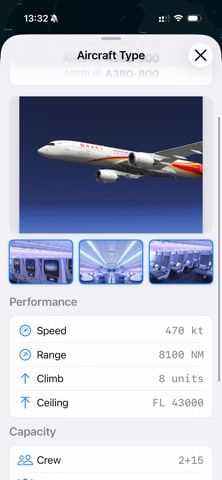
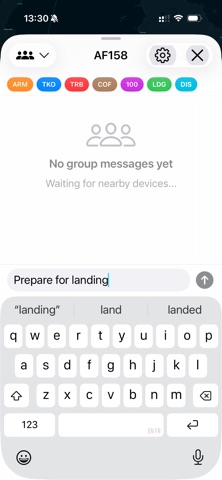
Off 2 is the flight tracker that keeps working when your wifi doesn't. While other apps lose signal the moment the cabin door closes, Off 2 uses your iPhone's GPS and barometer to track your flight in real time — at 35,000 feet, in airplane mode, over the ocean. No internet, no subscription, no excuses. — SCAN YOUR BOARDING PASS Tap your boarding pass barcode (QR, PDF417, Aztec, DataMatrix) and Off 2 fills everything in: airline, flight number, route, date, seat, booking reference. Boarding to wheels-up in seconds. — LIVE TRACKING, EVEN OFFLINE Watch your plane move on a stunning 3D globe — real position, real altitude, real ETA. The day-night terminator shows you exactly when you'll cross into sunrise. Flight progress that doesn't freeze. — SHARE YOUR FLIGHT Send a live link to family before takeoff. They watch your plane move across the globe in real time, see your ETA tick down, get notified on landing — even if you have no signal in the air. Peace of mind, no airline app needed. — APPLE WATCH COMPLICATION Time remaining, ETA, and progress right on your watch face. Updates autonomously, even when the iPhone app is closed. A glance is all it takes. — LIVE ACTIVITIES Your flight on the Lock Screen and Dynamic Island. No need to unlock or open the app. Just look down. — MULTI-SECTOR ITINERARIES Plan complex trips with multiple flights and stopovers. Edit times sector by sector — adjustments cascade forward automatically. Perfect for round-the-world routes, business travel, or any long-haul with a connection. — PEER CHAT AT 35,000 FEET Find other Off 2 passengers on your flight over Bluetooth and WiFi. No internet required. Share your seat, swap snacks, make a friend at altitude. — CURIOUS WHAT THE PILOTS SEE? UNLOCK PILOT MODE The cockpit view, in your seat. Barometric altimeter with QNH/QFE, Energy Path Angle (EPA) gauge, flight plan parsing, proper flight level display at cruise — plus flight replay on the 3D globe, external Bluetooth GPS receivers, custom offline maps, and the full aircraft performance database. One purchase, yours forever — no subscription. (In-app purchase.) — AIRCRAFT DATABASE Browse 200+ aircraft with photos, by category (airlines and business jets), manufacturer, and model. Full performance data included with Pilot Mode. — STUNNING 3D GLOBE Day-night visualization, your great circle route, tap to recenter on yourself. Optional: drop your own .mbtiles file into the Off 2 folder for custom maps. — PRIVACY FIRST No account. No tracking. No ads. Your flight data never leaves your phone unless you explicitly share it. — 39 LANGUAGES Fully translated for 39 App Store regions, including Arabic, Chinese (Simplified & Traditional), French, German, Hindi, Japanese, Korean, Portuguese, Russian, Spanish, Thai, and more. — HIGH-RESOLUTION GLOBE (PILOT MODE) Turn on the optional high-detail basemap and the world becomes four times sharper as you zoom in — coastlines, islands, terrain and night-time city lights. It downloads once, then works entirely offline like everything else. The flight tracker your last one wishes it was.
What's new · 2.4.2
Fixes for the itinerary, the Apple Watch complication, and the onboard map. -- The itinerary no longer crashes Deleting a sector from a multi-sector trip could close the app immediately. That is fixed. Deleting or reordering a sector also no longer moves the times you set on the other legs. -- Your stopovers are respected A stopover you entered by hand is no longer replaced by the automatic 45 or 75 minute value when you change an airport. -- Refuelling stops in the right place When the aircraft cannot reach the end of the next leg, the longer refuelling stop is now planned before that leg instead of after it. -- Boarding passes keep their dates Scanning a pass with legs on different days no longer pulls a next-day flight back onto the previous day, and the date is read in the departure airport's local time. "Scan More" now only adds the new legs and leaves the trip you already planned untouched. -- Apple Watch complication The complication could show a previous flight: the wrong destination, or "arrived" while you were still in the air. It now goes quiet once a flight is over, and keeps counting down on its own during a live flight even when the phone is quiet. -- Onboard position on Panasonic systems On aircraft using Panasonic inflight WiFi, the plotted track could sit up to 24 NM off the real route and move in a stutter-then-jump pattern. The position is now decoded correctly. -- Top of descent The top of descent marker could disappear while still in cruise when there was a strong headwind. It now stays on the same continuous profile as the 10,000 ft marker. -- Mach number When the onboard system reports it, the pilot panel's ground speed row now also shows the Mach number. -- Legs your aircraft cannot fly If a leg is longer than the aircraft's range, that sector is now marked in red. No stopover in front of it can make the leg flyable, so the app says so instead of presenting the trip as valid. -- Smoother when you drag a time Dragging a departure or arrival time no longer redraws the globe on every tick of the wheel.
Details