

Perception Assist
Nanjing Zutuanqu Information Science & Technology Co.,Ltd · Utilities
Independent analytics for this App Store listing. AppTracker is not affiliated with Nanjing Zutuanqu Information Science & Technology Co.,Ltd.
Chart standing · US
What changed · US
Listing changes AppTracker has observed for this app in this storefront — new versions, price moves, rating shifts, and store copy.
V2.1.0 fixes unavailable online scene descriptions so you can hear about your surroundings and objects again. Walking Guard adds Power-saving guard alongside Full guard. Switch on Home or in Quick settings; changes take effect while the guard is running, without restarting it. We also improved object alerts, urgent warnings and the flow of spoken feedback.
Ratings breakdown · US
The star breakdown behind this app's rating in this storefront.
In-app purchases · US
What this app sells inside itself, grouped by kind and priced for this storefront.
Screenshots

About
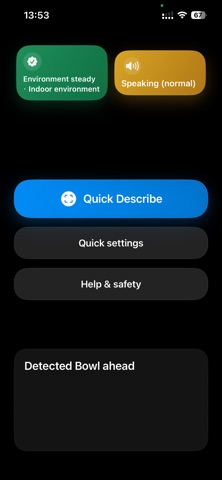
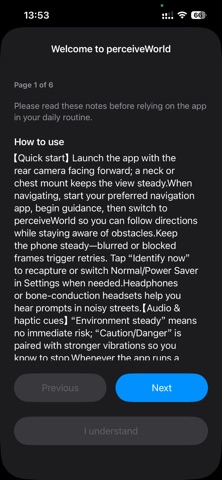
Perception Assist (Perceive World Assist) is an environmental awareness and voice guidance assistant designed for blind, visually impaired, and low-vision users. The app combines on-device visual detection, scene understanding, spoken feedback, and haptic cues to help users understand their surroundings more quickly. Even with weak or no network connection, on-device capabilities can provide basic environmental recognition and risk prompts. When a network is available, cloud AI can provide more detailed scene and object analysis. Accessible reading Version 1.9.0 expands accessible reading. 1. Browse, search, download, and read Project Gutenberg public-domain books, with offline reopening and download progress. 2. Import DRM-free EPUB and TXT files, and open PDFs up to 200 MB. 3. Switch among original text, smart-recognized text, and translations while keeping positions, bookmarks, notes, and search aligned. 4. Follow reading keeps the active line near the center with word highlighting; Listen mode can continue when the screen is locked. 5. Translation and smart recognition continue in sections, announce progress, and resume saved translated content. 6. Adds Siri reading controls and improves long-document positioning, scrolling, VoiceOver feedback, and stability. Key Features Outdoor risk recognition Detects selected traffic signals, crosswalks, bicycles, cars, approaching vehicles, and other elements, then provides voice prompts for potential surrounding risks. AI scene analysis Uses advanced AI models to interpret people, objects, spatial layout, and visible text, making indoor and outdoor environments easier to understand. Automatic detection mode Open the app and it can start automatically, reducing complex operations and helping users enter an assisted recognition state more quickly. Multilingual voice feedback Supports multiple spoken languages, adapts to the system language or user selection, and allows speech rate adjustment. On-device first, cloud assisted Basic recognition is mainly performed on device and remains available with weak or no network connection. When online, cloud AI can provide richer scene descriptions and review results. Accessible interaction design Combines voice, vibration cues, and accessible interface elements to provide detection status, scene overview, operation guidance, and assistive feedback. Privacy protection Visual and audio data are processed on device by default. No account registration is required. Except when users actively use optional cloud-assisted analysis, the app does not store personal visual or audio data. Usage suggestion For a more stable recognition experience, use headphones, bone-conduction headphones, or a chest phone mount. Safety Notice Perception Assist (Perceive World Assist) is an accessibility aid that uses the device camera to provide environmental audio and haptic cues. It does not measure health metrics and does not provide medical advice, diagnosis, treatment, or professional navigation services. Detection results may be inaccurate or incomplete and may be affected by lighting, weather, obstacles, camera angle, device movement, or network conditions. Always rely primarily on a cane, guide dog, or other mobility aid, follow official traffic signals and road signs, and act with your own judgment or assistance from trusted people. Do not use this app as the sole basis for crossing streets, navigation decisions, or any potentially dangerous situation. All information provided by the app is assistive and for reference only. Terms of Use: https://www.apple.com/legal/internet-services/itunes/dev/stdeula/
What's new · 2.1.0
V2.1.0 fixes unavailable online scene descriptions so you can hear about your surroundings and objects again. Walking Guard adds Power-saving guard alongside Full guard. Switch on Home or in Quick settings; changes take effect while the guard is running, without restarting it. We also improved object alerts, urgent warnings and the flow of spoken feedback.
Details