

Qalta AI: Expense Tracker
Daniel Tokkozhin · Finance
Independent analytics for this App Store listing. AppTracker is not affiliated with Daniel Tokkozhin.
Chart standing · US
What changed · US
Listing changes AppTracker has observed for this app in this storefront — new versions, price moves, rating shifts, and store copy.
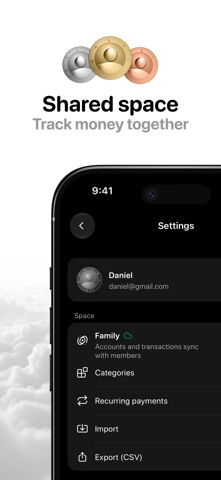
Meet Qalta 2.0.0! - Shared spaces: a budget you share stays in sync across your devices and with the people you keep it with. - Upcoming payments show up ahead of time, and you can count them in a budget. - A new “Spending for the period” widget. - A Guide that explains how amounts, budgets, debts, and other features work. - A new setup for people just getting started. - A profile with a coin avatar. - Sign in with Google. - Import from popular trackers. - Easier switching between periods in budgets. - Set the exchange rate more precisely when creating a transaction. - A reminder the day before a subscription is charged. - A redesigned Settings screen. - And many other improvements and fixes.
Price & rating history · US
Reconstructed from the listing changes AppTracker has observed in this storefront. A field is charted once it has changed more than once, and each line starts at the value it moved from.
Average rating · ★ 4.60 now · 5 changes on record
Ratings breakdown · US
The star breakdown behind this app's rating in this storefront.
Screenshots




About
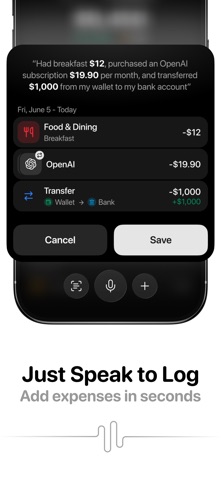
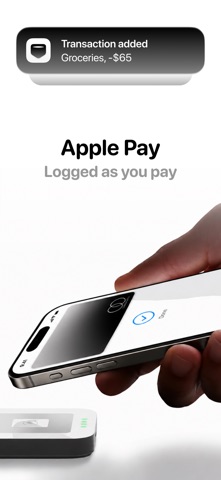
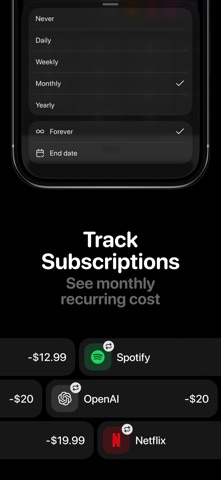
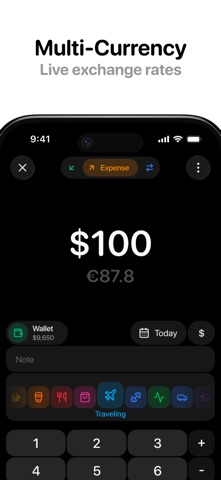
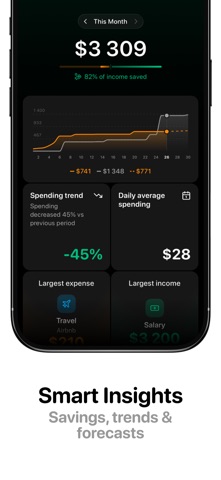
Track money at the speed of speech. Qalta is a fast money tracker for people who hate typing. Say a purchase out loud, scan a receipt, or add it manually — in seconds, not minutes. WHY QALTA? • Voice logging — Say "Spent $15 on coffee," "Got paid $2,000," or "Netflix $10 every month." One sentence can hold several transactions. Qalta fills in the amount, category, account, and recurring schedule. • Receipt scanning — Snap a photo, or share a PDF from another app. Qalta reads a receipt, bill, or bank statement and saves it as one transaction or as separate line items. • Shared spaces — Keep a private ledger on this iPhone, or share one with a partner or family. A shared space syncs across your devices and with the people you invite. • Bring your history — Import a CSV from YNAB, Monarch, Copilot, Rocket Money, Spendee, Monefy, ZenMoney, CoinKeeper, and other apps. Past spending comes with you. • Multi-currency accounts — Create accounts in any currency. Live exchange rates help you see your total balance at a glance — ideal for travel and remote work. • Built for iPhone — Home Screen widget, Siri Shortcuts, Back Tap, Action Button, and Apple Pay let you log spending without opening the app. On the latest iOS, a bank notification can do it too. MORE YOU'LL USE EVERY DAY • Budgets — Set limits by category or account and track what's left. • Goals — Link a savings goal to an account and watch the balance close in. • Debts — Track what you owe and what you're owed, then settle when it's paid. • Insights — Spending trends, savings, subscription totals, and patterns that are easy to miss in a spreadsheet. • Analytics — Category breakdowns and a cash-flow view of where money comes from and where it goes. • Recurring transactions — Subscriptions, bills, and income, set manually or by voice. • Reminders — A nudge to log the day, and a heads-up the day before a payment. • Search & filters — Find any transaction in seconds. • CSV export — Your data, your spreadsheet. • Privacy first — A private space stays on your device. Optional iCloud backup. A shared space is uploaded only when you choose to share it. No ads. Start with the free plan. Upgrade to Qalta Pro for unlimited transactions, voice, and scans — and for shared spaces. Terms of Use (EULA): https://www.apple.com/legal/internet-services/itunes/dev/stdeula/ Privacy Policy: https://tokkozhin.github.io/qalta.app/privacy-policy.html
What's new · 2.0.0
Meet Qalta 2.0.0! - Shared spaces: a budget you share stays in sync across your devices and with the people you keep it with. - Upcoming payments show up ahead of time, and you can count them in a budget. - A new “Spending for the period” widget. - A Guide that explains how amounts, budgets, debts, and other features work. - A new setup for people just getting started. - A profile with a coin avatar. - Sign in with Google. - Import from popular trackers. - Easier switching between periods in budgets. - Set the exchange rate more precisely when creating a transaction. - A reminder the day before a subscription is charged. - A redesigned Settings screen. - And many other improvements and fixes.
Details