

FlashcardAI - Photo to Cards
Taiga Nagano · Education
Independent analytics for this App Store listing. AppTracker is not affiliated with Taiga Nagano.
Chart standing · US
What changed · US
Listing changes AppTracker has observed for this app in this storefront — new versions, price moves, rating shifts, and store copy.
NEW • Study from the Lock Screen Review cards appear on your Lock Screen — reveal the answer and rate it without opening the app. Turn it on in Settings. • Search your cards Filter cards inside a deck by keyword. From the home screen, search across every deck at once. • Add cards back to back When adding cards by hand, "Save and add another" keeps the sheet open so you can keep typing. IMPROVEMENTS • No more ads while studying The banner on the study screen and the full-screen ad after a session are gone. • Rebuilt widgets Reveal and rate a due card right in the widget. Choose which deck it draws from and whether to shuffle. • Choose how a session starts Pick the scope (today's cards or all of them) and whether to shuffle, right when you start. • Generation keeps running when you close the scan screen Do something else while it works — the cards land in your deck when it finishes. • Better AI generation Fixed cases where a short topic could produce cards unrelated to what you wanted to study. FIXES • Fixed the reason for a failed generation sometimes not being shown. • Fixed "Saved" appearing even when saving a photo had failed.
In-app purchases · US
What this app sells inside itself, grouped by kind and priced for this storefront.
Screenshots


Keywords this app targets
Search terms AppTracker associates with this app — estimates, not search volume. ❝ = in the app's title; a highlighted number is its current position for that term.
Similar apps
Competitors and close alternatives, as estimated by AppTracker.





About
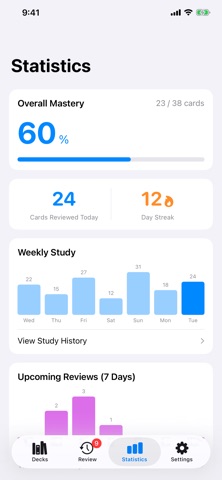
Snap a photo. Get a deck. Textbooks, notes, word lists — photograph them and they become flashcards. FlashcardAI turns photos and text into study cards automatically. [Main features] ■ A photo becomes cards Photograph a textbook, your notes or a word list, and the AI pulls out what matters and shapes it into question-and-answer cards. Up to 10 photos at once; PDFs work too. ■ No photo needed Just type a topic — "TOEIC verbs", "cell biology" — and you get cards. ■ Spaced repetition How you rate a card decides when it comes back, so it resurfaces just as you start to forget. ■ Home Screen widget See a due card, reveal the answer and rate it — all inside the widget. ■ Review from the Lock Screen Due cards can appear on your Lock Screen too (turn it on in Settings). ■ Find and tidy Search cards inside a deck or across every deck. Group decks into folders, and file away the ones you've finished. ■ See your progress Study streak, weekly volume, what's coming up, and mastery per deck. [Who it's for] - Anyone who wants their class notes and textbooks as flashcards - Studying for an exam or certification in short bursts of free time - Tired of writing flashcards by hand - Looking for a system that brings things back before you forget [Free] - Up to 5 AI generations per day - Up to 10 images at a time - Up to 10 decks and 3 folders (watch a short video to create more) [Premium] - Unlimited AI generation - No ads - Unlimited decks and folders - AI Fill-in: adds related knowledge when a photo alone isn't enough - Up to 300 characters of guidance per generation (50 on the free plan) - iCloud sync: the same decks on all your devices - Full statistics: past history, the next 30 days of reviews, and mastery for every deck [About the Subscription] - Your subscription automatically renews unless canceled at least 24 hours before the end of the current period. - Payment will be charged to your Apple ID account at confirmation of purchase. - You can manage or cancel your subscription anytime in your Apple ID account settings. - This app uses an anonymous account. Deleting the app also deletes your data. * The photos you take are never used as training data outside of this service. Apple standard EULA: https://www.apple.com/legal/internet-services/itunes/dev/stdeula/
What's new · 1.4.0
NEW • Study from the Lock Screen Review cards appear on your Lock Screen — reveal the answer and rate it without opening the app. Turn it on in Settings. • Search your cards Filter cards inside a deck by keyword. From the home screen, search across every deck at once. • Add cards back to back When adding cards by hand, "Save and add another" keeps the sheet open so you can keep typing. IMPROVEMENTS • No more ads while studying The banner on the study screen and the full-screen ad after a session are gone. • Rebuilt widgets Reveal and rate a due card right in the widget. Choose which deck it draws from and whether to shuffle. • Choose how a session starts Pick the scope (today's cards or all of them) and whether to shuffle, right when you start. • Generation keeps running when you close the scan screen Do something else while it works — the cards land in your deck when it finishes. • Better AI generation Fixed cases where a short topic could produce cards unrelated to what you wanted to study. FIXES • Fixed the reason for a failed generation sometimes not being shown. • Fixed "Saved" appearing even when saving a photo had failed.
Details