

PDF Converter - Word to PDF・
090Bravo Hong Kong Limited · Productivity
Independent analytics for this App Store listing. AppTracker is not affiliated with 090Bravo Hong Kong Limited.
Chart standing · US
What changed · US
Listing changes AppTracker has observed for this app in this storefront — new versions, price moves, rating shifts, and store copy.
Dear users, • Redesigned Home screen for a cleaner experience • Added new document & PDF tools • Improved UI, font sizes, and readability • Fixed minor bugs and improved overall performance Thank you for using our app!
Price & rating history · US
Reconstructed from the listing changes AppTracker has observed in this storefront. A field is charted once it has changed more than once, and each line starts at the value it moved from.
Average rating · ★ 4.62 now · 2 changes on record
Ratings breakdown · US
The star breakdown behind this app's rating in this storefront.
In-app purchases · US
What this app sells inside itself, grouped by kind and priced for this storefront.
Screenshots


About
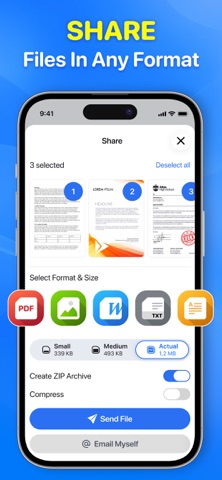
Scan documents, receipts, notes, invoices, IDs and more. Automatically detect document edges, enhance image quality and create clean PDF files in seconds. Scan Documents Use your camera to quickly scan paper documents and convert them into digital files. Automatic edge detection and smart cropping help create clear, professional-looking scans. Create PDF Files Combine multiple scanned pages into a single PDF document. Import photos from your library and convert them into PDF files with just a few taps. Enhance Your Scans Choose from multiple scan modes to make your documents easier to read: • Color • Grayscale • Black & White • Original • Auto Enhancement Multi-Page Scanner Scan multiple pages continuously and combine them into one organized document. OCR Text Scanner Extract text from scanned documents and images. Copy recognized text and use it wherever you need. Sign & Edit PDFs Add signatures, text, drawings, highlights and notes to your documents directly on your iPhone. Organize Documents Keep your scanned files organized with folders, search, sorting and favorites. Share Anywhere Export and share your documents as PDF or images through email, messaging apps and other services. Perfect For • Receipts and invoices • Business documents • Contracts and agreements • IDs and forms • Notes and study materials • Books and articles • Personal documents Smart Scanner: PDF Scan makes scanning, converting, editing and managing documents simple and convenient. Upgrade to Premium to unlock unlimited conversions You can choose: - Yearly Subscription - Weekly Subscription - Weekly With 3D free trial – Payment will be charged to iTunes Account at confirmation of purchase (After free trial period if offered). – Subscription automatically renews unless auto-renew is turned off at least 24-hours before the end of the current period. – Account will be charged for renewal within 24-hours prior to the end of the current period, and identify the cost of the renewal. – Subscriptions may be managed by the user and auto-renewal may be turned off by going to the user’s Account Settings after purchase. – Any unused portion of a free trial period, if offered, will be forfeited when the user purchases a subscription to that publication, where applicable. Download Smart Scanner: PDF Scan now! Privacy Policy: https://sites.google.com/view/pdf-converter-file-to-pdf/privacy-policy Term of service: https://www.apple.com/legal/internet-services/itunes/dev/stdeula/ Support: https://sites.google.com/view/pdf-converter-file-to-pdf/support
What's new · 1.0.5
Dear users, • Redesigned Home screen for a cleaner experience • Added new document & PDF tools • Improved UI, font sizes, and readability • Fixed minor bugs and improved overall performance Thank you for using our app!
Details