

PNG Tuber
Rowena Ricalde · Photo & Video
Independent analytics for this App Store listing. AppTracker is not affiliated with Rowena Ricalde.
Chart standing · US
What changed · US
Listing changes AppTracker has observed for this app in this storefront — new versions, price moves, rating shifts, and store copy.
Thank you for your continued support! This is a minor fix version that addresses some usability issues: • The built-in templates now do not count against the free avatar allowance. Now you don't have to delete the example avatars to create your own • Avatar set ZIPs import correctly when the images are inside a folder, as they are when you compress a folder
Price & rating history · US
Reconstructed from the listing changes AppTracker has observed in this storefront. A field is charted once it has changed more than once, and each line starts at the value it moved from.
Average rating · ★ 3.60 now · 8 changes on record
Ratings breakdown · US
The star breakdown behind this app's rating in this storefront.
Screenshots


About
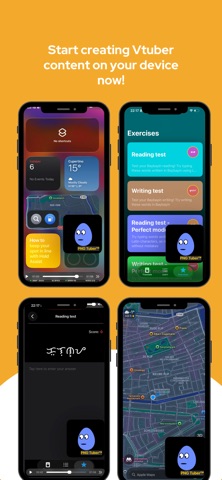
PNG Tuber – VTuber on device Take your VTuber avatar straight from your photo library and bring it to life in real‑time! PNG Tuber lets you use your VTuber avatar to create your content on-device, no other tools needed. * Tap‑to‑Load Avatar - Pick any avatar image you already own from your gallery and load it instantly. * Microphone Trigger Control - Set the mic volume threshold so your avatar reacts precisely when you speak. * Picture‑in‑Picture (PiP) - Keep your avatar floating over other apps or on your home screen while you multitask. * Fully Offline - All image rendering and audio processing happens locally; your files stay private. How It Works: * Open PNG Tuber. * Choose your 4 avatar images from your library - eyes open/mouth closed, eyes closed/mouth closed, eyes open/mouth open and eyes closed/mouth open * Adjust the mic‑trigger level to your preference. * Start audio monitoring and turn on picture-in-picture * Start streaming, recording, or simply enjoy the avatar in PiP mode. Download PNG Tuber today and let your chosen avatar shine across all your apps! A subscription via in-app purchase is required to use PNG Tuber without any watermarks on the avatar, background customization, and multiple avatar management. The service is provided according to the standard EULA: https://www.apple.com/legal/internet-services/itunes/dev/stdeula/ Privacy policy: https://www.ganglionsoftware.com/privacy.html
What's new · 2.2.1
Thank you for your continued support! This is a minor fix version that addresses some usability issues: • The built-in templates now do not count against the free avatar allowance. Now you don't have to delete the example avatars to create your own • Avatar set ZIPs import correctly when the images are inside a folder, as they are when you compress a folder
Details