

QuickPaste - Quick Clipboard
玉春 蔡 · Utilities
Independent analytics for this App Store listing. AppTracker is not affiliated with 玉春 蔡.
Chart standing · US
What changed · US
Listing changes AppTracker has observed for this app in this storefront — new versions, price moves, rating shifts, and store copy.
In "Categories → All," after modifying the category of a frequently used phrase and saving it, the list preview will immediately show the new category without needing to exit and re-enter.
Screenshots



About
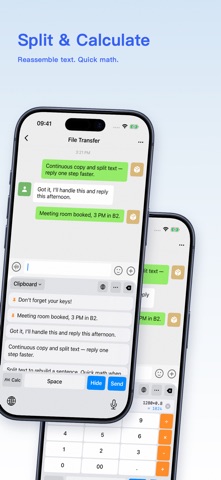
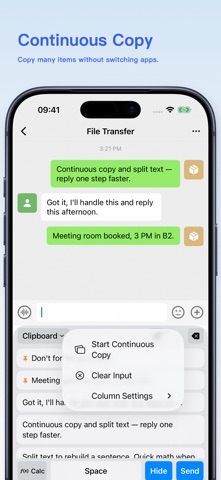
QuickPaste: Your Smart Clipboard Assistant Stop retyping the same content every day. QuickPaste helps you manage your clipboard efficiently, making copy and paste truly fast and easy. Key Features Clipboard History - Automatically save and quickly access your copy history Custom Keyboard - Access history and snippets directly from any app Snippets Manager - Organize frequently used text by category for instant input Smart Tokenizer - Intelligent word selection for precise and fast typing Privacy First - All data stored locally, completely offline, never uploaded Subscription Plans Upgrade to Pro and unlock unlimited clipboard history, full snippets category management, and advanced smart tokenizer features. Enjoy 3 days FREE TRIAL on your first subscription. Cancel anytime, no commitment. Why Choose QuickPaste? Fast - One-click access saves your time Secure - 100% local storage, complete privacy Easy - Simple, intuitive interface Complete - Everything you need for efficient copying and pasting Download now and experience smarter input! Privacy Policy: https://mcnzv1vkrtox.feishu.cn/wiki/NSfVwtdKeizasEkqU0JchyZOnle Terms of Service: https://mcnzv1vkrtox.feishu.cn/wiki/Gi4MwXm20i9ZfakhpHrcsJTXnMg
What's new · 1.2.7
In "Categories → All," after modifying the category of a frequently used phrase and saving it, the list preview will immediately show the new category without needing to exit and re-enter.
Details