

DOPro: Director's Viewfinder
Onur Suluk · Photo & Video
Independent analytics for this App Store listing. AppTracker is not affiliated with Onur Suluk.
Chart standing · US
What changed · US
Listing changes AppTracker has observed for this app in this storefront — new versions, price moves, rating shifts, and store copy.
• A new app icon: viewfinder corners and a center mark in tungsten amber, because DOPro is the viewfinder first. • False Color: load any reference frame and read its exposure the way an on-set monitor does. Tap to spot-meter any point in IRE, and see how much of the frame is clipped, at middle grey, or at skin tone. • Sun & Moon: search any city or place and see sun times in that place's own timezone. Plan a shoot on the other side of the world from wherever you are. • Privacy Policy and Terms of Use are now in Settings. • Rate DOPro and the EgeTech website are one tap away in Settings. MORE ACCURATE • Sunrise, sunset, golden hour and blue hour are now within a minute or two of published almanac data, including near the equinoxes and at high latitudes, and always for the right day in the place you're viewing. • The sun marker follows the day correctly in the southern hemisphere. • Moon phase and illumination now follow the real Moon, so first quarter reads 50% and Full Moon is no longer shown for days on end. • Depth of field uses one consistent circle of confusion for every sensor and shows it, and corrects the RED Komodo and IMAX 15/70 sensor sizes. • ND Filter names the filter (ND8, ND64) and tells you how far a whole-stop filter is from your exact need. • Gel advice says when a shift needs more than one gel. FIXED • Save to Photos no longer closes the app. • Shot list PDFs print full descriptions, gear lists and shot notes instead of cutting them off. • CSV exports open correctly in Excel with Turkish and accented characters. CSV imports accept files saved by Excel on Windows. • DOPro Pro stays unlocked when you open the app without a signal. • Purchase and Restore now tell you what happened, including when a purchase is waiting for approval. • Decimal comma works in the calculators. • Deleting a shot or a checklist asks first. • The camera tells you when a call or another app has taken it, keeps a video you were recording when you leave the screen, and photos and videos are correctly rotated on iPad. • Text is easier to read and follows your Dynamic Type size. • Error messages are written in plain language. • The Contact form no longer sends its placeholder text.
Screenshots



About
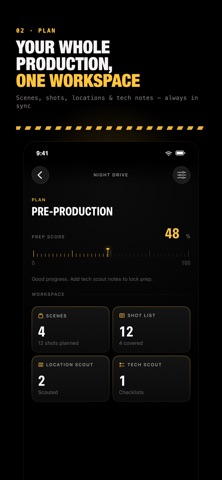
Plan the frame. Build the shot list. Run the set. DOPro is a private, on-device filmmaking toolkit for directors, cinematographers, DPs, camera teams, and independent filmmakers. Move from pre-production to set without juggling disconnected apps, PDFs, or spreadsheets. DIRECTOR'S VIEWFINDER Preview lens-locked framing for professional camera bodies, sensor modes, lens sets, and aspect ratios. Compare focal lengths, capture photo or video references, and keep every frame organized inside its production. SHOT LISTS THAT TRAVEL WITH YOU Build detailed shot lists with scene, shot type, camera movement, lens, equipment, priority, notes, and status. Import existing CSV or text-based PDF shot lists through a review step, then use the list as an on-set checklist. Export clean PDF and CSV files for your crew. LOCATION AND TECH SCOUTING Save locations with addresses, coordinates, photos, access details, weather notes, and production notes. Run structured technical scout checklists, flag issues, track completion, and generate shareable reports. SMART SLATE AND TAKE LOGS Use a full-screen digital slate, track scene, shot, take, roll, camera, lens, FPS, ISO, white balance, and timecode, then review and export the take history. ON-SET CALCULATORS Keep practical camera tools close at hand: • Reflected and incident light meter • Depth of field calculator • ND filter calculator • Time-lapse and storage calculators • Focal length and lens comparison tools • Sun and moon planning • Lighting source and gel references • Project checklists PRODUCTION-READY EXPORTS Create polished project summaries, shot lists, location reports, tech scout reports, production logs, take reports, and slate logs. Share PDFs and CSV files directly from the app. BUILT FOR REAL SETS • Purpose-built iPhone and iPad layouts • Fast, high-contrast controls • Accessible labels and large tap targets • No account required • No ads or tracking • Production data stays on your device FREE TO START, PRO WHEN YOU SHIP Use the Director's Viewfinder, Smart Slate, and every on-set calculator for free. Unlock DOPro Pro once—no subscription—for unlimited productions, crew-ready PDF and CSV exports, shot-list import, and location and tech scout reports. If you already bought DOPro, every Pro feature stays yours, free. From the first scout to the final take, DOPro keeps the production clear, focused, and ready to shoot.
What's new · 3.1
• A new app icon: viewfinder corners and a center mark in tungsten amber, because DOPro is the viewfinder first. • False Color: load any reference frame and read its exposure the way an on-set monitor does. Tap to spot-meter any point in IRE, and see how much of the frame is clipped, at middle grey, or at skin tone. • Sun & Moon: search any city or place and see sun times in that place's own timezone. Plan a shoot on the other side of the world from wherever you are. • Privacy Policy and Terms of Use are now in Settings. • Rate DOPro and the EgeTech website are one tap away in Settings. MORE ACCURATE • Sunrise, sunset, golden hour and blue hour are now within a minute or two of published almanac data, including near the equinoxes and at high latitudes, and always for the right day in the place you're viewing. • The sun marker follows the day correctly in the southern hemisphere. • Moon phase and illumination now follow the real Moon, so first quarter reads 50% and Full Moon is no longer shown for days on end. • Depth of field uses one consistent circle of confusion for every sensor and shows it, and corrects the RED Komodo and IMAX 15/70 sensor sizes. • ND Filter names the filter (ND8, ND64) and tells you how far a whole-stop filter is from your exact need. • Gel advice says when a shift needs more than one gel. FIXED • Save to Photos no longer closes the app. • Shot list PDFs print full descriptions, gear lists and shot notes instead of cutting them off. • CSV exports open correctly in Excel with Turkish and accented characters. CSV imports accept files saved by Excel on Windows. • DOPro Pro stays unlocked when you open the app without a signal. • Purchase and Restore now tell you what happened, including when a purchase is waiting for approval. • Decimal comma works in the calculators. • Deleting a shot or a checklist asks first. • The camera tells you when a call or another app has taken it, keeps a video you were recording when you leave the screen, and photos and videos are correctly rotated on iPad. • Text is easier to read and follows your Dynamic Type size. • Error messages are written in plain language. • The Contact form no longer sends its placeholder text.
Details