

Do First - Eisenhower Matrix
元仕 洪 · Productivity
Independent analytics for this App Store listing. AppTracker is not affiliated with 元仕 洪.
Chart standing · US
What changed · US
Listing changes AppTracker has observed for this app in this storefront — new versions, price moves, rating shifts, and store copy.
Do First is now available in Italian, Dutch, and Spanish. Your small widget can also show the quadrant title. New: • Italian, Dutch, and Spanish • Small widget: choose the quadrant title instead of the app name, so you can see which priorities are in view Improved: • Polished a few interface details across the app Focus on what matters most — we'll handle the rest.
In-app purchases · US
What this app sells inside itself, grouped by kind and priced for this storefront.
Screenshots



About
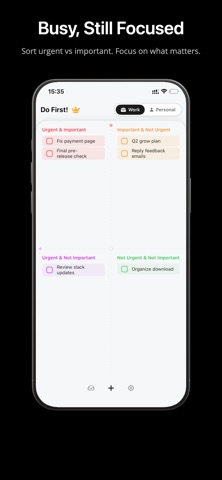
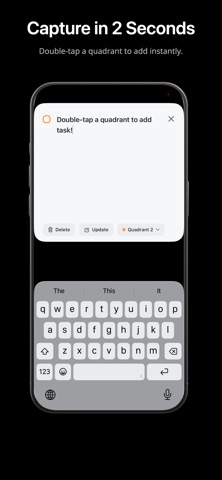
Do First is an iOS task manager built around the Eisenhower Matrix, the 4-quadrant method for sorting tasks by urgency and importance. If you are looking for a simple priority matrix or a clearer way to plan your day, Do First helps you stay focused on what truly matters. Capture tasks quickly on iPhone, organize them in a clean 4-quadrant view, and keep work and life separated with Work / Self spaces. If you also use Do First on Mac, your data stays in sync through iCloud. Key features: - 4-quadrant overview: sort tasks by urgency and importance at a glance - Work / Self spaces: keep work and life neatly separated - Fast task capture and organization: add tasks quickly and move them into the right quadrant - iCloud sync with Mac: keep your priorities aligned across devices - Light and Dark Mode support: follows your system appearance Privacy: Do First collects no data. Your tasks stay on your device and in iCloud. Put the important first. Download Do First and plan your priorities with clarity. Terms of Use (EULA): https://www.apple.com/legal/internet-services/itunes/dev/stdeula/
What's new · 1.5.0
Do First is now available in Italian, Dutch, and Spanish. Your small widget can also show the quadrant title. New: • Italian, Dutch, and Spanish • Small widget: choose the quadrant title instead of the app name, so you can see which priorities are in view Improved: • Polished a few interface details across the app Focus on what matters most — we'll handle the rest.
Details