

SnapSizing
Yamamoto Yoshihiro · Utilities
Independent analytics for this App Store listing. AppTracker is not affiliated with Yamamoto Yoshihiro.
Chart standing · US
What changed · US
Listing changes AppTracker has observed for this app in this storefront — new versions, price moves, rating shifts, and store copy.
• You can now type the full reference length even when no reference object (such as A4 paper) is in the photo. Previously the app could move on after the first digit • Added a “Done” button above the numeric keyboard, so you can go straight to measuring once you finish typing • Added a “Set by hand” button for when the wrong object is recognized as the reference, switching to manual setup in one tap • Clearer guidance when no reference object is recognized (tap two points to set it by hand)
Screenshots



About
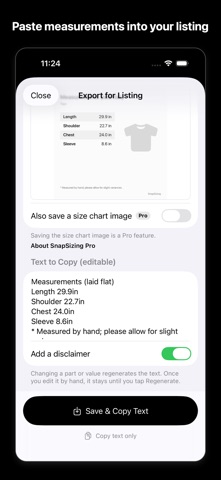
Measure clothes from a single photo — and get the listing photo and measurement text in the same app. SnapSizing measures body length, shoulder width, chest width, sleeve length and more from one photo of a garment laid next to a sheet of paper. The results become a measurement list with part names and an annotated image, ready for your online listing. HOW IT WORKS 1. Lay the garment next to a reference object and shoot from above Place a sheet of Letter or A4 paper beside the garment (not on top of it) and take a photo from directly above. The paper is detected automatically and sets the scale. Use the in-app camera or pick a photo from your library. 2. Tap both ends of each measurement Follow the prompts — length, shoulder, chest, sleeve — and tap two points for each. A loupe helps you land exactly on the edge. Part names are assigned automatically. 3. Export for listing Save two images in one tap: a clean listing photo with the reference object removed, and an annotated image with the measurements. The measurement text is copied at the same time, so you just paste it into your listing. Every garment you save is kept in History. FEATURES • Automatic reference detection: Letter, A4, B5, A3, postcard, ¥1,000 bill or a credit card • Garment types with matching part names: tops, bottoms, skirts and dresses • Edit any part name or value before exporting, and edit the text to copy freely • Optional disclaimer line ("Measured by hand; please allow for slight variances") • History: garments you save are kept automatically, so you can copy the text or save the photos again later • Inches or centimeters • Sample photos to try it right away SNAPSIZING PRO (ONE-TIME PURCHASE) • Plain background: cuts out just the garment and places it on a clean, light background • No watermark: hide the “SnapSizing” mark on the annotated image and size chart • Size chart image: a square image with just the measurements, saved alongside your listing photos • Unlimited history (the free version keeps 30 garments) • Buy once, use forever. Everything that is free stays free GREAT FOR • Selling clothes online: measurements, photos and the description in one go • Comparing your own clothes with a store's size chart • Keeping track of your family's clothing sizes • Checking lengths that are awkward to reach with a tape measure PLEASE NOTE • Keep the garment and the reference object on the same flat surface and shoot from as directly above as possible. • Camera angle, lens distortion and wrinkles affect the result, so the numbers are a guide. • For exact measurements, double-check with a tape measure. SnapSizing — from measuring to listing, in less time.
What's new · 2.0.1
• You can now type the full reference length even when no reference object (such as A4 paper) is in the photo. Previously the app could move on after the first digit • Added a “Done” button above the numeric keyboard, so you can go straight to measuring once you finish typing • Added a “Set by hand” button for when the wrong object is recognized as the reference, switching to manual setup in one tap • Clearer guidance when no reference object is recognized (tap two points to set it by hand)
Details