
Chart standing · US
What changed · US
Listing changes AppTracker has observed for this app in this storefront — new versions, price moves, rating shifts, and store copy.
v1.11.3 - fix issue where 3rd party system voices don't stop playing - fix issue where system voices highlighted the wrong words for the first paragraph of playback - fix issue where 3rd party system voices show a nonfunctional, confusing download icon v1.11.2 - Fix edge cases where audio playback session can get stuck - Better messaging around deleting voices - prompts to switch to another voice before being able to delete it etc. v1.11.1 ICLOUD SYNC RELIABILITY Documents added on one device could fail to appear or open on another, and could get stuck reporting that they were still downloading. Listen2 now keeps your synced library in a more reliable iCloud location and moves your existing documents there automatically, so your library, reading progress, and settings stay consistent across your iPhone, iPad, and Mac. A one-time notice explains the change. Once every device is updated to this version, you can remove the old copy from Settings, under iCloud and Backup. PLAYBACK RESUME FIX Playback could get stuck after you paused, switched to another app, and came back: pressing play did nothing, or the button changed to Pause with no audio, and the only way to recover was to relaunch Listen2. This was especially likely with VoiceOver, which constantly reconfigures the audio hardware in the background. Listen2 now rebuilds the audio pipeline and resumes from the sentence you were on, so playback recovers reliably. RATING PROMPT FIX The request to rate Listen2 could appear after every file import when the prompt was dismissed by swiping it away instead of tapping a button. Dismissing the prompt any way now counts, so it respects the intended limit and will not ask again for months. v1.11 VOICEOVER PLAYBACK FIX With VoiceOver turned on, playback could get stuck after pausing or switching apps: the button showed Pause but no audio played, and it would not recover until you relaunched Listen2. VoiceOver constantly reconfigures the audio hardware in the background, which could leave the audio engine wedged. Listen2 now detects this and rebuilds the engine on the next play, so audio resumes reliably. IMAGE RECOGNITION FIX When the vision model was not yet downloaded, recognizing images in a document could fail with no way to fix it, because the Manage Vision Model screen had no download control. That screen now has a Download Vision Model button, with progress, a cancel option, and full VoiceOver support, so you can download the model and get descriptions of the images and figures in your documents.
Price & rating history · US
Reconstructed from the listing changes AppTracker has observed in this storefront, so each line starts at the first change on record.
Average rating
Ratings breakdown · US
The star breakdown behind this app's rating in this storefront.
Screenshots




About
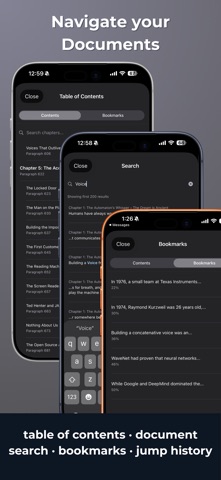
Listen2 runs neural text-to-speech directly on your iPhone or iPad without connecting to cloud services. No subscription or accounts — just a 7 day free trial and then a one-time purchase. Most text-to-speech apps either use the tried and true system voices or require monthly payments for cloud processing. Listen2 runs neural voice models locally using your iOS device's CPU and Apple Neural Engine, giving you natural-sounding speech without ongoing costs or privacy tradeoffs. WHAT MAKES LISTEN2 DIFFERENT Multi-Voice Engines, One App Piper provides reliable neural voices across 13 languages. Supertonic offers a fresh take on a voice engine — flow-matching models running on Apple's Neural Engine via CoreML for natural rhythm and expressive speech. Choose from 100+ voices in English, Spanish, French, German, Italian, Portuguese, Russian, Turkish, Greek, Hindi, Vietnamese, Swedish and Hungarian. More coming. Voice Tuning Adjust the model parameters of any voice to suit your preferences. Save presets to switch between profiles. Preview pronunciation rules before saving them. Import Anything PDF, EPUB, DOCX, DAISY, markdown, plain text, clipboard, or web articles. Share from Safari and Listen2 extracts the article text. Paywalled content works (even sites on which other major TTS apps fail) when shared from a browser where you are logged in. Machine Learning Word Sync CTC forced alignment matches audio to text at the word level. Watch each word highlight as it is spoken — across Latin and non-Latin scripts alike. Highlighting engine newly re-build to be lean and efficient that's dramatically easier on your battery life. Smart Document Reading Multi-column layout handling, footnote filtering (for PDF files), hyphenated word rejoining. AI Vision for scanned PDFs. Full EPUB, DOCX, and DAISY support. Figure Descriptions On-device AI vision generates spoken descriptions of figures, charts, and photos as you listen. For non-English documents, descriptions translate automatically via Apple's on-device Translation framework. (Works with EPUB and PDF as a first roll-out) Pronunciation Rules Fix how any word is spoken without changing display text. Rules for names, terms, or abbreviations. Live preview before saving. Built-in presets for footnote markers. Global or per-document. Doesn't break highlighting. True Offline Privacy Processing, normalization, and synthesis all happen on-device. Documents never leave your phone. No uploads, account, or tracking. FEATURES - 100+ neural voices across 13 languages, plus dozens of Apple system voices - 3+ engines: Piper (broad language support), Supertonic (high-fidelity CoreML, flow-matching models), and Kokoro. Apple system voices offer efficient, quality options if using enhanced or premium models. - Voice tuning with saveable presets - Word-by-word or sentence highlighting - PDF, EPUB, DOCX, DAISY, TXT, Markdown support - AI figure descriptions with auto-translation (PDF and EPUB support) - Collections with intros, cover art, and auto-advance - Web Article Collections — batch articles into an auto-playing queue - Clipboard import and Siri shortcut support - 0.5x to 2.5x playback speed (Kokoro supports up to 1.4x because of real-time constraint) - Background playback with lock screen controls - Import from Files, links, Share Extension, or other apps - Export any document as a plain-text file from the library - Pronunciation rules with live preview - Atkinson Hyperlegible and OpenDyslexic fonts - Full VoiceOver support with rotor navigation and Magic Tap - Elapsed and remaining time in now playing & reader view. WHO IT'S FOR - Commuters turning drive time into learning time - Students reviewing papers and textbooks - Professionals handling confidential documents privately - VoiceOver users looking for a fully accessible TTS reader - Readers with dyslexia who benefit from audio-visual sync - Anyone tired of TTS subscriptions One-time purchase. 7-day free trial. No subscriptions.
What's new · 1.11.3
v1.11.3 - fix issue where 3rd party system voices don't stop playing - fix issue where system voices highlighted the wrong words for the first paragraph of playback - fix issue where 3rd party system voices show a nonfunctional, confusing download icon v1.11.2 - Fix edge cases where audio playback session can get stuck - Better messaging around deleting voices - prompts to switch to another voice before being able to delete it etc. v1.11.1 ICLOUD SYNC RELIABILITY Documents added on one device could fail to appear or open on another, and could get stuck reporting that they were still downloading. Listen2 now keeps your synced library in a more reliable iCloud location and moves your existing documents there automatically, so your library, reading progress, and settings stay consistent across your iPhone, iPad, and Mac. A one-time notice explains the change. Once every device is updated to this version, you can remove the old copy from Settings, under iCloud and Backup. PLAYBACK RESUME FIX Playback could get stuck after you paused, switched to another app, and came back: pressing play did nothing, or the button changed to Pause with no audio, and the only way to recover was to relaunch Listen2. This was especially likely with VoiceOver, which constantly reconfigures the audio hardware in the background. Listen2 now rebuilds the audio pipeline and resumes from the sentence you were on, so playback recovers reliably. RATING PROMPT FIX The request to rate Listen2 could appear after every file import when the prompt was dismissed by swiping it away instead of tapping a button. Dismissing the prompt any way now counts, so it respects the intended limit and will not ask again for months. v1.11 VOICEOVER PLAYBACK FIX With VoiceOver turned on, playback could get stuck after pausing or switching apps: the button showed Pause but no audio played, and it would not recover until you relaunched Listen2. VoiceOver constantly reconfigures the audio hardware in the background, which could leave the audio engine wedged. Listen2 now detects this and rebuilds the engine on the next play, so audio resumes reliably. IMAGE RECOGNITION FIX When the vision model was not yet downloaded, recognizing images in a document could fail with no way to fix it, because the Manage Vision Model screen had no download control. That screen now has a Download Vision Model button, with progress, a cancel option, and full VoiceOver support, so you can download the model and get descriptions of the images and figures in your documents.
Details