

Ham Satting
Yousif AL Balushi · Utilities
Independent analytics for this App Store listing. AppTracker is not affiliated with Yousif AL Balushi.
Chart standing · US
What changed · US
Listing changes AppTracker has observed for this app in this storefront — new versions, price moves, rating shifts, and store copy.
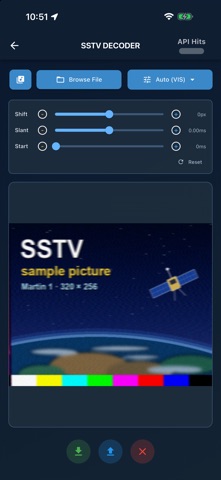
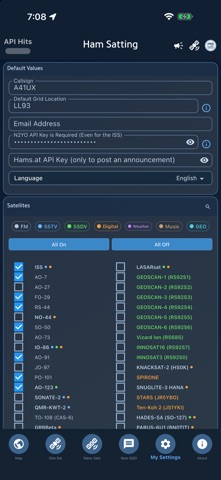
Settings now saves itself, the SSTV decoder opens more than WAV, and every satellite starts switched off until you choose it. SETTINGS • There is no Save All button any more. A tick or a choice is saved the moment you make it; a typed field is saved when you finish it: when you press Done, move to another field, or leave the page. "Details saved" confirms each one. • All On and All Off save at once too, and so does Apply in the Easy view list. • An email address or API key that is not valid is not saved: the page says which field and why, and keeps the one you had. • Reset All App Settings now really clears the APRS callsign and passcode it showed as cleared. They used to come back the next time the app opened. • Saving a setting no longer starts Tips & Tricks over from the first tip. • A tick box answers exactly where it is drawn. The rows are close together, and a tap on the lower half of a tick used to go to the row beneath it. SATELLITES • A new install starts with every satellite switched off, and Reset returns to that, so a first look at the pass list no longer spends your N2YO requests on satellites you never chose. Tick the ones you want. If you were already using the app, your satellites stay exactly as they were. NEW QSO • Choose a satellite, or type its name in full, and its mode, bands and frequencies are filled in for you: the same details the small button beside the name fills. Change the satellite and they change with it; delete the name and they are cleared. SSTV DECODER • Browse File now opens MP3, M4A, AAC, OGG and FLAC recordings as well as WAV. • Long recordings need about a quarter of the memory they did, and decode faster. The picture decoded is the same, dot for dot. • A recording longer than twenty minutes is refused with a message instead of being attempted. • My recordings: each recording now has a delete button, with a confirmation. One at a time, and only recordings this app made. • The My recordings list is now solid: the page behind it no longer shows through. • A picture sent with standard timing is now decoded where it belongs. It used to come out to one side, by ten pixels in Martin 1 and fifty in PD 120, more or less from one recording to the next, and Shift had to make up for it. A Shift you had saved for that is put back to 0 once; set it again only if a recording needs it. • A Robot 72 recording with its header no longer starts two lines down the picture. EVERYWHERE • A message that carries a button, such as Recording saved with Share, now goes away by itself after a few seconds like every other message. It used to stay until you swiped it. • The welcome dialog fits smaller phones: its Got It button is always in sight, and Tip of the Week no longer opens on top of it the first time the app starts. ABOUT • Privacy Policy now sits beside User Manual, Support and Version History. 73 de A41UX
In-app purchases · US
No in-app purchases.
Screenshots




About
Track amateur radio satellites in real time, predict passes, log QSOs, hunt grid squares — with a live APRS map layer and the new Music Broadcast service. Built by a fellow ham (A41UX) — free of analytics, ads, and tracking. CORE FEATURES • Real-time tracking for FM/SSB linear birds (e.g. ISS, SO-50, etc.), digipeaters (e.g. GRBBeta, Foresail-1p, etc), SSTV + SSDV image birds (e.g. Lobachevsky, GEOSCAN 1-6 , etc.), Weather LRPT (Meteor-M N2-3 / N2-4), and Music Broadcast (e.g. BALKAN-1, Flamingo-1, etc) • Pass predictions with quality indicators (Excellent, Good, Fair, Poor), AOS / LOS, max elevation, duration, azimuth • Interactive footprint mapping with live position + great-circle bearing lines • Compass dialog with theme-aware export image and watermark • AR Tracking (iPhone / iPad) using device compass + accelerometer • Multi-satellite tracking and side-by-side pass comparison • Five-mode AR audio recording (iPhone / iPad): SSTV, SSDV, Digital, Weather, Music — Doppler-corrected RX labelling; consistent WAV naming NEW IN APRIL 2026 • Music Broadcast: 4 satellites transmit short music tones as an RF identifier instead of CW Morse — T.MicroSat-1 plays Beethoven's "Ode to Joy" on 401.025 MHz; BALKAN-1, Flamingo-1, OTP-2 use classical / video-game themes. RX-only on UHF 400-402 MHz; brown toggle on AR page records the pass. • Scheduled Service Events: register a temporary frequency override for SSTV, SSDV, Digital, or Weather (Meteor-M rotation, ARISS channel shifts, etc.) • APRS digipeater added on SONATE-2 (DP0SNX) and NO-44 (PCSAT, W3ADO-1) on 145.825 MHz simplex • IO-86 SSDV downlink added on 145.880 MHz • AMSAT Live Activity Indicator: every prediction card carries a 24-hour activity dot in AMSAT cell colors, sourced from the AMSAT Live OSCAR Satellite Status page. Tap for a 48-hour popup with individual reports per cell (callsign + grid + UTC slot), attribution, and a compact share-image. • 10 new satellites with permanent NORADs: TO-108, GRBBeta, Foresail-1p, Horizon, 239Alferov, Luca, BALKAN-1, Flamingo-1, OTP-2, T.MicroSat-1 • APRS Live Map Layer: read-only APRS-IS feed, age-fading trails, 40+ symbol mappings, SSID filters, heard-by via aprs.fi • SSTV Decoder: multi-mode (Robot 36, PD 120 / 180, Martin, Scottie, Wraase, AVT, etc.) • Q1 2026 batch: 8 new satellites added (HADES-SA, PARUS-T3, HYPERVIEW-1G, MAGNARO-II Piscis, ARICA-2, FSI-SAT2, ZERO-II, OrigamiSat-2) • UI: long sat names auto-fit at any Font Scale; filter pills always one row; (i) info icons; 125 in-app tips LOGGING + AWARDS + EXPORT • Full QSO logbook: callsign, grid, mode, freq (TX / RX), satellite, RST, distance, bearing • Grid Hunters VUCC tracking with worked-grids map + great-circle paths from QTH • Per-QSO QSL card export — themed PNG ready to share or print • Export to ADIF (LoTW / TQSL), JSON, or CSV • Maidenhead 4 / 6 / 8-character grids • DXCC + VUCC dashboards, distance + bearing stats, worked-by-band charts • Calendar integration; smart pass notifications with min-elevation filter TECHNICAL • Available on iPhone, iPad, and Mac (Apple Silicon + Intel). AR Tracking and live audio recording are iPhone / iPad features; pass prediction, logging, exports, mapping, and the AMSAT indicator run on every Apple device. • N2YO API for orbital data (free key required for non-ISS satellites) • Cached satellite catalogue works offline • Privacy-first: data stays on device, no analytics SDKs, no advertising IDs, no tracking. APRS-IS, N2YO, AMSAT Live OSCAR Status, and the optional aprs.fi REST are the only network calls PERFECT FOR • Amateur radio operators pursuing satellite communications • AMSAT members and CubeSat / PocketQube enthusiasts • Contest participants and award hunters (DXCC, VUCC, satellite awards) • SDR listeners curious about Music Broadcast on 400-402 MHz 73 — A41UX (Unixeer, Oman)
What's new · 5.4.0
Settings now saves itself, the SSTV decoder opens more than WAV, and every satellite starts switched off until you choose it. SETTINGS • There is no Save All button any more. A tick or a choice is saved the moment you make it; a typed field is saved when you finish it: when you press Done, move to another field, or leave the page. "Details saved" confirms each one. • All On and All Off save at once too, and so does Apply in the Easy view list. • An email address or API key that is not valid is not saved: the page says which field and why, and keeps the one you had. • Reset All App Settings now really clears the APRS callsign and passcode it showed as cleared. They used to come back the next time the app opened. • Saving a setting no longer starts Tips & Tricks over from the first tip. • A tick box answers exactly where it is drawn. The rows are close together, and a tap on the lower half of a tick used to go to the row beneath it. SATELLITES • A new install starts with every satellite switched off, and Reset returns to that, so a first look at the pass list no longer spends your N2YO requests on satellites you never chose. Tick the ones you want. If you were already using the app, your satellites stay exactly as they were. NEW QSO • Choose a satellite, or type its name in full, and its mode, bands and frequencies are filled in for you: the same details the small button beside the name fills. Change the satellite and they change with it; delete the name and they are cleared. SSTV DECODER • Browse File now opens MP3, M4A, AAC, OGG and FLAC recordings as well as WAV. • Long recordings need about a quarter of the memory they did, and decode faster. The picture decoded is the same, dot for dot. • A recording longer than twenty minutes is refused with a message instead of being attempted. • My recordings: each recording now has a delete button, with a confirmation. One at a time, and only recordings this app made. • The My recordings list is now solid: the page behind it no longer shows through. • A picture sent with standard timing is now decoded where it belongs. It used to come out to one side, by ten pixels in Martin 1 and fifty in PD 120, more or less from one recording to the next, and Shift had to make up for it. A Shift you had saved for that is put back to 0 once; set it again only if a recording needs it. • A Robot 72 recording with its header no longer starts two lines down the picture. EVERYWHERE • A message that carries a button, such as Recording saved with Share, now goes away by itself after a few seconds like every other message. It used to stay until you swiped it. • The welcome dialog fits smaller phones: its Got It button is always in sight, and Tip of the Week no longer opens on top of it the first time the app starts. ABOUT • Privacy Policy now sits beside User Manual, Support and Version History. 73 de A41UX
Details