

Mona 7 for Mastodon
Junyu Kuang · Social Networking
Independent analytics for this App Store listing. AppTracker is not affiliated with Junyu Kuang.
Chart standing · US
What changed · US
Listing changes AppTracker has observed for this app in this storefront — new versions, price moves, rating shifts, and store copy.
Mona 27.1 adds support and optimizations for iPhone Duo. This update also includes general improvements and bug fixes.
Price & rating history · US
Reconstructed from the listing changes AppTracker has observed in this storefront. A field is charted once it has changed more than once, and each line starts at the value it moved from.
Average rating · ★ 4.29 now · 8 changes on record
Screenshots




About
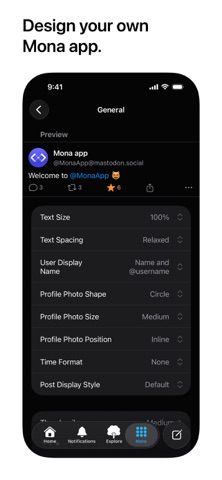
Meet Mona, the default Mastodon app for everyone. Enjoy buttery-smooth scrolling, native design, and powerful customization options. It delivers a truly personal Mastodon experience and is fully optimized for VoiceOver. All Mastodon features that everyone expects: • Browse timelines like Home, List, and Profiles • Reply, repost, favorite, bookmark posts with ease • Explore trending posts and news, plus Local and Federated timelines Mona features: • A stunning user interface with the Liquid Glass design • Check recent posts and trending news on your home screen or notification center with widgets • Sync your reading positions, mute list, user notes, drafts, search history, accent colors, and custom app themes across your iPhone, iPad, and Mac, privately and securely • Push notifications • Share a post as picture • Open multiple windows on iPad and Mac Privacy: • Mona does not collect any personal information • Your account tokens are protected by on-device Keychain • Your network connections to Mastodon servers are protected by HTTPS Other Mona features: • Post with HDR photos and Live Photos • Use Genmoji and custom emojis in your posts • Column View takes full advantage of the big screen on iPad and Mac, shows multiple views at once and allows you to navigate between views fluently and efficiently • Adjustable text spacing and text sizes • Retrieve missing posts with “Load from Remote Server” • Privately set aliases, notes and username colors for Mastodon accounts • User Notes list: browse, organize and edit all your notes in one place • Control the app and browse posts with a compatible game controller, such as a Playstation DualSense/DualShock, Nintendo Switch, Xbox or MFi controller • Customize game controller’s button functions via in-app settings Tab Bar (Mona Ultra feature): • Pin your frequently visit pages to the tab bar • Drag tabs into the order you prefer • Rename your tabs • Change your tab icons (more than a thousand of icons for you to choose) • Show/hide tab names Post Actions (Mona Ultra feature): • Drag actions into the order you prefer • Configure actions as swipe options: swipe a post horizontally to perform an action • Optionally hide some or all action buttons from post cards, while keeping them accessible via context menu, swipe options, keyboard shortcuts, and VoiceOver rotor Accent Color (Mona Ultra feature): • Configure different Accent Colors for Light and Dark mode • More than 10 built-in colors for you to choose • Design and set custom colors Theme Editor (Mona Ultra feature): • Customize the app’s color scheme • Design and set custom themes • Advanced color settings allow you to fine-tune colors for different level of views • Export and share your custom themes • Import custom themes shared by other people Font Customization (Mona Ultra feature): • Configure different fonts for body text and headings • Select from a variety of build-in fonts • Supports custom fonts installed by third-party apps Other Mona Ultra features: • Add multiple accounts: you can also opt to favorite, repost, quote post, or follow using a non-current account • Automatically translate posts on the timeline • Filter and mute: filter timelines based on post category and content; hide posts with certain words; hide posts from certain people • Customize push notifications based on notification category • Export and import settings: easily transfer your custom settings between multiple devices Customer support: • Mastodon: @MonaApp@mastodon.social • Email: theSpringApp@gmail.com Terms of use: https://apple.com/legal/internet-services/itunes/dev/stdeula
What's new · 27.1
Mona 27.1 adds support and optimizations for iPhone Duo. This update also includes general improvements and bug fixes.
Details