

Prio: To Do List & Day Planner
Haileslassie Lilay Desalegn · Productivity
Independent analytics for this App Store listing. AppTracker is not affiliated with Haileslassie Lilay Desalegn.
Chart standing · US
What changed · US
Listing changes AppTracker has observed for this app in this storefront — new versions, price moves, rating shifts, and store copy.
• A calmer new look with new colours, type and compact task rows • New Browse tab keeps Today, Inbox and Upcoming front and centre • Type "tomorrow 5pm" and Prio now understands the time • A quiet "all done" moment when you clear Today • Optional: watch a short video to go ad-free for 24 hours • No account needed — back up and restore from Settings • Better layout on iPad and foldable screens • Stability fixes
Price & rating history · US
Reconstructed from the listing changes AppTracker has observed in this storefront. A field is charted once it has changed more than once, and each line starts at the value it moved from.
Price · Free now · 2 changes on record
Screenshots


About
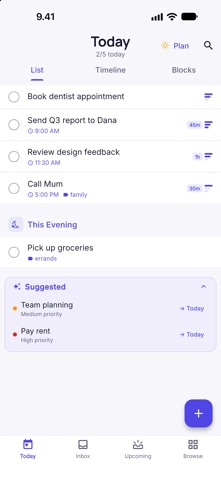
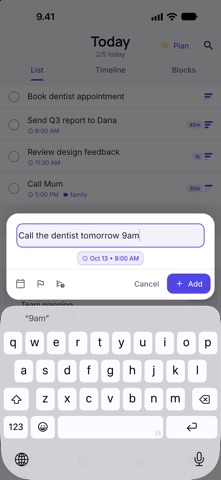
Prio is a calm to-do app that helps you plan your day. No account. No sign-up. Your tasks stay on your device. TYPE IT. PRIO SORTS IT. Write a task the way you would say it — "Call mum tomorrow 5pm !high #family" — and Prio finds the date, time, priority and tag for you. PLAN YOUR DAY Tap Plan to review what's due, then see your day as a list, a timeline, or time blocks. FINISH WITH A SATISFYING DONE Check things off, keep a daily goal and clear Today for a quiet "all done" moment. SIMPLE WHERE IT COUNTS - Today, Inbox and Upcoming, plus Anytime, Someday and a Logbook of everything you've finished • Areas, projects and tags when you want structure • Reminders, repeating tasks, notes and subtasks • Calendar events next to your tasks (optional — you choose) • Light and dark themes, built for iPhone and iPad • Works fully offline YOURS TO KEEP Back up everything to a JSON file and restore it on another device from Settings. No account needed. FREE TO USE Prio is free and supported by ads. After your first week you may see a small, clearly labelled ad on the Upcoming and Anytime screens — never on Today or Inbox, and never when you finish a task. Want a break? Watch one short video and Prio goes ad-free for 24 hours. Questions or ideas? We read every message.
What's new · 2.3
• A calmer new look with new colours, type and compact task rows • New Browse tab keeps Today, Inbox and Upcoming front and centre • Type "tomorrow 5pm" and Prio now understands the time • A quiet "all done" moment when you clear Today • Optional: watch a short video to go ad-free for 24 hours • No account needed — back up and restore from Settings • Better layout on iPad and foldable screens • Stability fixes
Details