

CPD Progress Tracker
BENJAMIN MATTHEW BAKER · Productivity
Independent analytics for this App Store listing. AppTracker is not affiliated with BENJAMIN MATTHEW BAKER.
Chart standing · US
What changed · US
Listing changes AppTracker has observed for this app in this storefront — new versions, price moves, rating shifts, and store copy.
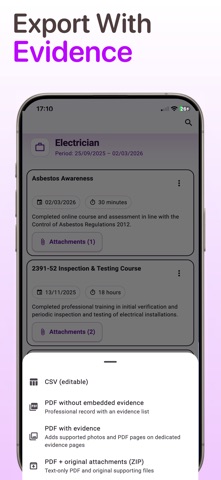
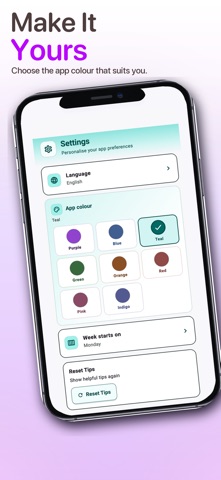
CPD Progress Tracker 1.4 brings a refreshed look and a more polished way to record and manage your professional development. WHAT’S NEW • Refreshed interface The app has been updated throughout with a cleaner, more modern design while keeping the familiar layout and workflow. • Choose your app colour Make CPD Progress Tracker your own with a choice of eight app colours, including Purple, Blue, Teal, Green, Orange, Red, Pink and Indigo. • Improved CPD entry Adding and editing CPD records is now clearer, with individual sections for profession, date, title, details, duration and evidence. • Better evidence handling Evidence and attachments are easier to add and manage alongside your CPD activities. • Professional PDF reports Create clear CPD reports for sharing, portfolio reviews, employer checks or professional requirements. Evidence can be incorporated into reports, with original files supplied separately when required. • Improved export options Choose between PDF without embedded evidence, PDF with evidence, PDF with accompanying original attachments where required, or CSV. • New Settings Language, app colour, week-start preferences and tips can now be managed from one dedicated Settings screen. • Refreshed onboarding Getting started has been improved with a cleaner setup experience, including the ability to choose your preferred app colour from the beginning. • UI refinements throughout Buttons, forms, date selection, attachment controls, progress indicators and other interface elements have been refined for a more consistent experience. Thank you for using CPD Progress Tracker. This update focuses on making the app easier and more enjoyable to use while keeping your CPD records organised, professional and ready to share.
In-app purchases · US
No in-app purchases.
Screenshots



Keywords this app targets
Search terms AppTracker associates with this app — estimates, not search volume. ❝ = in the app's title; a highlighted number is its current position for that term.
Similar apps
Competitors and close alternatives, as estimated by AppTracker.
 CPD Portfolio
CPD Made Easy Ltd
CPD Portfolio
CPD Made Easy Ltd
 My Certification Tracker
Skaggs Media LLC
My Certification Tracker
Skaggs Media LLC
 ATracker PRO Time Tracker
WonderApps AB
1 shared topic · 1 shared title word
ATracker PRO Time Tracker
WonderApps AB
1 shared topic · 1 shared title word
 Clinical Audit Compass
 Ltd.
Clinical Audit Compass
Clinical Audit Compass Ltd.
 Purpl PIP Symptoms Tracker
The Purpl Co Limited
Purpl PIP Symptoms Tracker
The Purpl Co Limited
 Simple Tracker: Goals
Michael Neal
1 shared topic · 1 shared title word
Simple Tracker: Goals
Michael Neal
1 shared topic · 1 shared title word
 Work Diary Pro
S.M.C. Analysts Ltd
1 shared topic
Work Diary Pro
S.M.C. Analysts Ltd
1 shared topic
 Pilot Career Manager
STEPHEN MICHAEL JAMISON
1 shared topic
Pilot Career Manager
STEPHEN MICHAEL JAMISON
1 shared topic
About
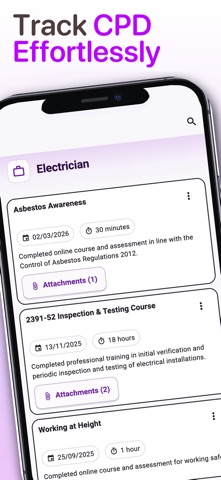
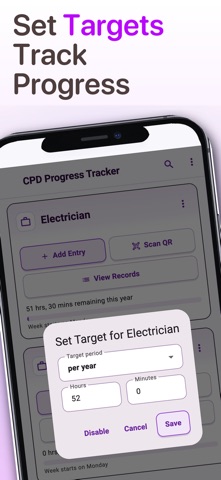
CPD Progress Tracker makes it simple to record, organise and share your Continuing Professional Development. Log training, courses, toolbox talks, site activities, professional learning and supporting evidence — wherever you are. Designed for busy professionals who don’t want to spend their time managing spreadsheets or paperwork, CPD Progress Tracker keeps your records, evidence, targets and professional development together in one straightforward app. A clean, modern interface makes everyday CPD recording quick and easy, with a choice of app colours to personalise your experience. KEY FEATURES 1. Create CPD Records in Seconds Quickly record professional development as it happens. Add: • Date and activity title • Details and notes • Hours and minutes • Photos and supporting evidence • Files and documents • Links 2. Attach Evidence to Your Records Keep evidence alongside the activity it relates to. Attach: • Certificate photos • Screenshots • PDFs • Supporting documents • Other files • Links This makes it easy to return to a record later and find the supporting information you need. 3. Professional PDF Reports Turn your CPD records into clear, professional reports ready to share. Choose from flexible export options including: • PDF without embedded evidence • PDF with evidence • PDF plus original attachments in an accompanying ZIP • CSV for use in spreadsheets and other systems PDF with evidence can incorporate supported photographs and documentary evidence directly into the report, helping you create a useful record for audits, employer checks, portfolio reviews and professional registration. When original files need to accompany a report, they can be supplied separately in a ZIP so the original evidence is retained. 4. Scan QR Codes Use QR codes to quickly capture training or learning information and create CPD records with less manual entry. Review the information before saving so you remain in control of your record. 5. Multiple Professions Maintain CPD for more than one profession, role or area of development within the same app. Each profession can have its own: • CPD records • Progress • Targets • Filters Useful for people who hold multiple roles, qualifications or professional responsibilities. 6. Set Targets and Track Progress Set weekly, monthly or annual CPD targets and see your progress at a glance. Progress indicators show how much development you have recorded against your target, helping you keep on top of ongoing requirements throughout the year. Custom week-start settings are also supported for different working patterns, regions or organisations. 7. Find and Manage Your Records Keep your CPD history organised and easy to revisit. Browse previous activities, search your records and keep evidence with the relevant professional development instead of spread across folders, emails and paperwork. BUILT FOR REAL-WORLD CPD CPD Progress Tracker can be used across many professions, including: • Electricians and skilled trades • Engineers and technicians • Healthcare professionals • Teachers and trainers • Managers and supervisors • Apprentices and students • Professionals maintaining evidence for career development or regulatory requirements Whether you’ve completed a training course, attended a toolbox talk, developed a new skill or need to document learning from everyday work, you can record it while the details are still fresh. KEEP YOUR CPD READY TO SHARE Build a useful professional record over time instead of trying to reconstruct your CPD when an audit, appraisal or renewal is approaching. Record the activity. Attach the evidence. Track your progress. Create a professional report when you need it. CPD Progress Tracker puts your professional development in your hands.
What's new · 1.4.0
CPD Progress Tracker 1.4 brings a refreshed look and a more polished way to record and manage your professional development. WHAT’S NEW • Refreshed interface The app has been updated throughout with a cleaner, more modern design while keeping the familiar layout and workflow. • Choose your app colour Make CPD Progress Tracker your own with a choice of eight app colours, including Purple, Blue, Teal, Green, Orange, Red, Pink and Indigo. • Improved CPD entry Adding and editing CPD records is now clearer, with individual sections for profession, date, title, details, duration and evidence. • Better evidence handling Evidence and attachments are easier to add and manage alongside your CPD activities. • Professional PDF reports Create clear CPD reports for sharing, portfolio reviews, employer checks or professional requirements. Evidence can be incorporated into reports, with original files supplied separately when required. • Improved export options Choose between PDF without embedded evidence, PDF with evidence, PDF with accompanying original attachments where required, or CSV. • New Settings Language, app colour, week-start preferences and tips can now be managed from one dedicated Settings screen. • Refreshed onboarding Getting started has been improved with a cleaner setup experience, including the ability to choose your preferred app colour from the beginning. • UI refinements throughout Buttons, forms, date selection, attachment controls, progress indicators and other interface elements have been refined for a more consistent experience. Thank you for using CPD Progress Tracker. This update focuses on making the app easier and more enjoyable to use while keeping your CPD records organised, professional and ready to share.
Details