

KnitCounter: Row Counter
HALEY JEAN BARLAR · Productivity
Independent analytics for this App Store listing. AppTracker is not affiliated with HALEY JEAN BARLAR.
Chart standing · US
What changed · US
Listing changes AppTracker has observed for this app in this storefront — new versions, price moves, rating shifts, and store copy.
Price & rating history · US
Reconstructed from the listing changes AppTracker has observed in this storefront. A field is charted once it has changed more than once, and each line starts at the value it moved from.
Average rating · ★ 4.96 now · 3 changes on record
Ratings breakdown · US
The star breakdown behind this app's rating in this storefront.
Screenshots


About
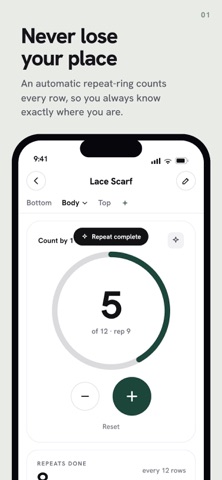
A calm, ad-free row counter for knitters and crocheters, now with iCloud sync and a built-in yarn stash. Track rows, repeats, sections and notes in one quiet place, so you can focus on your project instead of remembering where you left off. NEW IN 2.0 • iCloud sync: your projects, photos, pattern PDFs and yarn stash stay in sync across iPhone and iPad, automatically. No account, no setup. • Yarn Stash: track every skein you own. Colour, brand, weight category, yardage, and photos. • A full redesign: a calmer Projects list, a clearer counter, and a redesigned pattern reader. • Drag to reorder your projects, and five accent colours to make the app your own. EVERYTHING KNITCOUNTER DOES • Create knitting or crochet projects and organise each into sections like ribbing, body and sleeves • One-tap row and stitch counting, with custom step sizes • Automatic repeats that track your pattern for you • Attach and read your pattern PDF while you count • A built-in session timer, notes and finishing checklists • Pin and reorder projects so your current make is always on top • Light and dark mode, designed for long, comfortable sessions • Automatic saving: your progress is always preserved KnitCounter is free, ad-free, and made by one person who cares. Whether you're knitting a sweater, socks, or a lace shawl, it keeps everything organised and within reach. Happy making. Haley
What's new · 2.0.1
2.0.1 Notes are now separate for each section again. Each section has its own notes, and there's a "General notes" space in the Planner for notes about the whole project. If you added a note recently, you'll find it under General notes. Also includes sync reliability fixes and small improvements.
Details