

NauticCalc: Nav Calculator
Daniel Ehrensperger · Utilities
Independent analytics for this App Store listing. AppTracker is not affiliated with Daniel Ehrensperger.
Chart standing · US
What changed · US
Listing changes AppTracker has observed for this app in this storefront — new versions, price moves, rating shifts, and store copy.
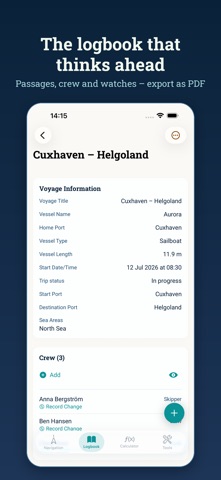
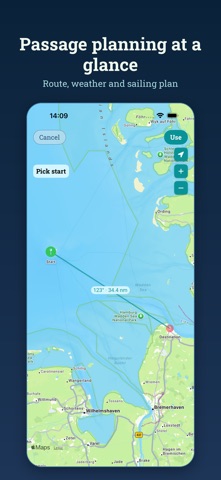
A language change now reaches everywhere • New: in the full-screen route preview every leg carries a wind barb at its midpoint, with the wind speed beside it – direction and knots at a glance, counted as on a weather chart • Fixed: after a language change the logbook stayed in the old language – the labels only switched once you pulled the list down • Fixed: automatically created entries kept the language they were born in for ever – description, weather condition and visibility now follow the app language • Fixed: engine and anchor status, the field names in the voyage report and the manually triggered GPS entry appeared in German whatever the app language • Fixed: three weather terms named the wrong thing – checked against the meteorological services' own glossaries in German, Dutch and Italian • Fixed: a correction to a logbook entry showed correctly in the list but stayed wrong in the PDF voyage report • Fixed: "Mark as manual" only held until the next app start – after that the automatic marker was back and the date field locked again • Fixed: taking over an existing voyage lost the crew, skipper included
In-app purchases · US
No in-app purchases.
Screenshots



Keywords this app targets
Search terms AppTracker associates with this app — estimates, not search volume. ❝ = in the app's title; a highlighted number is its current position for that term.
Similar apps
Competitors and close alternatives, as estimated by AppTracker.
 Nautical Calculator
Aviation Mobile Apps, LLC.
3 shared topics · 1 shared title word
Nautical Calculator
Aviation Mobile Apps, LLC.
3 shared topics · 1 shared title word
 NautiCalc - Boot Tool
Riber Shamo Elias
2 shared topics
NautiCalc - Boot Tool
Riber Shamo Elias
2 shared topics
 Nautical Calculator Pro
Giacomo Gabriele
1 shared title word
Nautical Calculator Pro
Giacomo Gabriele
1 shared title word
 CoNav
Vladyslav Yarmak
1 shared topic
CoNav
Vladyslav Yarmak
1 shared topic
 Nautic Converter - Boat Tool
Toni Dominik Hoffmann
1 shared topic
Nautic Converter - Boat Tool
Toni Dominik Hoffmann
1 shared topic
 Sextant Calculator
Will Downing
1 shared title word
Sextant Calculator
Will Downing
1 shared title word
 Nautic Speed and Compass
Toni Dominik Hoffmann
1 shared topic
Nautic Speed and Compass
Toni Dominik Hoffmann
1 shared topic
 Navigation Marine PRO
Andrea Bisegna
1 shared topic
Navigation Marine PRO
Andrea Bisegna
1 shared topic
About
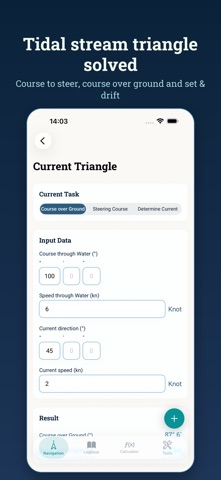
NauticCalc is a professional calculator for precise nautical navigation at sea. Designed for sailors, skippers and maritime crews, it helps you plan safe routes, correct courses and understand changing conditions. Use NauticCalc to convert between knots, kilometres per hour, metres per second, miles per hour and feet per second. Switch depth units between metres, fathoms and feet, and handle distance in nautical miles, metres and kilometres with confidence. Plan your voyage with accurate course calculations. Adjust compass headings for deviation and variation, and apply wind and current corrections to keep your vessel on track. Estimate arrival times using distance and speed so you can manage watch schedules and harbour approaches. Work with wind in Beaufort, kilometres per hour, metres per second and knots. Assess sea conditions, choose suitable sail plans and prepare for regatta or cruising passages. Combine speed, heading and drift to understand the effect of current on your track. NauticCalc supports everyday coastal sailing as well as longer offshore trips. Use it alongside your paper charts, electronic plotter and logbook to cross check bearings, positions and routes. Whether you sail a small boat or a large yacht, NauticCalc gives you clear, reliable calculations to support safe and efficient navigation.
What's new · 1.10.0
A language change now reaches everywhere • New: in the full-screen route preview every leg carries a wind barb at its midpoint, with the wind speed beside it – direction and knots at a glance, counted as on a weather chart • Fixed: after a language change the logbook stayed in the old language – the labels only switched once you pulled the list down • Fixed: automatically created entries kept the language they were born in for ever – description, weather condition and visibility now follow the app language • Fixed: engine and anchor status, the field names in the voyage report and the manually triggered GPS entry appeared in German whatever the app language • Fixed: three weather terms named the wrong thing – checked against the meteorological services' own glossaries in German, Dutch and Italian • Fixed: a correction to a logbook entry showed correctly in the list but stayed wrong in the PDF voyage report • Fixed: "Mark as manual" only held until the next app start – after that the automatic marker was back and the date field locked again • Fixed: taking over an existing voyage lost the crew, skipper included
Details