
Chart standing · US
What changed · US
Listing changes AppTracker has observed for this app in this storefront — new versions, price moves, rating shifts, and store copy.
Know What to Charge — a new price calculator works a price forward: materials, plus hours at your rate, plus the markup or margin you want to keep. Open it from Tools, or from the price field on any line item, and send the result straight to your price book. What Your Hours Actually Earned — a seventh report, Effective Rate, divides each project's profit by every hour logged against it — billable or not — and compares it to the rate that project was meant to earn. Worst first, with CSV export; tap a row to open the project.
Ratings breakdown · US
The star breakdown behind this app's rating in this storefront.
Screenshots



About
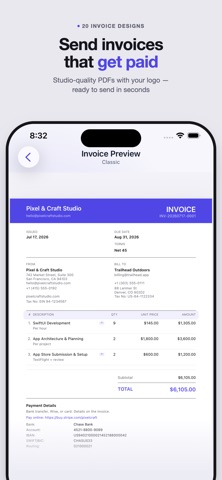
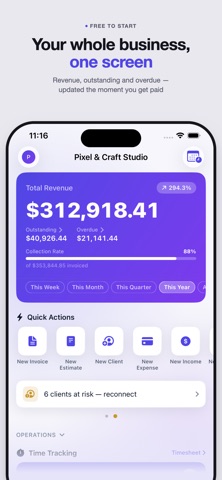
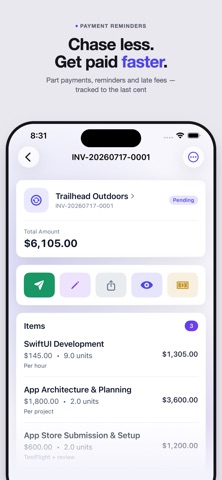
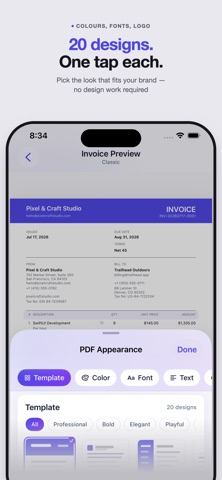
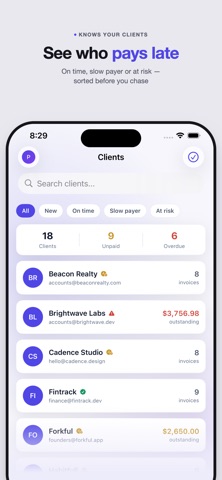
The simplest invoicing app for freelancers, contractors, and small businesses. Create professional invoices, send estimates, track expenses and billable hours, and get paid faster — all from your iPhone and iPad. No account required. CREATE INVOICES IN SECONDS Add a client, pull items from your price book, set a due date — done. Every invoice is numbered automatically. RECURRING INVOICES & TEMPLATES Auto-generate invoices weekly or monthly, or save any invoice as a reusable template and send in one tap. ESTIMATES & PROPOSALS Send a quote and convert it to an invoice on approval. Turn any estimate into a proposal with a cover letter and a signed acceptance block on the PDF. TRACK TIME, BILL HOURS Run a timer or log hours against any project, then turn unbilled time into an invoice in one tap. ORGANISE WORK INTO PROJECTS Group invoices, estimates, and expenses under a project and track profit against a budget on a built-in chart. CLIENT CRM Tag clients, see a health score for on-time vs. late payers, log every interaction, and set follow-up reminders. EMAIL TEMPLATES Send with saved templates for invoices, reminders, and overdue notices — smart variables fill in name, number, and amount due. RECURRING EXPENSES Auto-generate rent, subscriptions, or any regular cost on a weekly or monthly schedule. SEND AS PDF BY EMAIL Send a polished PDF from the app with a payment link (PayPal, Stripe, Venmo) or bank details (IBAN, SWIFT). Customize the accent color to match your brand. REPORTS & ANALYTICS See revenue, outstanding balances, and monthly trends at a glance, plus aging and tax reports and one-tap client statements — exportable as PDF or CSV. TRACK WHAT YOU'RE OWED Filter by period, currency, or year, and record partial payments with full payment history per invoice. CLIENTS, EXPENSES & PRICE BOOK Track expenses per client or project, scan receipts with your camera to fill in the amount, and save go-to services in a price book. HOME SCREEN WIDGET See your outstanding balance and overdue count without opening the app — small and medium sizes. STAY ORGANISED Bulk-edit invoices, auto-archive old paid ones, and find anything instantly with Spotlight Search. YOUR DATA, YOUR WAY No account required. File backup and restore, and CSV export. — — — INVOICES PRO — UNLIMITED ACCESS Upgrade to Pro for: • Unlimited invoices, estimates & clients • Send & share PDFs by email • Recurring invoices, expenses & templates • Estimates & proposals — create, send & convert • Time tracking — timer, timesheet & billing • Projects — budgets & profitability • Client CRM — tags, health scores & reminders • Saved email templates • Expense tracking & receipt scanning • Aging & tax report PDF export • Client statements • Custom invoice numbers & PDF branding Subscription auto-renews unless cancelled at least 24 hours before the end of the current period. Manage or cancel in App Store account settings. Perfect for freelancers, consultants, contractors, and small business owners. Terms of Use: https://www.notion.so/Terms-of-Use-35efe3988bb6802aacc6e18ad7ea4488 Privacy Policy: https://www.notion.so/Privacy-Policy-35cfe3988bb680b8a7a4e820ebe57292 By downloading this app, you agree to our Terms of Use and Apple's Standard License Agreement (EULA): https://www.apple.com/legal/internet-services/itunes/dev/stdeula/
What's new · 1.9
Know What to Charge — a new price calculator works a price forward: materials, plus hours at your rate, plus the markup or margin you want to keep. Open it from Tools, or from the price field on any line item, and send the result straight to your price book. What Your Hours Actually Earned — a seventh report, Effective Rate, divides each project's profit by every hour logged against it — billable or not — and compares it to the rate that project was meant to earn. Worst first, with CSV export; tap a row to open the project.
Details