

Void Widgets - Retro & Minimal
Yeasir Arafat · Graphics & Design
Independent analytics for this App Store listing. AppTracker is not affiliated with Yeasir Arafat.
Chart standing · US
What changed · US
Listing changes AppTracker has observed for this app in this storefront — new versions, price moves, rating shifts, and store copy.
Minor bug fixes and improvements
Price & rating history · US
Reconstructed from the listing changes AppTracker has observed in this storefront. A field is charted once it has changed more than once, and each line starts at the value it moved from.
Average rating · ★ 4.80 now · 15 changes on record
Ratings breakdown · US
The star breakdown behind this app's rating in this storefront.
In-app purchases · US
What this app sells inside itself, grouped by kind and priced for this storefront.
Screenshots






Similar apps
Competitors and close alternatives, as estimated by AppTracker.
 WhyNot Widgets
Iskren Georgiev
WhyNot Widgets
Iskren Georgiev
 Everything Widgets
Mustakim Maknojiya
Everything Widgets
Mustakim Maknojiya
 Color Widgets
Digital Charms, Inc.
Color Widgets
Digital Charms, Inc.
 LockWidget - LockScreen Themes
SoCloud Technology Co., Limited
LockWidget - LockScreen Themes
SoCloud Technology Co., Limited
 NewThing Widgets Pro
AppsLab Co.
NewThing Widgets Pro
AppsLab Co.
 Widgetsmith
Cross Forward Consulting, LLC
Widgetsmith
Cross Forward Consulting, LLC
 Timedash Widgets
Vincent Meertens
Timedash Widgets
Vincent Meertens
 Weather Widgets - Clock Widget
ACCOUNTING PLATFORM HUMAN RESOURCES JOINT STOCK COMPANY
Weather Widgets - Clock Widget
ACCOUNTING PLATFORM HUMAN RESOURCES JOINT STOCK COMPANY
About
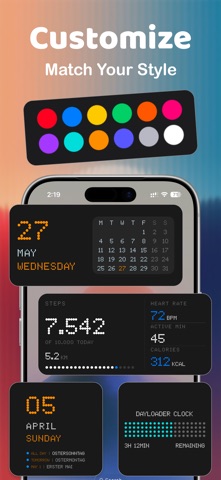
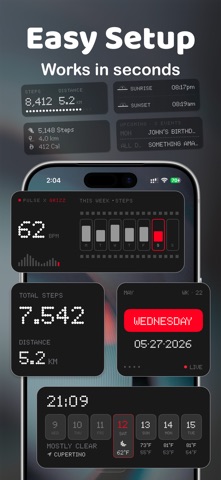
Beautiful Home Screen & Lock Screen Widgets You Won't Find Anywhere Else Void Widgets brings 50+ hand-crafted widgets to your iPhone — morse code clocks, dot-matrix displays, retro pixel art, weather, calendars, health tracking, and our brand-new Grizz Pack. Mix, match, and make your screens truly yours. CLOCK WIDGETS - MORSE Watch: Tell time in dots and dashes - Dot Clock: Crisp NDOT 47 dot-matrix time - Glyph Clock: Pixel HH/MM with an animated seconds digit - Dual Tone Clock: Bold two-color analog face - Pebble Watch: Time written out in words, Pebble-style - Dayloader Clock: Watch your day fill up with a color gradient - Dayloader Clock Dot: Dot-matrix take on the day loader - Minimal Date Time: Clean time + date with a red accent - Time & Date: Compact time and date together - Day & Date: Big day name and number at a glance - Time: Ultra-minimal single time display CALENDAR & PROGRESS WIDGETS - Events & Date: Your next appointments up front - Event Timeline: Today, tomorrow & later, beautifully bucketed - Minimal Calendar: Clean iOS-style 2-week view - Analog Clock Calendar: Classic clock face over a month grid - Retro Calendar: Pixel-art month (Small & Large) - Retro Date Calendar: Retro date with week overview - Year Progress: Every day of the year as dots - Retro Progress: Track day, week, month & year in dot-matrix WEATHER WIDGETS - Current Weather: Conditions, temp, and daily high/low - Weather Forecast: Next hours at a glance - Weekly Weather: Up to a 6-day forecast - Retro Weekly Forecast: Pixel-styled 7-day strip - Modern Weather Calendar: Weather fused with your week - Weather Dashboard: Full-screen temps, charts & sun bar (Large) - Luminous: Clock, weather, forecast & events in one (Large) - Sunrise / Sunset / Sun Times: Golden-light moments, simply shown - Golden Hour: Morning & evening golden-hour windows HEALTH & ACTIVITY WIDGETS See your day's movement at a glance — all read straight from Apple Health and kept private on your device. - Health At Glance: Steps, calories, heart rate & battery around a live clock - Pulse Dots: Steps, calories, heart rate & distance in retro dots - Steps: Daily step count with goal streak - Weekly Steps: 7-day bar chart on a film-strip border GRIZZ PACK (NEW!) - Sequence: 35mm film-strip aesthetic with week/month/year progress and a viewfinder calendar - Glyph Eyes: Playful animated blinking eyes for your home screen LOCK SCREEN WIDGETS Glanceable info without unlocking: - Today's Weather & Hourly Forecast - Calendar Grid & Next Event - Sun Times & Golden Hour - Year Progress & daily Steps WHAT MAKES VOID DIFFERENT - Morse code time — found nowhere else - Exclusive NDOT 47 pixel typography across the app - Word-based and dot-matrix designs inspired by classic hardware - Dayloader: turn any time range into a visual progress bar - Authentic retro pixel aesthetic - Fresh designs added regularly KEY FEATURES - Sizes for Small, Medium & Large - Home Screen AND Lock Screen widgets - 13 color themes + per-widget tinting - Dark mode optimized - No ads, no tracking - Health data stays on-device, never shared - Works offline with low battery usage SIMPLE SETUP Long-press your Home or Lock Screen > Tap + or Customize > Select Void Widgets > Pick your style. PREMIUM ACCESS Unlock every widget with a free trial. Choose monthly, yearly, or a one-time lifetime purchase — clock, weather, calendar, health, and Grizz Pack all included. Compatible with iOS 18+ and all iPhone models. Terms of Use: https://www.apple.com/legal/internet-services/itunes/dev/stdeula/
What's new · 1.3.3
Minor bug fixes and improvements
Details