
Chart standing · US
What changed · US
Listing changes AppTracker has observed for this app in this storefront — new versions, price moves, rating shifts, and store copy.
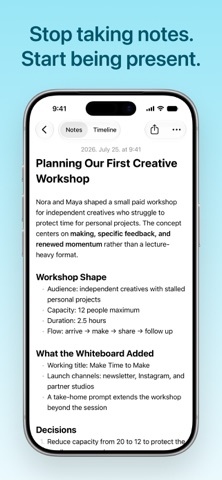
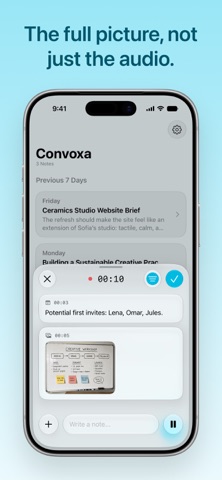
Convoxa 2.0 Stop taking notes. Start being present. Live notes Send text, images, or PDFs to Convoxa while you're still recording. Everything you add becomes part of the context your AI note is built from — so the summary reflects the slide you photographed and the agenda you pasted, not just what was said out loud. One timeline Your transcript and live notes now live in a single timeline, in order, so you can see what you added and what was being said at that moment side by side. Notes you can actually edit The static summary is gone. Notes are now fully editable rich text — headings, bullet, dashed, numbered, and checklist styles, highlights, and color. The AI formats your note for you, and you can take it from there. Convoxa for Mac A full Mac companion app, launching alongside this release. It records system audio from FaceTime, Zoom, and anything else running on your Mac, with the same features as iOS. Notes sync over iCloud.
Screenshots



About
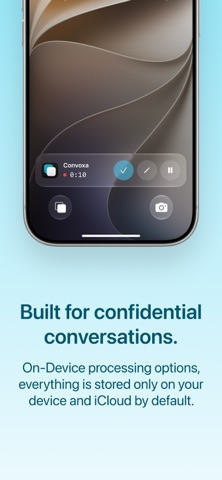
Stop taking notes. Start being present. Convoxa doesn't just transcribe what's said. Snap the whiteboard, drop in the deck, jot a thought — while it's still recording — and it weaves all of it into one note: what was discussed, what was decided, what you said you'd do. LIVE NOTES Meetings aren't only spoken. Someone shares a deck, sketches something on a whiteboard, sends a PDF nobody reads out loud. Add it mid-recording and it doesn't sit at the bottom of the note as an attachment — it becomes context. A photo of a whiteboard is read and written into the note alongside what people were saying about it at the time. THE TIMELINE UNDERNEATH Every line is timestamped. Tap one to hear exactly how it was said, so nothing in the note has to be taken on faith. TWO WAYS TO TRANSCRIBE Cloud transcription handles 60+ languages and labels who said what. On-device transcription runs completely offline, using your iPhone's built-in speech recognition. A NOTE YOU CAN ACTUALLY EDIT The note arrives formatted: headings, paragraphs, bullets, numbered lists, checklists. Underneath that is a full rich text editor, not a read-only recap. Rewrite a line that missed the point. Tick off action items as you finish them. Highlight, color, restructure. Your edits are yours and stay exactly where you put them. ONE PRESS TO START Action Button, Siri, Lock Screen, or Control Center. Start at the beginning of a meeting or halfway through — long meetings, quick calls, or a thought in the car. Recording starts before the moment passes. CONFIDENTIAL BY DEFAULT On-device transcription never sends your audio anywhere. It doesn't leave your iPhone, because it never needs to. If you choose cloud transcription for accuracy or language coverage, the audio is deleted the moment it's processed. It is never stored, never shared, and never used to train anything. Neither are your notes — they aren't read, kept, or fed into any model. AFTER THE MEETING Every note is searchable from Spotlight without opening the app. Export as plain text, Markdown, or PDF. Everything syncs privately over iCloud, so a meeting recorded on your iPhone is on your iPad before you sit down with it. PRICING Free to try, with recording hours included in every mode — cloud transcription included, nothing held back to a preview. Convoxa Pro is a monthly subscription that unlocks unlimited on-device transcription and 20 hours of cloud transcription each month. Payment will be charged to your Apple Account at the confirmation of purchase. Subscription automatically renews unless it is canceled at least 24 hours before the end of the current period. Your account will be charged for renewal within 24 hours prior to the end of the current period. You can manage and cancel your subscriptions by going to your account settings on the App Store after purchase. Terms and Conditions: https://www.convoxa.com/terms Privacy Policy: https://www.convoxa.com/privacy
What's new · 2.0
Convoxa 2.0 Stop taking notes. Start being present. Live notes Send text, images, or PDFs to Convoxa while you're still recording. Everything you add becomes part of the context your AI note is built from — so the summary reflects the slide you photographed and the agenda you pasted, not just what was said out loud. One timeline Your transcript and live notes now live in a single timeline, in order, so you can see what you added and what was being said at that moment side by side. Notes you can actually edit The static summary is gone. Notes are now fully editable rich text — headings, bullet, dashed, numbered, and checklist styles, highlights, and color. The AI formats your note for you, and you can take it from there. Convoxa for Mac A full Mac companion app, launching alongside this release. It records system audio from FaceTime, Zoom, and anything else running on your Mac, with the same features as iOS. Notes sync over iCloud.
Details