

Steply: Step Counter Pedometer
Taohidul Islam · Health & Fitness
Independent analytics for this App Store listing. AppTracker is not affiliated with Taohidul Islam.
Chart standing · US
What changed · US
Listing changes AppTracker has observed for this app in this storefront — new versions, price moves, rating shifts, and store copy.
19 new Apple Watch complications More ways to put Steply on your watch face, so every face style has a complication that fits: • Circular: Three Rings (steps, active calories and active minutes), Steps Dial, Steps Minimal, Day Clock (today's steps hour by hour around a 24-hour dial), Week Dots and Floors. • Rectangular: Activity Summary, Progress Bars, Distance Hero, Goal ETA (when you'll reach your goal at today's pace) and Week Summary. • Inline: Active Minutes, Floors, Week and Goal ETA. • Corner: Active Minutes Gauge, Steps Label, Pace and Floors. Bolder rings Ring complications now have a thicker ring that sits fully inside the circle, so they're easier to read at a glance. The whole day in Hourly Activity The Hourly Activity complication now shows today from midnight to midnight, with times along the bottom. Before, it showed a 12-hour window that shifted every hour. Distance that matches Health When you record a walk with Steply on Apple Watch while your iPhone is also counting, Steply now counts overlapping minutes only once, the same way the Health app does. On those days, your distance and calories no longer come out higher than in Health. A weekly chart that stays current In the watch app, today's bar in the 7-day chart now grows as you walk, and the chart moves on to the new day after midnight. Thank you for using Steply! Keep stepping towards your health goals! We hope you love these updates! Please take a moment to rate Steply if you're enjoying these new features. Your rating helps us grow and improve! Have feedback? Contact us at support@steplyapp.com
Price & rating history · US
Reconstructed from the listing changes AppTracker has observed in this storefront. A field is charted once it has changed more than once, and each line starts at the value it moved from.
Average rating · ★ 4.87 now · 7 changes on record
Ratings breakdown · US
The star breakdown behind this app's rating in this storefront.
Screenshots



About
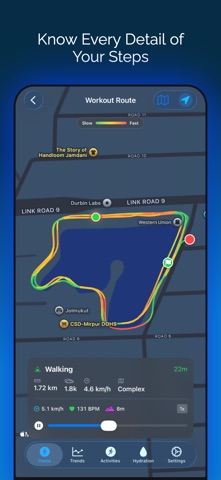
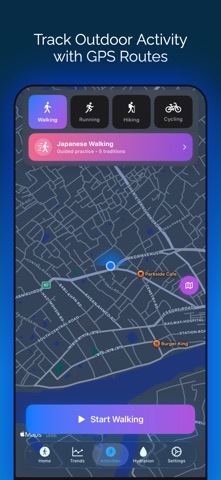
Steply is a step counter with LIVE GPS tracking and beautiful widgets. Track your steps, map your routes, and reach your daily goals with the most gorgeous step tracking app on iOS. LIVE GPS MAP TRACKING Watch your walking route unfold in real-time. Steply shows exactly where you've walked with GPS precision - perfect for tracking walks, exploring neighborhoods, and discovering new routes. View route history with complete stats and pace tracking (min/mile or min/km). SMART INSIGHTS & GUIDANCE • Active Hours Tracking: See how many hours you've been active throughout the day • Daily Personalized Tips: 70+ helpful fitness tips tailored to your progress • Activity Energy Gauge: Visual meter shows your activity level and pace in real-time • Smart Info Buttons: Quick explanations for all metrics and calculations • 3D Glass Orb Ring: Stunning animated progress display with dynamic glow • Weekly Wave Chart: Visualize your daily step patterns • Step Velocity Analysis: Track your walking speed trends over time • 24-Hour Activity Clock: See exactly when you're most active • Hourly Heatmap: Discover your activity patterns across days BMI & WEIGHT LOSS CALCULATOR • BMI Calculator: Enter height/weight, see your BMI score instantly • Visual Health Indicators: Color-coded scale shows your category • Healthy Weight Range: Know your ideal weight based on your height • Weight Loss Projections: See how walking helps you reach goals • Days to Target: Calculate exactly how long to reach healthy weight • Calorie Math: Track daily burn based on your step target • Flexible Units: Switch between kg/lbs and cm/ft-in independently ACCURATE STEP TRACKING • Precise counting via Apple Health integration • Real-time updates throughout the day • Heart rate monitoring during walks • Calorie tracking based on your activity • Distance in miles or kilometers • Hourly breakdown charts • 7-day trend analytics GOALS & MOTIVATION • Custom daily targets (1K-50K steps) • 10,000 steps challenge • Streak counter with celebrations • Achievement badges system • Weekly challenges • Optional smart notifications BEAUTIFUL WIDGETS • Home Screen Widgets: See your progress at a glance • Lock Screen Widgets: Check steps without unlocking • Live Activity: Real-time updates on Dynamic Island • 3 Styles: Today's Progress, 7-Day Trend, Streak Counter HEART RATE MONITORING Track heart rate during walks. See real-time BPM, average heart rate, and accurate calorie burn. Works with Apple Watch - no chest strap needed. DESIGNED FOR iOS • Stunning adaptive gradients • Smooth SwiftUI animations • Perfect Dark Mode • Haptic feedback • Privacy-first: All data stays on your device • No tracking, no ads, no signup required • GDPR compliant WHO IT'S FOR Beginners, 10K challenge participants, weight loss seekers, BMI trackers, remote workers, seniors, dog walkers, and anyone wanting to walk more and live healthier. APPLE HEALTH INTEGRATION Syncs with Health app automatically. Combines iPhone + Apple Watch data. Works seamlessly with other fitness apps. START TODAY Download FREE - no credit card, no signup. Track your steps, map your walks, and reach your goals. Terms: https://www.apple.com/legal/internet-services/itunes/dev/stdeula/ Privacy: https://steplyapp.com/privacy
What's new · 2.30.0
19 new Apple Watch complications More ways to put Steply on your watch face, so every face style has a complication that fits: • Circular: Three Rings (steps, active calories and active minutes), Steps Dial, Steps Minimal, Day Clock (today's steps hour by hour around a 24-hour dial), Week Dots and Floors. • Rectangular: Activity Summary, Progress Bars, Distance Hero, Goal ETA (when you'll reach your goal at today's pace) and Week Summary. • Inline: Active Minutes, Floors, Week and Goal ETA. • Corner: Active Minutes Gauge, Steps Label, Pace and Floors. Bolder rings Ring complications now have a thicker ring that sits fully inside the circle, so they're easier to read at a glance. The whole day in Hourly Activity The Hourly Activity complication now shows today from midnight to midnight, with times along the bottom. Before, it showed a 12-hour window that shifted every hour. Distance that matches Health When you record a walk with Steply on Apple Watch while your iPhone is also counting, Steply now counts overlapping minutes only once, the same way the Health app does. On those days, your distance and calories no longer come out higher than in Health. A weekly chart that stays current In the watch app, today's bar in the 7-day chart now grows as you walk, and the chart moves on to the new day after midnight. Thank you for using Steply! Keep stepping towards your health goals! We hope you love these updates! Please take a moment to rate Steply if you're enjoying these new features. Your rating helps us grow and improve! Have feedback? Contact us at support@steplyapp.com
Details