

Overtime Live - Shift Tracker
Andy Mesa · Finance
Independent analytics for this App Store listing. AppTracker is not affiliated with Andy Mesa.
Chart standing · US
What changed · US
Listing changes AppTracker has observed for this app in this storefront — new versions, price moves, rating shifts, and store copy.
Built by a shift worker, for shift workers. 4.6 is about how shift work is really paid. • Sleep-ins and on-call nights: give a shift template a flat rate and it pays one fixed amount, however long it runs. • No set length: for shifts that end when the job's done, the shift counts up until you end it, on your Lock Screen, in the Dynamic Island and on Apple Watch, with a reminder if it's still running after 13 hours. • Auto-Overtime: when a shift runs over, pay moves to your overtime rate by itself. • Shift differentials: set your night or weekend premium once and it applies to every shift it covers. • Start or end a shift from Control Center (iOS 18 and later). • Native iOS date and time pickers, layouts that work at the largest text sizes, and clearer VoiceOver labels. • A two-column Home on iPad. • Now in Simplified and Traditional Chinese.
Ratings breakdown · US
The star breakdown behind this app's rating in this storefront.
Screenshots



About
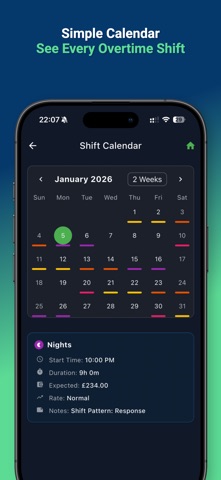
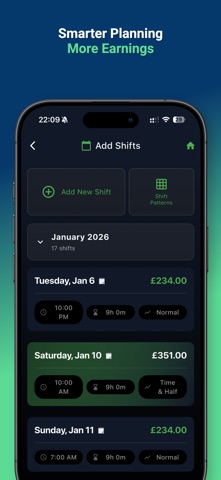
Know exactly what every shift is worth. Watch your pay tick up live on your Lock Screen, plan your work schedule in seconds and see your take-home pay before you say yes to overtime. Built by a shift worker, for shift workers. Free, no subscription, no sign-up. YOUR EARNINGS, LIVE ON THE LOCK SCREEN The moment you start a shift, a Live Activity shows your pay ticking up and the time left, without opening the app. On iPhone 14 Pro and later it appears in the Dynamic Island too. WATCH YOUR PAY TICK UP Enter your hourly rate and Overtime Live counts your earnings up second by second, with overtime tracked separately from regular hours. KNOW YOUR REAL TAKE-HOME PAY See past the gross figure. The What-If calculator compares hours, rate and estimated take-home pay before you accept a shift, and the Take Home Pay card estimates what you actually keep after tax. Set your pay period to weekly, biweekly, monthly or a custom date and track every payday. BUILT FOR SHIFT WORK Handle the pay that office apps ignore: overtime multipliers like time and a half and double time, shift differentials, on-call days with separate callback pay, flat-rate sleep-ins, shifts with no set end that count up until you finish, and custom rates for any arrangement. Split a shift across different rates or an unpaid break and track comp time. Add expenses and receipt photos to any shift. PLAN YOUR SCHEDULE IN SECONDS Pick a popular rotation such as DuPont, Pitman or 4 on 4 off, or build your own and fill in weeks or months ahead. Save your usual shifts as templates, set reminders and see everything in month, week, day, agenda or full-screen calendar views. Overlap warnings, schedule export and iPhone calendar sync included. INSIGHTS, STATS & GOALS Explore a 12-month hours and earnings heatmap, track totals and averages, set a yearly goal and unlock achievements as your shifts add up. On compatible iPhones, optional Apple Intelligence creates a short personalized briefing on-device. YOUR DATA, YOUR WAY Your shift, pay and goal data stays on your device. Optional iCloud backup uses your personal iCloud account and keeps earlier copies automatically, so you can restore if you need to. Export your hours and pay history as CSV or a monthly PDF for taxes or bookkeeping. FREE, WITH AN OPTIONAL ONE-TIME PRO UNLOCK Shift tracking, live earnings, your schedule calendar, stats and iCloud backup are free. Your first 30 days include every Pro feature. After that, a one-time Pro purchase removes ads, adds the Apple Watch app and lifts the limits on What-If calculations, exports, expenses and pay period tracking. No subscription. WHO IT'S FOR Nurses, CNAs and caregivers. Police, EMTs and firefighters. Retail, restaurant and warehouse workers. Security, delivery drivers and gig workers. Anyone paid by the hour who wants to see what their time is really worth. Available in English, German, Spanish and Chinese (Simplified and Traditional). Download Overtime Live and make every hour count.
What's new · 4.6
Built by a shift worker, for shift workers. 4.6 is about how shift work is really paid. • Sleep-ins and on-call nights: give a shift template a flat rate and it pays one fixed amount, however long it runs. • No set length: for shifts that end when the job's done, the shift counts up until you end it, on your Lock Screen, in the Dynamic Island and on Apple Watch, with a reminder if it's still running after 13 hours. • Auto-Overtime: when a shift runs over, pay moves to your overtime rate by itself. • Shift differentials: set your night or weekend premium once and it applies to every shift it covers. • Start or end a shift from Control Center (iOS 18 and later). • Native iOS date and time pickers, layouts that work at the largest text sizes, and clearer VoiceOver labels. • A two-column Home on iPad. • Now in Simplified and Traditional Chinese.
Details