

Myra: Android TV Remote
Pankaj Gaikar · Utilities
Independent analytics for this App Store listing. AppTracker is not affiliated with Pankaj Gaikar.
Chart standing · US
What changed · US
Listing changes AppTracker has observed for this app in this storefront — new versions, price moves, rating shifts, and store copy.
Quick Launch just got a big upgrade — pin your favorite TV apps and open them on every brand we support. NEW • Worldwide streaming catalog with up to 15 pinned quick-launch apps • Reliable Android TV app launch via deep links (works again after Play Store changes) • App launch mapping for Samsung, LG, Roku, and Fire TV — not just Android TV • App icons for the full catalog so your strip looks polished Better TV discovery and more honest setup — especially for Samsung, LG, Roku, and Fire TV. IMPROVED • Multicast networking entitlement so SSDP discovery can find Samsung and Fire TVs on your Wi‑Fi • Broader Bonjour browsing for faster discovery across all brands • Clearer Fire TV setup: enable ADB Debugging once in Developer Options • Android Cast discoveries now connect on the correct remote port • Stronger reconnect when your TV gets a new Wi‑Fi address (with IPv6 fallback) NEW • Camera Magic: playful decorative animations around the camera cutout and Dynamic Island • 75+ custom app icons and visual appearance preview strips in Settings
Price & rating history · US
Reconstructed from the listing changes AppTracker has observed in this storefront. A field is charted once it has changed more than once, and each line starts at the value it moved from.
Average rating · ★ 4.48 now · 18 changes on record
Ratings breakdown · US
The star breakdown behind this app's rating in this storefront.
In-app purchases · US
No in-app purchases.
Screenshots




About
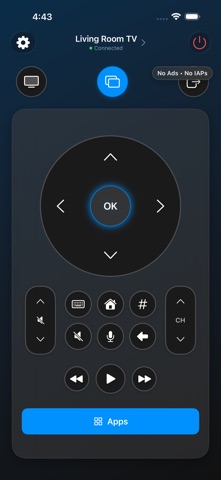
Turn your iPhone into a powerful remote for your smart TV. No tracking. No hidden costs. Just a fast, simple remote that works. Works With • Samsung TVs (Tizen) — power, volume, navigation, apps, and text input • LG webOS TVs — full remote, input switching, and app launch • Amazon Fire TV & Fire TV Stick — control over Wi‑Fi • Android TV (Sony Bravia, TCL, Hisense, Philips, and more) • Google TV (Chromecast with Google TV) • Roku • Xiaomi Mi Box & Mi TV • NVIDIA Shield TV Features • Touchpad & D-Pad Swipe to navigate or use classic directional buttons — switch modes anytime. • Built-in Keyboard Type on your TV instantly — search YouTube, sign into Netflix, enter passwords. • One-Tap Pairing Discover TVs on your Wi‑Fi and connect in seconds. No complicated setup. • App Launcher Open your favorite TV apps with a single tap. • Apple Watch Remote Control your TV from your wrist — even when your phone is across the room. • Multiple TVs Save and switch between all the TVs in your home — including mixed brands. Privacy First • No ads — ever • No accounts required • No data collection • No unnecessary permissions Why Myra? Most TV remote apps are packed with ads, paywalls, and subscriptions. Myra is different — it's free with zero ads, built by an indie developer who was tired of the same tricks. Whether you lost your remote, hate typing with arrow keys, or just want one app for every TV in the house — download Myra. It's free, and it always will be. NEW IN 2.2: CAMERA MAGIC & CUSTOM ICONS • Camera Magic Playful decorative animations around the camera cutout and Dynamic Island — Orbit on connect, Eye of the Remote radar sweep while discovering TVs, Brand Wink, and Touch Echo ripples. Purely decorative and never accesses the camera. • 75+ Alternate App Icons & Appearance Strips Customize Myra to match your home screen with dozens of cute mascots, square editions, and classic styles. Preview themes, remote layouts, and icons directly in Settings. • Reliable Multi-Brand Discovery Upgraded SSDP multicast and Bonjour scanning to instantly discover Samsung, LG webOS, Roku, Fire TV, and Android TV on your local Wi‑Fi. Supported TV Brands & Platforms: Samsung (Tizen) · LG (webOS) · Amazon Fire TV · Roku · Android TV & Google TV (Sony Bravia, TCL, Hisense, Philips, Chromecast, Xiaomi, NVIDIA Shield). All connected seamlessly over your local Wi‑Fi.
What's new · 2.2.1
Quick Launch just got a big upgrade — pin your favorite TV apps and open them on every brand we support. NEW • Worldwide streaming catalog with up to 15 pinned quick-launch apps • Reliable Android TV app launch via deep links (works again after Play Store changes) • App launch mapping for Samsung, LG, Roku, and Fire TV — not just Android TV • App icons for the full catalog so your strip looks polished Better TV discovery and more honest setup — especially for Samsung, LG, Roku, and Fire TV. IMPROVED • Multicast networking entitlement so SSDP discovery can find Samsung and Fire TVs on your Wi‑Fi • Broader Bonjour browsing for faster discovery across all brands • Clearer Fire TV setup: enable ADB Debugging once in Developer Options • Android Cast discoveries now connect on the correct remote port • Stronger reconnect when your TV gets a new Wi‑Fi address (with IPv6 fallback) NEW • Camera Magic: playful decorative animations around the camera cutout and Dynamic Island • 75+ custom app icons and visual appearance preview strips in Settings
Details