

Buzzer: Big Red Button Sound
Omari Sopromadze · Utilities
Independent analytics for this App Store listing. AppTracker is not affiliated with Omari Sopromadze.
Chart standing · US
What changed · US
Listing changes AppTracker has observed for this app in this storefront — new versions, price moves, rating shifts, and store copy.
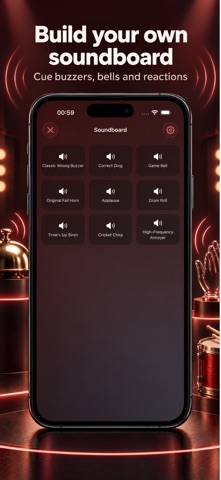
Save your own recordings in the Soundboard and play them with one tap. New • With Buzzer Pro, record sounds directly from Soundboard setup or choose from your saved recordings. • Build a board with up to 50 sound pads, mixing your recordings with built-in sounds. • Preview, rename, and delete recordings from your sound library. Adding a recording to the Soundboard leaves your main buzzer sound unchanged. Improved • A larger, clearer name field makes recordings easier to name when saving. • The Custom sounds onboarding preview now shows how to save recordings and use them in your Soundboard.
Price & rating history · US
Reconstructed from the listing changes AppTracker has observed in this storefront. A field is charted once it has changed more than once, and each line starts at the value it moved from.
Average rating · ★ 4.53 now · 12 changes on record
In-app purchases · US
What this app sells inside itself, grouped by kind and priced for this storefront.
Screenshots



About
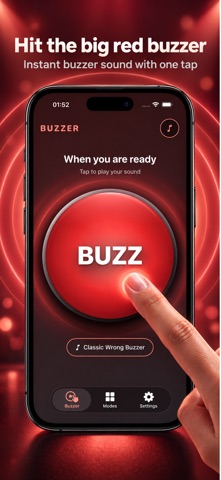
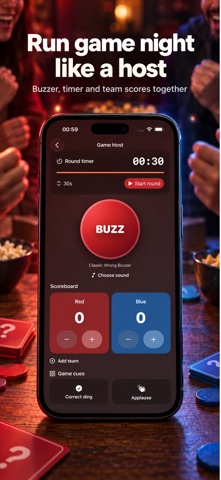
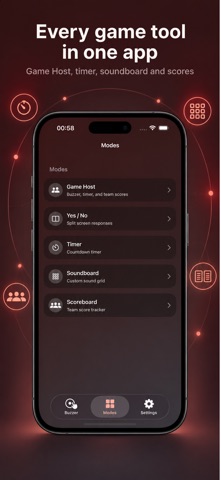
Make quiz night feel like a game. Tap the big red buzzer for an instant sound and haptic feedback, or open Game Host to run a round on one iPhone. BUZZ, THEN PLAY • Choose from 20 bundled sounds, including a wrong-answer buzzer, correct ding, game bell, applause and sirens. • Run timed rounds with team scores and sound cues in Game Host. • Tap the Yes or No button for quick responses. • Record and use your own sounds with Buzzer Pro. Game Host starts free with a 30-second timer and two teams. Buzzer Pro adds longer and custom timers, up to four teams, premium sounds, sound cues and saved setups. Recording your own sounds also requires Pro. Use Buzzer for trivia nights, classroom activities, party rounds, or a quick sound effect. No account is required. Buzzer Pro is an optional auto-renewing subscription. The price, trial and renewal terms are shown before purchase. Manage or cancel subscriptions in your Apple account settings. Privacy Policy: https://green-chips-b04.notion.site/Privacy-Policy-Buzzer-2a663820dc898072837fd9c47c9d65a4 Terms of Use: https://green-chips-b04.notion.site/Terms-of-Use-Buzzer-2a663820dc8980b79ff4e6bc651a756d
What's new · 2.2.0
Save your own recordings in the Soundboard and play them with one tap. New • With Buzzer Pro, record sounds directly from Soundboard setup or choose from your saved recordings. • Build a board with up to 50 sound pads, mixing your recordings with built-in sounds. • Preview, rename, and delete recordings from your sound library. Adding a recording to the Soundboard leaves your main buzzer sound unchanged. Improved • A larger, clearer name field makes recordings easier to name when saving. • The Custom sounds onboarding preview now shows how to save recordings and use them in your Soundboard.
Details