

Passport Photo:ID Print App AI
启鹏 田 · Photo & Video
Independent analytics for this App Store listing. AppTracker is not affiliated with 启鹏 田.
Chart standing · US
What changed · US
Listing changes AppTracker has observed for this app in this storefront — new versions, price moves, rating shifts, and store copy.
Fix bugs and optimize user experience.
In-app purchases · US
What this app sells inside itself, grouped by kind and priced for this storefront.
Screenshots

About
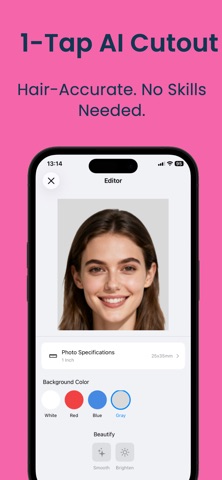
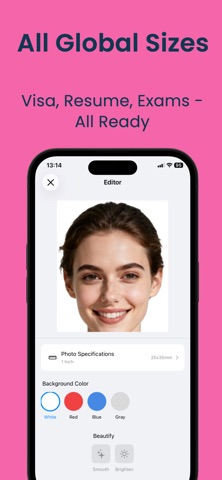
ID Photo (Passport Photo) is a professional mobile tool for creating ID photos, designed for students, job seekers, exam registrations, and various visa applications. Powered by on-device AI portrait segmentation and image processing, it supports standard ID photo sizes and background colors. IMPORTANT: An active subscription is required to access and use the app's photo creation and export features. Main Features AI Background Removal: Precisely detects hair edges and removes or changes the photo background. Multiple Size Library: Includes 1-inch, 2-inch, 3-inch, 4-inch, and various exam and visa photo sizes, including US, Japan, and Schengen formats. Background Color Options: Standard red, white, and blue backgrounds, as well as gray, gradient, and custom colors. Shooting Guide & QC: Face alignment, posture guidance, lighting and sharpness checks help you create suitable ID photos. Manual Retouching: Restore and erase brushes allow fine-tuning of photo edges. Smart Use Suggestions: Search for purposes such as “US visa” or “Teacher license” to find matching photo sizes and ratios. HD Export: Export high-definition photos without watermarks. Applicable Scenarios Suitable for school registration, exams, job applications, visas, certificates, and professional ID photos. How to Use 1. Take a photo or import one from your photo library. 2. Remove the background and select the desired size and background color. 3. Manually refine the photo if needed. 4. Preview and export your ID photo. Subscription Required An active subscription is required to access the app's photo creation and export functionality. The app offers auto-renewable weekly, monthly, and yearly subscription options. Payment will be charged to your Apple ID account upon confirmation of purchase. Subscriptions automatically renew unless canceled at least 24 hours before the end of the current subscription period. You can manage or cancel your subscription in your Apple ID account settings. Privacy All image processing occurs locally on your device. No portrait data is uploaded or stored. Privacy Policy: https://www.forapp.store/IDPhoto/privacy-en.html Terms: https://www.forapp.store/IDPhoto/terms-en.html
What's new · 1.8
Fix bugs and optimize user experience.
Details