

Marker for Creators
Jona Ramos de la Rosa · Photo & Video
Independent analytics for this App Store listing. AppTracker is not affiliated with Jona Ramos de la Rosa.
Chart standing · US
What changed · US
Listing changes AppTracker has observed for this app in this storefront — new versions, price moves, rating shifts, and store copy.
• The 14-Day Challenge: Make Marker your time saving habit and earn an exclusive award for completing all tasks! • Your stats and awards now belong to your account and come back with you on a new device. • Fixed: slide to lock on iPad in landscape works again. • Fixed: the In/Out button no longer vibrates when you swipe between pages, and Recently Deleted updates instantly. • Lot's of other fixes and improvements – some laying the groundwork for exiting future updates!
Price & rating history · US
Reconstructed from the listing changes AppTracker has observed in this storefront. A field is charted once it has changed more than once, and each line starts at the value it moved from.
Average rating · ★ 3.83 now · 2 changes on record
Ratings breakdown · US
The star breakdown behind this app's rating in this storefront.
In-app purchases · US
What this app sells inside itself, grouped by kind and priced for this storefront.
Screenshots




About
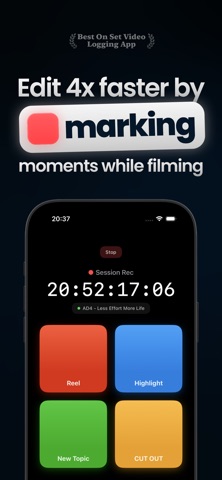
Edit rough cuts 4x faster by marking moments while filming. »The biggest workflow upgrade since keyboard shortcuts. We've spent years shaving seconds off our edits. This one saves hours.« Marker for Creators is the best way for videographers, podcasters, and content teams to speed up a video rough cuts. Stop rewatching hours of footage. Set highlights while filming via your iPhone or Apple Watch - directly into your editing timeline. Perfect for long sessions, events, interviews, podcasts, and multi-camera shoots. While shooting, you notice great moments all the time. A reaction. A highlight. A take you defenitely know you will use. Or you know you’ll have to cut out. But on a busy set there’s no time to note something. And syncing notes would be super painful anyways. How cool would it be, to just press a button, which would appear in your editing timeline? That’s exactly what Marker for Creators does. "Editing a sports game used to take me 2 hours. Now I'm done in 30 minutes" – Joshua Schwartz, Sports Videographer CORE FEATUTES: Create Timeline Markers on set: • Add markers with a single tap • Markers are placed onto your video clips instead of onto the timeline (so your markers stay in the correct position in editing) • Add Notes to Markers, visible in your NLE • Lock In/Out Markers • Create Marker Presets for different kind of shoots Timeline Creation • Automatically add video clips to timelines while filming • The Companion app automatically opens up your project with your timelines prebuilt Scan to connect Camera • Scan the timecode of any camera to connect it to Marker for Creators in seconds! One-Click-Workflow The Companion app (Mac & PC) syncs & detects which footage on your PC belongs to your Marker session, connects it and you just click "Play". Marker will create a DaVinci Resolve, Premiere Pro or Final Cut Pro project with all videos, timelines & markers onto your video clips - so you can jump into editing within 10 seconds. Academy • Easy & fast setup for all kinds for cameras and supported editing software Apple Watch Support • Add markers & create timelines – directly from your wrist • Ideal for run-and-gun setups, events, and busy shoots Timecode Modes • Time-of-Day – matches real-world TOD timecode • External Timecode – Sync to Tentacle Sync, Ambient Lockit, LTC, Visual Timecode & more! • Rec Run – follows your recording start Professional Workflow Export • Export directly into DaVinci Resolve, Premiere Pro or Final Cut Pro • Share sessions with your editor or team Perfect for: Video production and filmmaking Podcast recording and editing Live event documentation Interviews and meetings Sports and performance analysis Any recording scenario requiring precise time markers How it works: 1. Start a recording session 2. Tap markers, add notes & create timelines while filming 3. Stop the session 4. Open the Companion on Mac or PC 5. Press play and start editing right away Marker for Creators is the fastest way to take live timecode notes while filming and get them straight into your editing tools. Edit faster, earn more, stress less. – Marker for Creators. Terms of use: https://markerforcreators.com/terms Privacy Policy: https://markerforcreators.com/privacy
What's new · 1.6.3
• The 14-Day Challenge: Make Marker your time saving habit and earn an exclusive award for completing all tasks! • Your stats and awards now belong to your account and come back with you on a new device. • Fixed: slide to lock on iPad in landscape works again. • Fixed: the In/Out button no longer vibrates when you swipe between pages, and Recently Deleted updates instantly. • Lot's of other fixes and improvements – some laying the groundwork for exiting future updates!
Details