

BakeryMinder
Mikal Krall · Productivity
Independent analytics for this App Store listing. AppTracker is not affiliated with Mikal Krall.
Chart standing · US
What changed · US
Listing changes AppTracker has observed for this app in this storefront — new versions, price moves, rating shifts, and store copy.
* Added Production Defaults cost fields: active time, passive time, kitchen usage, and Core Data syncing. * Updated recipe detail costs to include hourly costs, added minimum sale price, and made cost/time tiles cycle with slide animations. * Added Support BakeryMinder heart button/reminder flag behavior, close button, pulse state, and header placement updates. * Fixed Business Information save button showing too early. * Added protected Business IDs section with device authentication and Core Data/export/import support. * Fixed saved contacts from orders not appearing in Contacts list. * Fixed duplicated order invoice/order numbers to find the next unused number. * Made customer rows in Order Detail navigate to Contact Detail. * Made linked order customer info read live contact email/phone. * Added explicit contact method actions: copy, email, call, text. * Fixed contact method edit sheets opening empty. * Added animated copy checkmark feedback. * Reordered contact method action buttons and moved Default into Type • Default. * Added address copy and Apple Maps confirmation/open actions. * Added direct invoice delivery actions from invoice preview. * Added Email to Customer invoice action with PDF attachment, recipient, subject, and default message prefilled. * Added Message to Customer invoice action with PDF attachment, recipient, and default message prefilled. * Added conditional invoice toolbar buttons for email and message based on available customer contact info. * Kept the standard share button available for general invoice sharing. * Added customer-name personalization to default invoice delivery messages. * Added invoice delivery shortcuts for Email to Customer and Message to Customer from the invoice viewer. * Invoice delivery actions auto-fill the customer’s email or text-capable phone number when available. * Invoice email/message bodies include a default customer-facing message with the customer’s name. * Invoice PDFs are automatically attached to customer email/message delivery. * After a sent invoice email/message, the app can prompt to add the interaction as a customer communication. * Contact list and contact detail communication buttons can prompt to create a new communication record after use. * New Communication can now open prefilled with type, method, subject, and notes from the initiating action. * Invoice Design now pulls Accent Color choices from Business Information > Business Colors. * Invoice Design now includes business info visibility controls for logo, name, address, phone, email, website, and hours. * Business info controls were moved into a separate Business Information card and displayed in a two-column grid. * Empty/missing Business Information fields are greyed out and disabled. * Missing Business Information fields also auto-toggle off and stay off in saved invoice settings. * Invoice PDFs and previews now honor selected business info visibility options. * Invoice Design preview now has an expand button. * Expanded invoice preview opens in a full-screen PDF view with Done and Share controls.
In-app purchases · US
No in-app purchases.
Screenshots




About
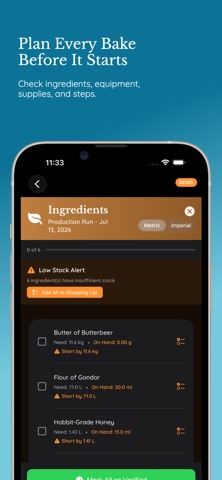
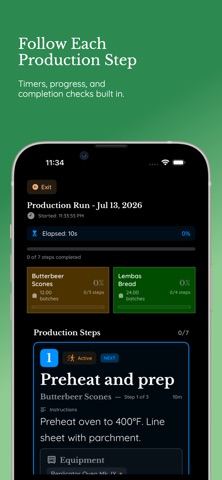
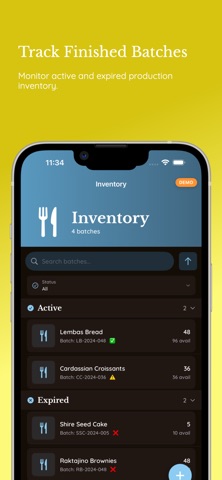
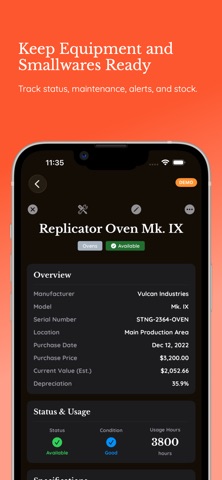
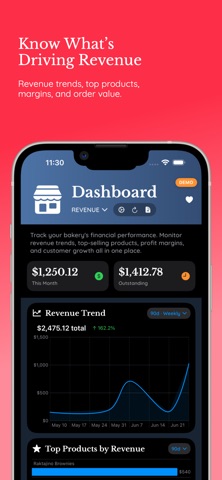
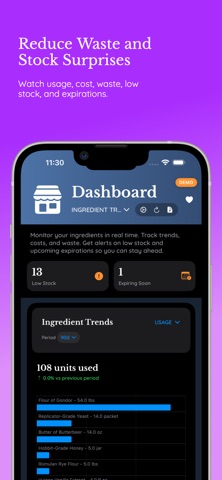
BakeryMinder is an operations manager built for small bakeries, cottage bakers, pastry teams, and food businesses that need more than a notebook or spreadsheet. Keep your bakery organized from recipe planning through production, orders, events, inventory, equipment, contacts, and reporting. BakeryMinder brings the daily details of running a bakery into one connected workspace, so you can see what needs attention and keep work moving. ———————————— PLAN PRODUCTIONS WITH CONFIDENCE ———————————— Turn recipes into production runs and verify what you need before you start. Check ingredients, equipment, supplies, and production steps so shortages and missing details are easier to catch before the bake begins. During production, follow step-by-step instructions, track progress, use timers, and complete each stage as work gets done. ———————————— MANAGE RECIPES LIKE PRODUCTION ASSETS ———————————— Store detailed recipes with ingredients, batch sizes, production steps, allergens, required equipment, supplies, notes, linked resources, and production history. Recipes connect to production planning, cost awareness, inventory, and order fulfillment. ———————————— TRACK ORDERS FROM REQUEST TO DELIVERY ———————————— Manage custom orders, recurring orders, customer details, line items, payments, delivery information, notes, and production links. Keep order status clear from draft and pending through production, ready, delivered, paid, completed, or cancelled. ———————————— ORGANIZE EVENTS AND CATERING ———————————— Plan catering jobs, pickup days, markets, weddings, classes, and other bakery events. Track locations, setup requirements, budgets, contacts, equipment, supplies, and related production items. For larger jobs, keep production and event details connected instead of scattered across separate tools. ———————————— MONITOR INVENTORY AND INGREDIENTS ———————————— Track ingredient purchases, costs, vendors, expirations, restrictions, and low-stock thresholds. Monitor production batches in inventory so you know what finished goods are active, used, or expired. Ingredient dashboards help you watch usage, cost, waste, low stock, and upcoming expirations. ———————————— KEEP EQUIPMENT AND SUPPLIES READY ———————————— Track ovens, mixers, refrigerators, smallwares, and other equipment with status, condition, maintenance schedules, alerts, warranty details, notes, and linked resources. Manage smallware stock and adjustment history so everyday tools and supplies do not disappear into guesswork. ———————————— SEE THE BUSINESS AT A GLANCE ———————————— BakeryMinder includes dashboards for general operations, ingredient trends, revenue, and equipment. Review production queues, pending orders, low stock, upcoming expirations, revenue trends, top products, profit margins, order value, customer acquisition, equipment alerts, and smallware stock. Export reporting data when you need to review or share it. ———————————— FEATURES INCLUDE ———————————— • Recipe management with ingredients, allergens, steps, equipment, supplies, notes, resources, and history • Production planning, verification, execution, timers, and progress tracking • Order management with statuses, line items, payments, delivery details, and recurring orders • Event and catering planning with contacts, setup details, equipment, supplies, budgets, and production links • Ingredient tracking with purchases, vendors, costs, restrictions, expirations, and low-stock thresholds • Batch-based inventory for finished production • Equipment and smallware tracking with maintenance, alerts, stock, warranties, and resources • Shopping list support for missing or needed items • Contacts and groups for customers, vendors, and partners • Operational, ingredient, revenue, and equipment dashboards • Export tools for revenue and ingredient trend reporting • Demo mode for exploring sample bakery data BakeryMinder helps turn bakery operations into a system you can understand, manage, and improve.
What's new · 1.1
* Added Production Defaults cost fields: active time, passive time, kitchen usage, and Core Data syncing. * Updated recipe detail costs to include hourly costs, added minimum sale price, and made cost/time tiles cycle with slide animations. * Added Support BakeryMinder heart button/reminder flag behavior, close button, pulse state, and header placement updates. * Fixed Business Information save button showing too early. * Added protected Business IDs section with device authentication and Core Data/export/import support. * Fixed saved contacts from orders not appearing in Contacts list. * Fixed duplicated order invoice/order numbers to find the next unused number. * Made customer rows in Order Detail navigate to Contact Detail. * Made linked order customer info read live contact email/phone. * Added explicit contact method actions: copy, email, call, text. * Fixed contact method edit sheets opening empty. * Added animated copy checkmark feedback. * Reordered contact method action buttons and moved Default into Type • Default. * Added address copy and Apple Maps confirmation/open actions. * Added direct invoice delivery actions from invoice preview. * Added Email to Customer invoice action with PDF attachment, recipient, subject, and default message prefilled. * Added Message to Customer invoice action with PDF attachment, recipient, and default message prefilled. * Added conditional invoice toolbar buttons for email and message based on available customer contact info. * Kept the standard share button available for general invoice sharing. * Added customer-name personalization to default invoice delivery messages. * Added invoice delivery shortcuts for Email to Customer and Message to Customer from the invoice viewer. * Invoice delivery actions auto-fill the customer’s email or text-capable phone number when available. * Invoice email/message bodies include a default customer-facing message with the customer’s name. * Invoice PDFs are automatically attached to customer email/message delivery. * After a sent invoice email/message, the app can prompt to add the interaction as a customer communication. * Contact list and contact detail communication buttons can prompt to create a new communication record after use. * New Communication can now open prefilled with type, method, subject, and notes from the initiating action. * Invoice Design now pulls Accent Color choices from Business Information > Business Colors. * Invoice Design now includes business info visibility controls for logo, name, address, phone, email, website, and hours. * Business info controls were moved into a separate Business Information card and displayed in a two-column grid. * Empty/missing Business Information fields are greyed out and disabled. * Missing Business Information fields also auto-toggle off and stay off in saved invoice settings. * Invoice PDFs and previews now honor selected business info visibility options. * Invoice Design preview now has an expand button. * Expanded invoice preview opens in a full-screen PDF view with Done and Share controls.
Details