
Chart standing · US
What changed · US
Listing changes AppTracker has observed for this app in this storefront — new versions, price moves, rating shifts, and store copy.
Ambient focus sounds are here: white, pink, and brown noise plus rain and ocean surf, generated on device and playing right through a locked screen. A new Home Screen widget starts a focus session in one tap, and a Live Activity keeps the countdown on your Lock Screen and in the Dynamic Island. The Stats tab now shows your real charts, streaks, and insights, and any chart can be exported as a PNG or PDF. Auto-start for breaks and next sessions now works as described, and a lot of leftover wording from an older app has been cleaned up throughout.
Screenshots

About
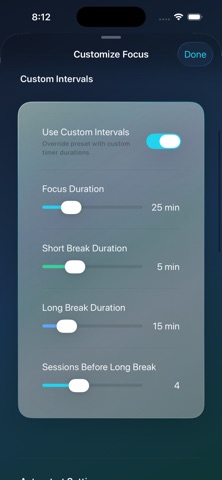
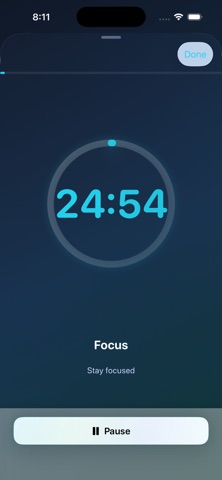
Master Focus with the Pomodoro Technique Alston Focus Flow brings a proven time-management method that helps you stay on task, reduce distractions, and get more done, using simple cycles of focused work and short breaks. What makes Focus Flow special Classic Pomodoro 25-minute focus sessions with 5-minute breaks 15-minute long break after every 4 sessions Research-backed approach inspired by Francesco Cirillo Maximizes concentration while preventing burnout Flexible Timer Presets Classic Pomodoro: 25 / 5 / 15 (default) Deep Work: 45 / 15 / 30 Short Sprints: 15 / 3 / 15 Custom Intervals: create your own durations and save unlimited presets Ambient Focus Sounds White, pink, and brown noise for steady concentration Rain and rolling ocean surf Every sound is generated on device, so nothing streams and nothing downloads Keeps playing with the screen locked or the app in the background Preview any sound and set its volume before you start Progress & Analytics A dedicated Stats tab with daily focus time and session counts Visual charts and a weekly calendar heatmap Streaks, milestones, and achievement badges Personalized insights, including your most productive time of day Export any chart as a PNG or PDF On Your Home Screen and Lock Screen A Home Screen widget, in two sizes, that starts a focus session in a single tap A Live Activity that keeps the countdown on your Lock Screen and in the Dynamic Island Distraction-Free Design Minimal, calm interface designed for focus Smooth, refined animations and glass-style cards Dark Mode support Multiple themes (Calm Focus, Energetic, Monochrome) Smart Notifications Daily focus reminders and break alerts Streak-maintenance nudges Weekly progress summaries Customization & Controls Adjustable focus and break lengths Set how many sessions come before a long break Optional sounds and haptics Auto-start breaks and next sessions, or start each one yourself Accessibility VoiceOver and Dynamic Type High-contrast and reduced-motion support Clear labels and accessible color choices Power Features Siri Shortcuts, such as "Start focus session," "Start deep work," and "Show focus stats" Detailed session history with export (CSV/JSON) Share your progress and achievements Learn & Improve Built-in Pomodoro guide and productivity tips Focus strategies and time-management best practices Perfect for Students: structured study and exam prep Remote workers: maintain momentum at home Professionals: break complex work into manageable blocks Writers & creators: build a consistent daily habit Freelancers: stay on schedule across clients Anyone seeking better focus, fewer distractions, and steady productivity
What's new · 1.4.1
Ambient focus sounds are here: white, pink, and brown noise plus rain and ocean surf, generated on device and playing right through a locked screen. A new Home Screen widget starts a focus session in one tap, and a Live Activity keeps the countdown on your Lock Screen and in the Dynamic Island. The Stats tab now shows your real charts, streaks, and insights, and any chart can be exported as a PNG or PDF. Auto-start for breaks and next sessions now works as described, and a lot of leftover wording from an older app has been cleaned up throughout.
Details