

Saldo: More money saving
Alejandro Alonso Garcia · Finance
Independent analytics for this App Store listing. AppTracker is not affiliated with Alejandro Alonso Garcia.
Chart standing · US
What changed · US
Listing changes AppTracker has observed for this app in this storefront — new versions, price moves, rating shifts, and store copy.
Saldo has been rebuilt from the ground up. NEW • Automatic capture: tap your iPhone to pay in a store and the expense files itself, with a notification seconds later and the app closed. You switch it on by creating one Wallet automation per card; the app walks you through it. It does not reach online purchases, the plastic card, bank transfers, direct debits or cash. • Your month runs from payday to the day before the next one. Every total and every limit is worked out on that cycle rather than the calendar month. • A budget built from your own answers, including the figure for what is leaking every month. • Analysis, dated goals and streaks rebuilt on server data, so two screens can no longer show two different totals. IF YOU ALREADY HAD SALDO • Saldo is now a subscription. Said here rather than in small print. • Shared expenses are gone. They never worked properly and the app does something else now. FIXED • Editing an amount no longer detaches the expense from its budget or clears its favorite. • Renaming an account in another currency no longer converts it to euros. • Undoing a delete lasts the five seconds it promises instead of a quarter of one. • Expenses on the last day of the month no longer fall out of the total. • Changing the system language no longer leaves half the app in the previous one.
Screenshots



About
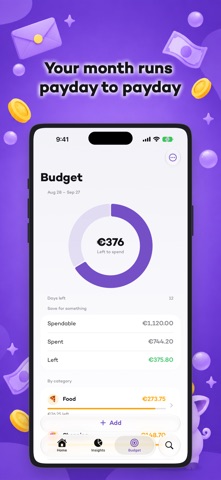
You tap your phone at a store counter. Seconds later a notification arrives: "Coffee shop, $4.20." One tap picks the category and the expense is filed. Saldo never opened, nothing typed, and nothing to remember tonight about what you bought this morning. If you have ever tried to log your spending by hand and given up after two weeks, you already know why this exists. HOW THE AUTOMATIC CAPTURE WORKS Saldo rides on the Wallet automation your iPhone already has. You create it once per card — the app walks you through it — and from then on every contactless payment in a store lands on its own, with the app closed. WHERE IT DOES NOT REACH, SAID BEFORE YOU PAY • It captures contactless payments made with your iPhone in a physical store. • It does not capture online or in-app purchases, payments with the plastic card, bank transfers, direct debits, or cash. • It needs iOS 17 or later, and you have to create the automation yourself: iOS does not let an app install one for you. • Anything it misses takes three taps to add by hand. YOUR MONTH STARTS ON PAYDAY Get paid on the 28th and your month runs from the 28th to the 27th. Not the 1st to the 30th. That is how your money actually moves, and it is why the "left to spend" in Saldo matches what your bank says. A BUDGET BUILT FROM YOUR OWN NUMBERS Before you get in, Saldo asks only what it needs: what you earn, the day you are paid, your fixed costs, and where you think the money goes. Then it shows you one number — how much is leaking every month, and what that is over a year — and splits what is left across your categories, week by week. WHAT COMES AFTER • Category analysis, measured on your pay cycle instead of the calendar month. • Goals with a date: say how much and by when, and Saldo tells you whether it fits. • A separate weekend budget, if Saturdays look nothing like Tuesdays. • A streak that counts the days you have stayed on top of it. • A purple piggy bank that cheers when you hold the line and sulks when you don't. SUBSCRIPTION Saldo Pro opens the whole app. It is offered as a yearly plan and as a weekly plan, with no free trial. The price for your country is shown on the purchase screen before you buy. Payment is charged to your Apple Account at confirmation of purchase. The subscription renews automatically unless it is canceled at least 24 hours before the end of the current period, and renewal is charged within those 24 hours. Manage or cancel it in Settings › your name › Subscriptions. Terms of use: https://www.apple.com/legal/internet-services/itunes/dev/stdeula/
What's new · 2.0.0
Saldo has been rebuilt from the ground up. NEW • Automatic capture: tap your iPhone to pay in a store and the expense files itself, with a notification seconds later and the app closed. You switch it on by creating one Wallet automation per card; the app walks you through it. It does not reach online purchases, the plastic card, bank transfers, direct debits or cash. • Your month runs from payday to the day before the next one. Every total and every limit is worked out on that cycle rather than the calendar month. • A budget built from your own answers, including the figure for what is leaking every month. • Analysis, dated goals and streaks rebuilt on server data, so two screens can no longer show two different totals. IF YOU ALREADY HAD SALDO • Saldo is now a subscription. Said here rather than in small print. • Shared expenses are gone. They never worked properly and the app does something else now. FIXED • Editing an amount no longer detaches the expense from its budget or clears its favorite. • Renaming an account in another currency no longer converts it to euros. • Undoing a delete lasts the five seconds it promises instead of a quarter of one. • Expenses on the last day of the month no longer fall out of the total. • Changing the system language no longer leaves half the app in the previous one.
Details