

Photo Optimizer: Clean Storage
Pin Traveler LLC · Utilities
Independent analytics for this App Store listing. AppTracker is not affiliated with Pin Traveler LLC.
Chart standing · US
What changed · US
Listing changes AppTracker has observed for this app in this storefront — new versions, price moves, rating shifts, and store copy.
Photo Optimizer 2.3.0 * More smart suggestions * Performance Improvements & Bug fixes
Price & rating history · US
Reconstructed from the listing changes AppTracker has observed in this storefront. A field is charted once it has changed more than once, and each line starts at the value it moved from.
Average rating · ★ 4.91 now · 5 changes on record
Ratings breakdown · US
The star breakdown behind this app's rating in this storefront.
In-app purchases · US
No in-app purchases.
Screenshots




About
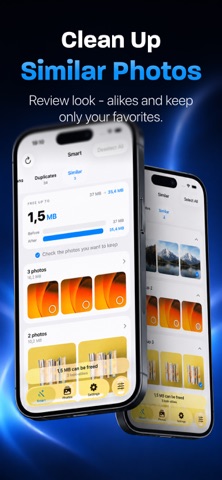
Too many photos eating up your storage? You’re not alone. Modern phones take incredible pictures… and shockingly huge files. Screenshots are ~2–3 MB each, everyday photos can be 5–20 MB, and before you know it, your device is “Storage Almost Full” — again. But deleting memories or banishing them to the cloud isn’t the solution. Photo Optimizer is. Photo Optimizer intelligently compresses your images while keeping them looking great. It’s not magic — it’s smart compression. Most images contain way more detail than your eyes — or your screen — can display. Why waste precious space storing invisible pixels? With Photo Optimizer, you can shrink photos to a fraction of their original size — often up to 90% smaller — while keeping them indistinguishable to the naked eye. Your screenshots, receipts, memes, chat exports, or repetitive shots don’t need ultra-high fidelity. You still get the image — just without the bloat. Perfect for: • Users running out of storage • People who don’t want to delete photos • Travelers taking thousands of pictures • Screenshot hoarders and photo collectors • Anyone who wants a lighter, faster photo library How it works: Just pick your images or albums, choose your quality preference, and Photo Optimizer safely compresses copies — leaving originals untouched unless you choose otherwise. You stay in control. Why Photo Optimizer? • Smart compression tailored for modern screens • Visually identical results for most photos • Batch optimize entire libraries • Free up GBs instantly • Keep photos local — no cloud dependency • Preserve privacy: everything happens on-device Some photos deserve every pixel of detail. Others — like screenshots of your email, tickets, PDFs, notes, or random memes — are just fine at one-tenth the size. Photo Optimizer helps you make that difference — effortlessly. Take back your storage. Keep your photos. Get Photo Optimizer and optimize smarter — not smaller. By the way, we're giving away lifetime memberships with access to all future features to all who join in our first two months!
What's new · 2.3.0
Photo Optimizer 2.3.0 * More smart suggestions * Performance Improvements & Bug fixes
Details