

PixioDoc: Clinical Photo App
LM Tech Labs, LDA · Medical
Independent analytics for this App Store listing. AppTracker is not affiliated with LM Tech Labs, LDA.
Chart standing · US
What changed · US
Listing changes AppTracker has observed for this app in this storefront — new versions, price moves, rating shifts, and store copy.
- Refreshed PixioDoc — updated colors, typography, app icon, and splash screen - New Calendar tab — see your month at a glance, jump to Today, and start a session on the day you choose; includes patients you share with your team - Redesigned bottom navigation — clearer tabs and icons so you always know where you are - Patient list and profiles — easier to scan, with shortcuts above the timeline and a tidier activity history - Getting started on the dashboard — new accounts get a short guide to add a first patient, session, and photo - Camera — redesigned shutter button; press your phone’s volume keys to capture - Export your data in the app — choose what to download, see the size before you start, follow progress, and cancel if needed; export one patient from their profile (not available on web)
In-app purchases · US
What this app sells inside itself, grouped by kind and priced for this storefront.
Screenshots




Keywords this app targets
Search terms AppTracker associates with this app — estimates, not search volume. ❝ = in the app's title; a highlighted number is its current position for that term.
Similar apps
Competitors and close alternatives, as estimated by AppTracker.
 MedPix: Medical Photography
MEDPIX
1 shared topic
MedPix: Medical Photography
MEDPIX
1 shared topic
 PhotoDoc
Wiseminer
1 shared topic
PhotoDoc
Wiseminer
1 shared topic
 Dental Folio
Folio Tools Ltd
Dental Folio
Folio Tools Ltd
 Captix
PAR TECH LTDA
1 shared topic
Captix
PAR TECH LTDA
1 shared topic
 Dental Shooting v2
Dental Shooting srls
Dental Shooting v2
Dental Shooting srls
 Facial Injector Planner
Valet Hero LLC
Facial Injector Planner
Valet Hero LLC
 Refina: AI Plastic Surgery
Trilogy Labs
Refina: AI Plastic Surgery
Trilogy Labs
 Body Evaluation
Health Plan, LLC
Body Evaluation
Health Plan, LLC
About
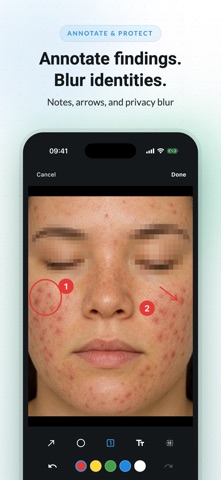
Your patient photos don't belong in your personal gallery. PixioDoc gives healthcare professionals a dedicated, secure workspace to capture, organize, compare, and share patient photos and videos — without mixing clinical media with personal images on your phone. Built for aesthetic medicine, medspas, dermatology, and plastic surgery — and any specialty that documents patient progress in photos. KEY FEATURES • Ghost overlay capture — overlay the previous photo on your camera screen to match the same angle, framing, and distance, so every before and after lines up • Annotation and privacy blur — mark areas of clinical interest or blur identifying features directly on an image before it is saved • Before and after comparison with interactive slider — show patients their progress in one swipe • Side by side image comparison with synchronized zoom (Pro) — pinpoint changes between visits • Patient progress timelines — every visit organized chronologically, at a glance • Patient tags and a smarter patient list — filter by tag, with status labels and last-seen sorting as your list grows • Session drafts — pause documentation mid-visit and pick up exactly where you left off • Fast, full-resolution capture — instant thumbnails while full-quality photos process in the background • Clinical video capture with recording, compression, and playback • PDF patient reports (Pro) — pick the sessions and photos, and patients leave with a professional progress summary; referrers get only what you choose to share • Secure case sharing and team collaboration (Pro) — replace screenshots and insecure file transfers • Role based access controls for medical teams (Pro) — control who sees what Features marked (Pro) need a Pro or Teams subscription. WHO PIXIODOC IS FOR • Aesthetic practitioners, injectors, aesthetic nurses, and medspas tracking botox, dermal filler, lip filler, body contouring, laser, microneedling, and chemical peel results • Dermatologists tracking skin conditions and treatment response • Plastic surgeons documenting before and after outcomes • Other clinicians who document patient progress in photos, including wound care, orthopedics, and primary care • Medical teams managing shared clinical image workflows BEFORE AND AFTER PHOTOS FOR AESTHETIC MEDICINE Gradual botox, filler, laser, and peel results are easy to undersell when photos don't match. Ghost overlay lines up every shot, and the before and after slider shows patients the real result in the consult — and the case for their next session. SECURITY AND PRIVACY PixioDoc is built with security and privacy at its core: • Encrypted data handling • EU-hosted infrastructure • Biometric authentication and session protection • Audit logging for accountability • On-image privacy blur before an image is ever saved • GDPR-aligned data handling PLANS • Free: up to 10 patients — try it risk-free, no time limit • Pro: unlimited patients and sessions, side by side and multi-image comparison, PDF patient reports, case sharing, background removal, and web app access • Teams: shared workflows, admin controls, and team-wide access management WHAT CLINICIANS SAY "I no longer keep patient media mixed with my personal phone gallery. My documentation flow is cleaner from the first visit onward." — Dermatology User "Comparing visits side by side during consultations has made progress conversations much clearer for my patients." — Orthopedic Specialist Download PixioDoc and start organizing your clinical photos today. Support: support@pixiodoc.com Website: https://pixiodoc.com
What's new · 1.3.0
- Refreshed PixioDoc — updated colors, typography, app icon, and splash screen - New Calendar tab — see your month at a glance, jump to Today, and start a session on the day you choose; includes patients you share with your team - Redesigned bottom navigation — clearer tabs and icons so you always know where you are - Patient list and profiles — easier to scan, with shortcuts above the timeline and a tidier activity history - Getting started on the dashboard — new accounts get a short guide to add a first patient, session, and photo - Camera — redesigned shutter button; press your phone’s volume keys to capture - Export your data in the app — choose what to download, see the size before you start, follow progress, and cancel if needed; export one patient from their profile (not available on web)
Details