

AI Trip Plan: smart map travel
WEALTHAI LIMITED · Travel
Independent analytics for this App Store listing. AppTracker is not affiliated with WEALTHAI LIMITED.
Chart standing · US
Screenshots




About
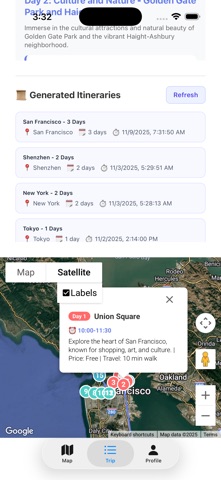
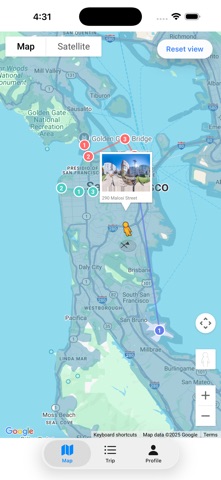
TripPlan — Your AI Trip Planner. Generate, edit, and share complete travel itineraries in seconds. Whether you’re planning a quick weekend getaway or a multi-day trip, TripPlan uses AI to turn your destination, preferences, and travel style into day-by-day plans you can customize and export. What TripPlan does AI-powered itinerary generation: Tell TripPlan your destination, dates, and preferences (e.g. food, sights, budget, walking vs driving). Get a ready-to-use itinerary in seconds. Flexible templates: Choose from templates like Weekend Getaway, City Walk, Family Trip, or create a custom plan tailored to your needs. Map & route integration: View daily routes on the map, get transportation suggestions, and estimated travel times. Easy editing: Tap to reorder stops, add or remove attractions, adjust durations, and instantly update the schedule. Export & share: Export itineraries to PDF or ICS, or share an editable link with friends and travel companions. Offline access: Save key trip details to your device for offline viewing (selected features require local caching). Team planning: Share editable itineraries with companions and collaborate on trip adjustments. TripPlan Premium (Subscription) Unlimited AI itinerary generations (no per‑use limits). Subscription details TripPlan Premium is available as auto‑renewable subscriptions: Monthly, Quarterly, Six‑Month, or Annual plans. Payment will be charged to your Apple ID account at confirmation of purchase and will automatically renew unless auto‑renewal is turned off at least 24 hours before the end of the current period. Subscriptions may be managed by the user and auto‑renewal may be turned off by going to the user’s Account Settings after purchase. Any unused portion of a free trial, if offered, will be forfeited when the user purchases a subscription, where applicable. How to get started 1. Open TripPlan and enter your destination and dates. 2. Choose a template or let AI create a custom plan based on your preferences. 3. Edit stops, reorder days, and add notes. Terms of Use https://westinedu.github.io/Privacy-Policy-Documents/VCards_Terms_of_Use.html Privacy Policy https://westinedu.github.io/Privacy-Policy-Documents/VCards_PrivacyPolicy.html Need help? Visit the Help & Support section in the app for FAQs, feedback, and contact options. contact: westine@gmail.com
What's new · 1.1
Automatically load example itineraries for new users. Automatically load history itineraries for users.
Details