

Luminary - Smart AI Scanner
Calogero Cascio · Productivity
Independent analytics for this App Store listing. AppTracker is not affiliated with Calogero Cascio.
Chart standing · US
What changed · US
Listing changes AppTracker has observed for this app in this storefront — new versions, price moves, rating shifts, and store copy.
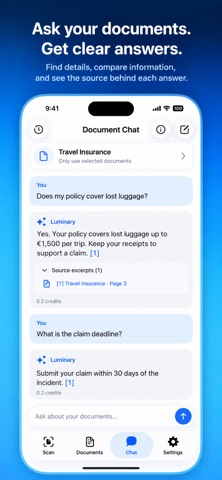
Introducing Document Chat. A new way to get more from your documents. • Ask questions about your scanned and imported documents. • Explore up to five documents together, or let Luminary find relevant passages in your library. • Check the source excerpts behind an answer. • Keep the conversation going with follow-up questions. • Search your saved chats and continue where you left off. Conversations are saved on your device, ready when you need them.
In-app purchases · US
What this app sells inside itself, grouped by kind and priced for this storefront.
Screenshots


About
Less paperwork. More clarity. Luminary scans your documents, files them for you, and answers questions about what's inside. Receipts, leases, warranties, contracts, all in one place. Scan or import. Photograph a paper document or import a PDF. Luminary reads the text, so you can search it later. Filing, done for you. Every document gets a sensible name and tags when you add it. You can change them, but you probably won't need to. Search inside your documents. Look for a word, a name or an amount, not just a file title. Filter by tag or date to narrow it down. Ask questions. "When does my lease end?" "Is water damage covered?" Choose up to five documents, or let Luminary find the right pages for you. Each answer quotes the passage it came from, so you can check it. Follow up anytime. Ask another question in the same chat. Conversations are stored on your device, and you can reopen them later. Credits and privacy. Document chat uses credits based on usage, and you set a limit per reply. Unlimited access includes chat. Text recognition and search run on your device. To answer a question, Luminary sends only the relevant excerpts and recent messages to OpenAI. EULA: https://www.apple.com/legal/internet-services/itunes/dev/stdeula/
What's new · 3.0
Introducing Document Chat. A new way to get more from your documents. • Ask questions about your scanned and imported documents. • Explore up to five documents together, or let Luminary find relevant passages in your library. • Check the source excerpts behind an answer. • Keep the conversation going with follow-up questions. • Search your saved chats and continue where you left off. Conversations are saved on your device, ready when you need them.
Details