

Home Stories: Renovation
Robert Jensen · Productivity
Independent analytics for this App Store listing. AppTracker is not affiliated with Robert Jensen.
Chart standing · US
What changed · US
Listing changes AppTracker has observed for this app in this storefront — new versions, price moves, rating shifts, and store copy.
Improvements • Document previews now have a Done button, so you can close a PDF and go back to your project without restarting the app. • If you cancel "Restore Purchases", you no longer see an old error message the next time you open the upgrade screen. • "Restore Purchases" now always stays on screen in the upgrade offer, also after you cancel a purchase.
In-app purchases · US
What this app sells inside itself, grouped by kind and priced for this storefront.
Screenshots






About
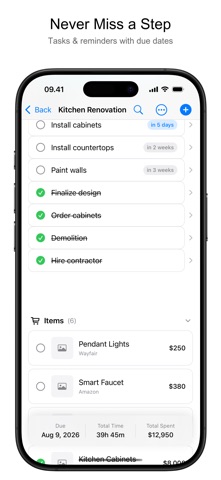
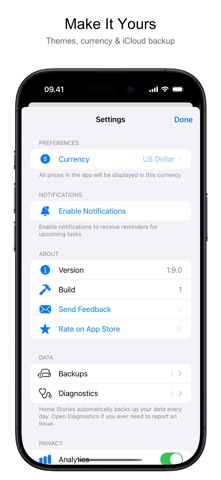
Plan your renovation, track what it really costs, and keep every photo, quote and to-do in one place. Home Stories turns a kitchen remodel or a bathroom reno into a project you can actually see. NEW: BUILT FOR IPAD - Your projects sit in a sidebar and the project opens beside them - A task, item, note or document opens in an inspector alongside your work, not on top of it - Drag photos, PDFs and links straight in from Safari, Files or Photos - Keyboard shortcuts and pointer support NEW: YOUR PROJECTS ON EVERY DEVICE (PRO) - Turn on iCloud sync and your edits reach your other devices as you make them - Start a project on iPhone, carry on planning it on iPad - Sync stays off until you switch it on HOW IT WORKS 1. Create a project - give it a name, a start date and a budget 2. Add tasks, items, notes and documents as you go 3. The running total and the photo timeline build themselves TRACK THE MONEY - Every item you save adds its price to the project total - Budget vs. actual cost chart, so you see the overrun coming (Pro) - Log payments and keep materials, labour and contractor costs apart - Works in your own currency SAVE WHAT YOU FIND - Spot a sink in the store: snap it, add the price, the shop and a note - Share a product straight from Safari, Amazon or IKEA into a project - Keep quotes, contracts and receipts as documents - Notes for everything else - the carpenter's number, the paint code BEFORE, DURING AND AFTER - A photo timeline for the whole project - Side-by-side before and after comparison - Slideshow to show people what changed TASKS THAT DO NOT GET FORGOTTEN - Due dates and reminders (Pro) - Built-in time tracking with a Lock Screen timer and Dynamic Island (iPhone 14 Pro and later) - Home Screen widgets for budget progress and what is next SHARE THE PROJECT (PRO) - Invite a partner, a family member or your contractor - Everyone sees the same tasks, items and photos, kept in step through iCloud - Export a polished PDF report with a cover photo - the whole project or just the parts you need FREE, WITH A ONE-TIME PRO UPGRADE Unlimited projects, items, photos, notes, documents, time tracking, widgets, local backups and full data export are free, and stay free. Pro is a single purchase - no subscription, nothing to cancel - and adds the budget chart, task reminders, PDF export, iCloud sync and project sharing. Family Sharing included. PRIVACY - No account and no sign-up - Your projects stay on your device unless you turn on sync or share a project - Sync runs through your own private iCloud - Anonymous usage analytics can be switched off in Settings - Works offline, and sync catches up when you are back online ACCESSIBILITY AND LANGUAGES - Full VoiceOver support and Dynamic Type - Available in 50 languages PERFECT FOR Kitchen renovations, bathroom remodels, attic and basement conversions, bedrooms and nurseries, home offices and home gyms, decorating and flooring, garages, garden and landscaping projects, house flipping, and the long list of small repairs every home collects. Start your first project today.
What's new · 1.9.18
Improvements • Document previews now have a Done button, so you can close a PDF and go back to your project without restarting the app. • If you cancel "Restore Purchases", you no longer see an old error message the next time you open the upgrade screen. • "Restore Purchases" now always stays on screen in the upgrade offer, also after you cancel a purchase.
Details