

Baseball Lineup Maker
Shuhei Ota · Sports
Independent analytics for this App Store listing. AppTracker is not affiliated with Shuhei Ota.
Chart standing · US
What changed · US
Listing changes AppTracker has observed for this app in this storefront — new versions, price moves, rating shifts, and store copy.
[What's New] - Check a saved lineup right from your home screen with the new widget. Choose which lineup to show in the app, and tap the widget to open it. - Refreshed the look of the app. - Minor bug fixes.
Ratings breakdown · US
The star breakdown behind this app's rating in this storefront.
In-app purchases · US
What this app sells inside itself, grouped by kind and priced for this storefront.
Screenshots



About
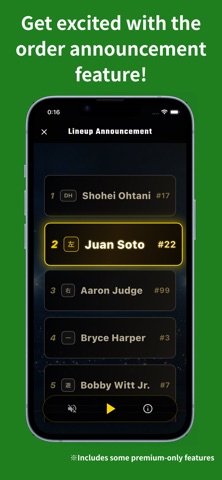
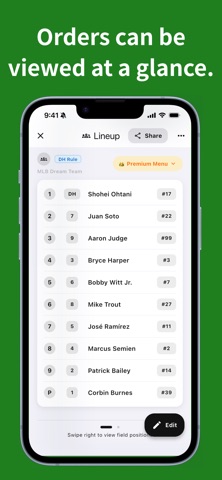
Create baseball lineups, batting orders, and lineup cards in seconds. Baseball Lineup Maker helps coaches, managers, and teams build clear lineup cards on their phone. Enter batting order, fielding positions, and jersey numbers, check defensive positions on the field view, and share clean lineup images with your team. Home screen widgets on iPhone and Android show a saved lineup at a glance. Choose which lineups to show in the app, and tap the widget to open that lineup right away. The small size shows a summary, and the large size shows the full starting lineup. Voice lineup editing lets you speak entries such as "number one pitcher Skubal jersey number 29" or "number two DH Judge jersey number 99". The app turns them into candidate cards so you can check and apply them one by one. Applied players that are not in your roster yet can be saved right away. Uniform customization offers more than 20 presets across free and Premium designs. Apply a team uniform in one tap and carry it through to the field view and shared lineup images. Home also lets you filter lineups by team, while team editing makes it easy to add, remove, or transfer multiple members at once. Perfect for youth baseball, school teams, recreational leagues, and softball teams that want to prepare lineups faster before game day. Main Features • Home screen widget to check a saved lineup and open it with a tap • Voice input for batting order, position, player name, and jersey number • Save unregistered players from voice input to your roster • Choose from more than 20 free and Premium team uniform presets and use the selected design in field views and shared lineup images • Filter lineups by team and manage team members in bulk • Create, edit, and save starting lineups • Enter batting order, fielding positions, and jersey numbers • Check defensive positions on the field view • Swap players directly from the field screen • Supports DH and EH • Supports extended batting orders with 11 or more players • Save lineup cards as images and share them • Manage players and teams • Manage game schedules with the calendar • Add games to your device calendar • Auto-save while editing Premium Features • Voice lineup editing Speak lineup details, review candidate cards, and save players to your roster. Try it 5 times for free, then unlock Premium to keep using it. • Unlock special lineup card themes Create lineup cards with unique designs such as Sports Newspaper, Smart, and Formal. • Unlock more uniform designs Free designs are available, with additional uniform presets and jersey patterns included in Premium. • Create lineup announcement videos Generate animated lineup announcement videos to build excitement before the game. • Remove player and team limits Manage more players, bench members, and guest players. • One-time purchase Unlock premium features forever with a single purchase. No subscription required. Recommended For • Coaches and managers who need to create lineups quickly • Youth baseball, school baseball, recreational baseball, and softball teams • Teams that use DH, EH, or extended batting orders • Anyone who wants to replace paper lineup sheets with a digital lineup app • Teams that want to share clean lineup cards before the game More Use Cases • Prepare lineups for league games, tournaments, scrimmages, and practice games • Share one clear lineup image with players, parents, coaches, and scorekeepers • Keep guest players, bench members, and recurring roster details ready • Check defensive balance before the game by reviewing positions on the field view • Save opponent, date, and field information so past lineups are easy to review From first pitch preparation to post-game review, Baseball Lineup Maker keeps the details that often get scattered across paper notes, whiteboards, and chat messages in one practical lineup app.
What's new · 2.9.0
[What's New] - Check a saved lineup right from your home screen with the new widget. Choose which lineup to show in the app, and tap the widget to open it. - Refreshed the look of the app. - Minor bug fixes.
Details