

Flight Countdown -Trip Tracker
Japality Limited · Travel
Independent analytics for this App Store listing. AppTracker is not affiliated with Japality Limited.
Chart standing · US
What changed · US
Listing changes AppTracker has observed for this app in this storefront — new versions, price moves, rating shifts, and store copy.
Widgets are now available! • View departure and arrival countdowns right from your iPhone’s Home Screen or Lock Screen. • Choose from small and medium Home Screen widgets. • Automatically display your next flight, or choose a specific flight for each widget on iOS 17 or later. • Tap a widget to open that flight’s countdown in the app. To get started, touch and hold your Home Screen, select “Add Widget,” and add “Flight Countdown.” Note: Lock Screen widgets require iOS 16 or later. Note: Countdowns are based on the scheduled times you enter. Real-time flight delay information is not supported.
Screenshots




About
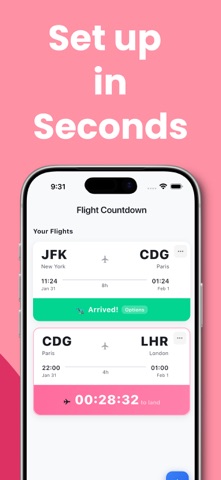
“How much longer until we land?” See your countdown at a glance. Flight Countdown puts the time until departure or arrival right on your iPhone’s Home Screen and Lock Screen. Keep your next flight in view, check your countdown in airplane mode, and build a personal logbook of your travels—all without creating an account. From your next vacation to your regular business trips, make every flight easier to follow and worth remembering. HOME SCREEN & LOCK SCREEN WIDGETS Check the time until departure before your flight and the time until arrival while you’re in the air—without opening the app. Choose small or medium Home Screen widgets to fit your layout. Automatically show your next flight, or select a specific flight for each widget on iOS 17 or later. Tap a widget to open that flight’s countdown in the app. KNOW HOW MUCH TIME IS LEFT Enter your scheduled departure and arrival times to start your countdown. See how much time remains at a glance, whether you’re deciding to watch another movie, read a few more chapters, or get some rest. Spend less time checking the clock and more time enjoying the journey. WORKS IN AIRPLANE MODE Your saved flight countdowns work without an internet connection. No in-flight Wi-Fi or cellular service is needed to check the time remaining. A useful travel companion, even when you’re offline. YOUR FLIGHTS, YOUR TRAVEL STORY Keep your flight history in one place and look back on the countries you’ve visited. View your flight count, total flight time, and number of countries visited. From an annual getaway to weekly business trips, every flight adds another chapter to your personal travel logbook. SIMPLE SETUP. NO ACCOUNT REQUIRED. Add your departure airport, arrival airport, and scheduled flight times. You can enter domestic or international flights with any airline. To add a widget, touch and hold your Home Screen, choose “Add Widget,” and search for “Flight Countdown.” SHARE YOUR TRAVEL PLANS Share an image of your flight details and countdown with friends and family. Let someone know your scheduled arrival time, coordinate an airport pickup, or share the excitement of your next trip. MADE FOR YOUR NEXT FLIGHT • Long-haul travelers who want to see how much time is left • Business travelers keeping multiple flights organized • Families planning vacations and airport pickups • Travelers who enjoy collecting flight memories and travel stats Add your next flight and keep the journey in view—from departure to arrival. COMPATIBILITY & NOTES • Lock Screen widgets require iOS 16 or later. • Selecting a specific flight for each widget requires iOS 17 or later. • Countdowns use the scheduled times you enter. The app does not retrieve real-time flight delays or live flight status. Terms of Use: https://app.japality.com/flightcountdown/i/terms/ Privacy Policy: https://app.japality.com/flightcountdown/i/privacy_policy/
What's new · 0.1.5
Widgets are now available! • View departure and arrival countdowns right from your iPhone’s Home Screen or Lock Screen. • Choose from small and medium Home Screen widgets. • Automatically display your next flight, or choose a specific flight for each widget on iOS 17 or later. • Tap a widget to open that flight’s countdown in the app. To get started, touch and hold your Home Screen, select “Add Widget,” and add “Flight Countdown.” Note: Lock Screen widgets require iOS 16 or later. Note: Countdowns are based on the scheduled times you enter. Real-time flight delay information is not supported.
Details