

Glimpsy: Smart Complications
Hans-Juergen Richstein · Utilities
Independent analytics for this App Store listing. AppTracker is not affiliated with Hans-Juergen Richstein.
Chart standing · US
What changed · US
Listing changes AppTracker has observed for this app in this storefront — new versions, price moves, rating shifts, and store copy.
V3.3: Yet another update packed with new features! As always, check out the "What's new" section in the companion app for even more information. ◈ Configuration schedules allow you to provide different complication setups for different days (like changing date colors for weekends or having a different Amulet photo every day) ◈ Add percentage display to inline battery/date mode ◈ Optionally use shorter date format for inline complications with shown battery ◈ New date formats, totaling now 20 different formats to choose from. Running out of names for them, the picker now just shows live samples to select from ◈ Calendar Week now available standalone or as an addition to some date formats ◈ Compatibility settings for inline complications to work around an issue with the new Siri Modular inline complication ◈ Fix for date display where sometimes days and months were displayed in English instead of your local language
Price & rating history · US
Reconstructed from the listing changes AppTracker has observed in this storefront. A field is charted once it has changed more than once, and each line starts at the value it moved from.
Average rating · ★ 4.82 now · 4 changes on record
Screenshots


Keywords this app targets
Search terms AppTracker associates with this app — estimates, not search volume. ❝ = in the app's title; a highlighted number is its current position for that term.
Similar apps
Competitors and close alternatives, as estimated by AppTracker.
 PowerGlass
Jaisah Webb
2 shared topics
PowerGlass
Jaisah Webb
2 shared topics
 BatteryMonitorComplication
Michael Burch
1 shared topic
BatteryMonitorComplication
Michael Burch
1 shared topic
 Wristmate
Minorbits LLC
Wristmate
Minorbits LLC
 Stay On Target 1138
Harin Wickremasinghe
1 shared topic
Stay On Target 1138
Harin Wickremasinghe
1 shared topic
 Battery Widget: PowerToYou
Karandeep Singh
1 shared topic
Battery Widget: PowerToYou
Karandeep Singh
1 shared topic
 Bauhaus Clock - Analog Watch
Atilla Taskiran
Bauhaus Clock - Analog Watch
Atilla Taskiran
 BioMate
Blaine Leckett
BioMate
Blaine Leckett
 Sloww: Sun & Moon Phase Clock
SOREN MIKKEL LAULAINEN
Sloww: Sun & Moon Phase Clock
SOREN MIKKEL LAULAINEN
About
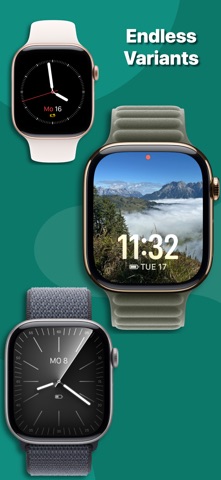
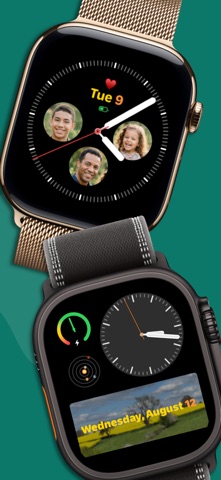
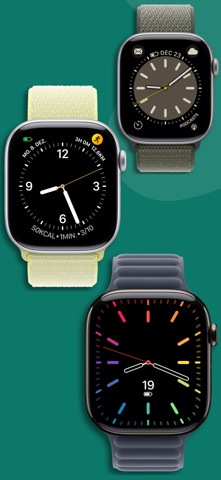
Your wrist. Your rules. Glimpsy is the smart battery complication for Apple Watch that stays invisible until you need it — or turns any slot into something unmistakably yours. Multiple independent styles and live previews for every complication shape. Insignia. Amulet. One elegant app. ◈ MINIMALIST BY DEFAULT. PERSONAL BY DESIGN. Love a clean dial? Glimpsy hides the battery until charge drops below your threshold. Want more? Add an insignia, photo, custom colors, and combined date layouts without cluttering your watch face. ◈ DE-CLUTTER YOUR WRIST Battery life shouldn't always be in your face. Set a custom threshold (e.g. 30%). Above that, the indicator vanishes — clean dial, zero anxiety. When it matters, Glimpsy appears. ◈ SAVE A SLOT: COMBINED COMPLICATIONS Every complication spot is precious. Glimpsy's Date & Battery combo shows the date by default and only brings in the battery when you need it — freeing a slot for another app or data source. ◈ LOTS OF DATE FORMATS Choose from 20 different ways to display date information, including calendar week. ◈ INSIGNIA: STAMP IT WITH YOUR MARK Add a personal Insignia — initials, emoji, or symbol — to your complication. Your watch face, your signature. ◈ AMULET: WEAR WHAT YOU LOVE Turn a circular slot into an Amulet: a photo of your partner, kids or dog fills the complication, with the battery icon only when Smart visibility says it's time. ◈ FULL STYLE EDITOR + LIVE PREVIEWS Dial in fonts, colors, date formats, battery size, and more in the Style Editor. Live dual previews show battery shown and hidden for every family before you commit. Edit on Apple Watch or iPhone — changes sync instantly. ◈ CONFIGURATION SCHEDULE Different complication setups for different days — like weekend date colors or a different Amulet photo every day. ◈ IPHONE COMPANION Quick tweaks on your wrist; deep customization on iPhone — custom colors, Amulet cropping, and Insignia editing. Browse styles with live previews in the companion app and sync to your watch. ◈ FEATURES • Smart visibility: Auto-hide the battery until charge drops below your threshold. • Combined Date & Battery: Free up complication slots on data-rich watch faces. • Lots of Date Formats: 20 options, including calendar week. • Insignia: Monograms on circular, corner, rectangular, and inline complications. • Amulet: Photo-backed circular complications with smart battery overlay. • Multiple Independent Styles: Different configs per watch face — simultaneously. • Full Style Editor: Fonts, colors, date formats, battery size, and layout options. • Configuration Schedules: Per-day setups — weekend colors, daily Amulet photos, and more. • Live Previews: Battery-shown and battery-hidden states for every family. • Universal Support: Circular, Corner, Inline, and Rectangular — all covered. • iPhone Companion: Edit, preview, and sync from your phone. • Battery Efficient: Optimized for Apple's energy guidelines. ◈ TRY GLIMPSY FOR FREE Download today for a 7-day trial with no limitations. Love it? Unlock the Permanent License once — all future updates included. No subscriptions. Ever.
What's new · 3.3.0
V3.3: Yet another update packed with new features! As always, check out the "What's new" section in the companion app for even more information. ◈ Configuration schedules allow you to provide different complication setups for different days (like changing date colors for weekends or having a different Amulet photo every day) ◈ Add percentage display to inline battery/date mode ◈ Optionally use shorter date format for inline complications with shown battery ◈ New date formats, totaling now 20 different formats to choose from. Running out of names for them, the picker now just shows live samples to select from ◈ Calendar Week now available standalone or as an addition to some date formats ◈ Compatibility settings for inline complications to work around an issue with the new Siri Modular inline complication ◈ Fix for date display where sometimes days and months were displayed in English instead of your local language
Details