

Mouse Jiggler : Cursor Mover
Anshuman Behura · Utilities
Independent analytics for this App Store listing. AppTracker is not affiliated with Anshuman Behura.
Chart standing · US
What changed · US
Listing changes AppTracker has observed for this app in this storefront — new versions, price moves, rating shifts, and store copy.
What's new in this version: • Smoother, continuous vibration mode for steadier mouse movement • New quick tutorial to get you set up in seconds • Refreshed design with a cleaner, more polished look • Smaller app size and faster launch • Multiple bug fixes and stability improvements
Price & rating history · US
Reconstructed from the listing changes AppTracker has observed in this storefront. A field is charted once it has changed more than once, and each line starts at the value it moved from.
Average rating · ★ 4.67 now · 2 changes on record
Ratings breakdown · US
The star breakdown behind this app's rating in this storefront.
Screenshots





About
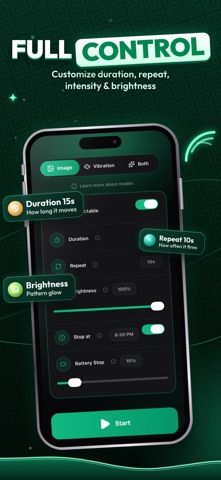
Keep your Mac or Windows interface active, responsive, and ready - automatically. Mouse Jiggler is a lightweight and precise utility that subtly simulates mouse movement to maintain system activity and prevent idle states. Ideal for automation workflows, UI testing, and screen recording setups, Mouse Jiggler ensures your system never pauses when it matters most. Whether you're running automated test scripts, recording tutorials, or maintaining an active remote session, Mouse Jiggler helps keep your cursor (and your focus) exactly where you need it — without requiring admin access or modifying system settings. Key Features • Simulated Mouse Input — Generates subtle cursor movement to prevent screen sleep or inactivity. • Automation & Testing Support — Keep UI states stable during demos, recordings, or automated runs. • Accessibility-Friendly Design — Supports users who require constant cursor presence for visual tracking or workflow continuity. • Custom Movement Modes — Choose between different jiggle styles, speeds, and silent modes. • Smart Auto-Stop Options — Automatically pause based on timer, battery, or system state. • Lightweight & Efficient — Runs quietly in the background with minimal resource use. • Universal Compatibility — Works seamlessly with all standard input devices including mice, touchpads, and trackballs. Privacy & Security Mouse Jiggler requires Accessibility permissions only to perform mouse movements. No personal data, keystrokes, or analytics are ever collected. Your privacy and system integrity remain fully protected. Why You’ll Love It • Keeps screens awake during long render sessions or presentations. • Perfect for remote desktop or VDI environments. • Simple interface — no configuration headaches or complex setup. • Designed for professionals who value precision and reliability. Download Now Stay in control of your Mac’s activity. Download Mouse Jiggler – Mouse Mover today and keep your cursor alive! Terms of Use: https://www.apple.com/legal/internet-services/itunes/dev/stdeula/
What's new · 1.7
What's new in this version: • Smoother, continuous vibration mode for steadier mouse movement • New quick tutorial to get you set up in seconds • Refreshed design with a cleaner, more polished look • Smaller app size and faster launch • Multiple bug fixes and stability improvements
Details