

Chart standing · US
What changed · US
Listing changes AppTracker has observed for this app in this storefront — new versions, price moves, rating shifts, and store copy.
Scriptly now works on iPad, and there's a lot more in this one. iPad support Keep the script on screen with your insights, chat or notes beside it. Works with external keyboards. Chat about your scene Ask anything about the script you're holding — what a line means, why your character says it, or the background you need to play it. Scan pages with your camera Photograph up to five script pages at once instead of hunting for the PDF. Tap "Auto" in the corner of the camera if you'd rather take each shot yourself. One speed for the whole scene Set the reading speed once from the reader instead of adjusting line by line. Per-line delivery still works, and now says how the two combine. A calmer mood board The Visuals tab no longer generates images the moment you open it. Add your own photos, or generate set, wardrobe and prop visuals when you actually want them. Also in this release - A back button in the reader, so you can always get to your scripts - The keyboard closes properly in chat - Insights cards are tighter and no longer show stray formatting - iCloud backup now tells you the truth about whether it worked, with a "Back up now" button in Privacy settings - Fixes to memorization scoring and general polish throughout
Screenshots



About
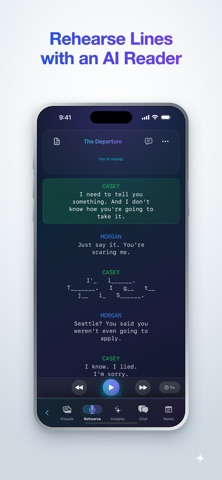
Scriptly: Your AI-Powered Acting Companion Master your lines, understand your character, and bring your performance to life with Scriptly–the ultimate app for actors preparing for auditions, rehearsals, and performances. TRANSFORM YOUR SCRIPT PREPARATION Scriptly uses advanced AI to help actors break down scenes, understand characters, and memorize lines faster. Whether you're preparing for a film audition, theater production, or drama class, Scriptly gives you the tools you need to deliver your best performance. KEY FEATURES Interactive Rehearsal Mode Practice your lines with an AI scene partner. Pick your character and run the scene line by line, with a different voice for each character. Hide your lines to test yourself, and adjust the reading speed to match how you actually want to play it. Know When You're Off Book Scriptly scores how well you know each line as you rehearse aloud, weighted by how much of the line was hidden at the time. Set your audition date and it paces your practice, then shows you the lines still worth drilling. Scene Insights Comprehensive breakdowns of your scene: summary, key details, beats, subtext, stakes, and the moment before. Understand how the scene is built and where it turns. Character Insights Deep analysis of motivations, objectives, relationships, and narrative arc. Understand your character's journey and make stronger acting choices. Ask Scriptly Long-press any line for instant analysis, or for reflection prompts that connect the moment to your own experience. Chat About Your Scene A conversation about the script you're holding. Ask what a line really means, why your character says it, or what background you need to play it truthfully. Visual Mood Boards Build a board for the look and feel of your scene. Add your own photos, or generate set, wardrobe and prop visuals with AI when you want a starting point. Scan Pages With Your Camera Photograph up to five script pages in one go. Scriptly straightens and crops each page, then reads it — no scanner, no email-yourself-a-PDF. Your Own Workspace A notes page for every script, for blocking, direction, or anything you want beside the scene. Built for iPad Keep the script on screen while your insights, chat or notes sit beside it. Full iPad support, including external keyboards. PRIVACY No account. No sign-up. Your scripts live on your device and back up to your own iCloud, so they move between your iPhone and iPad without ever being stored on Scriptly's servers. You can turn that backup off in Settings at any time. When you use an AI feature — insights, chat, or spoken lines — the relevant text is sent to be processed and the result comes straight back to you. It isn't used to train models and it isn't kept. Everything else stays on your device, and you can erase all of it from inside the app. SCRIPTLY PRO Scriptly is free to try with one script of your own, plus the built-in sample scene. Scriptly Pro unlocks the rest: 7-Day Free Trial - Try all features risk-free $14.99/month after trial - Cancel anytime Start your free trial today and experience the future of script preparation. PERFECT FOR Film and TV actors Theater performers Drama students Acting coaches SIMPLE & POWERFUL Scriptly combines cutting-edge AI technology with an intuitive, beautiful interface. Upload your script, select your character, and start preparing. No complicated setup, no learning curve–just powerful tools that help you do your best work. Download Scriptly today and transform how you prepare for your next role. Privacy Policy: https://www.scriptlyapp.com/privacy-policy Terms of Service: https://www.scriptlyapp.com/terms-of-service
What's new · 2.3
Scriptly now works on iPad, and there's a lot more in this one. iPad support Keep the script on screen with your insights, chat or notes beside it. Works with external keyboards. Chat about your scene Ask anything about the script you're holding — what a line means, why your character says it, or the background you need to play it. Scan pages with your camera Photograph up to five script pages at once instead of hunting for the PDF. Tap "Auto" in the corner of the camera if you'd rather take each shot yourself. One speed for the whole scene Set the reading speed once from the reader instead of adjusting line by line. Per-line delivery still works, and now says how the two combine. A calmer mood board The Visuals tab no longer generates images the moment you open it. Add your own photos, or generate set, wardrobe and prop visuals when you actually want them. Also in this release - A back button in the reader, so you can always get to your scripts - The keyboard closes properly in chat - Insights cards are tighter and no longer show stray formatting - iCloud backup now tells you the truth about whether it worked, with a "Back up now" button in Privacy settings - Fixes to memorization scoring and general polish throughout
Details