

Piano Composer: Listen & Learn
Murat Saygin · Music
Independent analytics for this App Store listing. AppTracker is not affiliated with Murat Saygin.
Chart standing · US
What changed · US
Listing changes AppTracker has observed for this app in this storefront — new versions, price moves, rating shifts, and store copy.
In Theme 3, topic-based song lists have been added to both the half-screen and full-screen sections for Downloads, MIDI and Classical Pieces. Vertical screen support has been updated for Theme 4. User-friendly improvements have been made for iPhone Duo.
Price & rating history · US
Reconstructed from the listing changes AppTracker has observed in this storefront. A field is charted once it has changed more than once, and each line starts at the value it moved from.
Price · 0.49 USD now · 6 changes on record
In-app purchases · US
No in-app purchases.
Screenshots




Keywords this app targets
Search terms AppTracker associates with this app — estimates, not search volume. ❝ = in the app's title; a highlighted number is its current position for that term.
Similar apps
Competitors and close alternatives, as estimated by AppTracker.
 Piano+ - Sheet Music Composer
嵩 张
2 shared topics · 2 shared title words
Piano+ - Sheet Music Composer
嵩 张
2 shared topics · 2 shared title words
 Piano ٞ
Impala Studios
1 shared title word
Piano ٞ
Impala Studios
1 shared title word
 Piano - Simple Piano Recording
Seiji Hashizume
1 shared topic · 1 shared title word
Piano - Simple Piano Recording
Seiji Hashizume
1 shared topic · 1 shared title word
 Piano Keyboard App: Play Songs
Yokee Music LTD
1 shared topic · 1 shared title word
Piano Keyboard App: Play Songs
Yokee Music LTD
1 shared topic · 1 shared title word
 Piano Note: Sheet Music & Play
Taito Ajiki
1 shared title word
Piano Note: Sheet Music & Play
Taito Ajiki
1 shared title word
 Perfect Piano - Learn to Play
Revontulet Soft Inc
2 shared title words
Perfect Piano - Learn to Play
Revontulet Soft Inc
2 shared title words
 Piano: Keyboard Lessons & Game
MWM
1 shared title word
Piano: Keyboard Lessons & Game
MWM
1 shared title word
 Score Creator Pro
Sharp Notes Company Limited
1 shared topic
Score Creator Pro
Sharp Notes Company Limited
1 shared topic
About
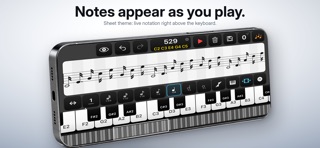
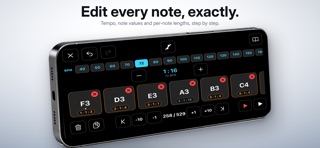
The simplest way to compose, learn, and play music on your iPhone and iPad. No ads, no subscriptions, no internet required. Buy once, use forever. Piano Composer gives you a clean, responsive workspace to capture, edit, learn, and shape your musical ideas anywhere. Every recording is stored with embedded music metadata, so your compositions can be recognized when reopened — ready to view, edit, and play again. CREATE & PLAY: Play and record across 84 keys — the full piano range Play up to 10 notes at once Record compositions with up to 20,000 notes Choose between Simple Timing and Full Timing Use virtually unlimited BPM values for precise rhythm Record rests for cleaner compositions Pedal playback with sustain options from 1 to 5 seconds Repeat compositions up to 5 times Turn background audio playback on or off Export your tracks as M4A, WAV, or MIDI LEARN: Learn with three different learning modes: Keyboard Mode — learn and practice directly on the piano keyboard KlassikKids — discover classical music through a child-friendly learning experience Pro Learning Mode — a more advanced way to learn and practice EDIT MODE: Navigate octaves with +1, +10, −1, and −10 controls Duplicate, delete, or modify any note Adjust note duration and timing Arrange 2-, 3-, 4-, 5-, 6-note, and octave chords Add and edit simultaneous notes directly in your compositions Use different editing and playback views, including Slide Mode SCOREEEDITOR: Turn your music into a visual score Load and work with your music like a real sheet-music editor Review your composition visually and make corrections Export your score as a printable PDF NOTEBOOK MODE: Review your complete composition visually Quickly find sections that need correction Use your compositions as a music player CLASSICAL MUSIC LIBRARY: 200+ classical piano pieces for listening, learning, practice, inspiration, and editing PERFECT FOR: Piano learning and practice Melody sketching Songwriting and composition Music lessons Classical music discovery Game and film music ideas
What's new · 9.5
In Theme 3, topic-based song lists have been added to both the half-screen and full-screen sections for Downloads, MIDI and Classical Pieces. Vertical screen support has been updated for Theme 4. User-friendly improvements have been made for iPhone Duo.
Details