

Y2Cam - Film Camera & Editor
CalendTree, LLC · Photo & Video
Independent analytics for this App Store listing. AppTracker is not affiliated with CalendTree, LLC.
Chart standing · US
What changed · US
Listing changes AppTracker has observed for this app in this storefront — new versions, price moves, rating shifts, and store copy.
Camera Curator Plug your camera into your iPhone with a USB-C cable and manage its custom settings from your phone. See what's in each slot, load recipes, and keep safety copies of what was there before. Works with the X-T30 II, X-Pro3, X100V and X-S20. 60 Fuji Recipes and Recipe Stacks Browse 60 recipes by mood and film, and load any of them onto a slot. Group recipes into stacks for a trip or a shoot, and load a whole stack in one go with Y2Cam Studio. 3D Photos Photos that wiggle with real depth. Dual Lens fires two lenses at once, and Orbit guides you around your subject point by point. Save as a GIF or a video, in standard or high quality. Pro Mode Lenses labelled in focal lengths, aperture control on supported iPhones, and manual white balance. Standard mode keeps things simple. Chat with Greg Tell Greg what you're shooting and he builds a stack for your camera. He runs entirely on your iPhone. Requires Apple Intelligence. Fixes - Four light leaks that weren't showing up now render properly - Light leaks no longer disappear when you switch to Grain, Clarity or another tool - Your film no longer snaps back to the default when you change tabs - The aperture button no longer goes missing after switching lenses - Brush mask adjustments now show as soon as you reopen a photo - Editor labels and the Edited badge no longer sit under the status bar or the tool bar Improvements - Undo now steps back one change at a time - HSL colour sliders rebuilt: each colour moves on its own, and nothing else in the photo shifts - Photo Info shows the camera, lens and exposure a photo was taken with - Scan a recipe card or settings screen to import its settings - Dual Lens 3D photos match brightness and colour between the two lenses far better - The film strip opens on the film you have loaded - A lighter, faster photo editor - New app icon
Ratings breakdown · US
The star breakdown behind this app's rating in this storefront.
Screenshots





About
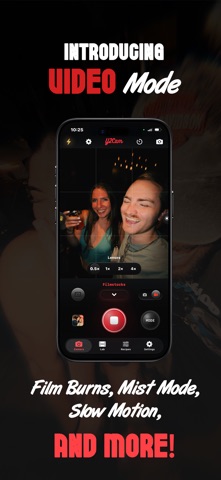
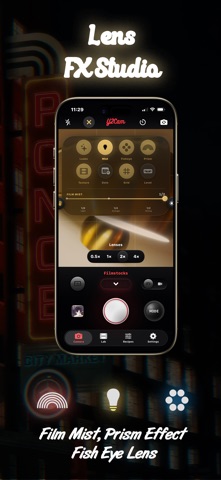
Y2Cam 2.1: your iPhone now talks to your camera. Y2Cam is a film lab in your pocket: a film camera, a full photo and video editor, and now a way to manage the recipes on your Fujifilm camera. It suits a night out as well as paid work. Take the photo. Then decide what to do with it, now or later. NEW IN 2.1 Camera Curator Plug your camera into your iPhone with a USB-C cable and manage its custom settings from your phone. See what's in each slot, load a recipe, and keep safety copies of what was there before. Every value is read back from the camera and checked. 60 Fuji recipes and recipe stacks Browse 60 recipes by mood, film and occasion, and load any of them onto a slot. Group recipes into stacks for a trip, a wedding or a night shoot, and load a whole stack in one go with Y2Cam Studio. 3D Photos Photos that wiggle with real depth. Dual Lens fires two lenses at the same instant. Orbit guides you around your subject point by point. Save the result as a looping GIF or a video. Pro Mode Lenses labelled in focal lengths, aperture control on supported iPhones, and manual white balance. Standard mode keeps things simple. Chat with Greg Tell Greg what you're shooting and he builds a stack for your camera. He runs entirely on your iPhone, so nothing you type leaves it. Requires Apple Intelligence. Scan a recipe Photograph a recipe card or a settings screen and Y2Cam reads the settings for you. THE Y2CAM WAY Shoot first, decide later. Edits never damage the original file. Looks that feel real. Y2Cam's film stocks react to light, colour and contrast more like film than like a flat filter. Edit as much or as little as you like. Adjust light and colour, add grain, texture and light leaks, tune individual colours with HSL, and paint adjustments onto part of a photo with brush masks. Built for delivery. Import from your phone or camera, edit groups of photos together so they match, and export ready to post. STUDIOS Video Shoot with Slow Motion, Blurry Pic, Film Burns and Dreamy mode, or bring in existing videos and process them with the same effects. Panels Build panoramas and collages with flexible layouts, and insert pages anywhere in the sequence. Lens FX Film Mist, Fisheye and Prism, live while shooting or later in the editor. Instagram Grid Planner Plan your feed before you post. Rearrange your grid, draft captions and hashtags, set reminders, and keep separate grids for different accounts. No Process Mode Photos exactly as the sensor saw them, with no smoothing. GOOD TO KNOW Camera Curator works over USB-C with the X-T30 II, X-Pro3, X100V and X-S20. Other Fujifilm cameras can be read but not written to. No account is needed. Your photos and settings stay on your iPhone. Y2Cam is free to use. Y2Cam Studio unlocks every film stock, shooting Fuji recipes on iPhone, whole-stack loading, Orbit 3D and more. Subscribe, or buy once. Y2Cam is not affiliated with, endorsed by or sponsored by FUJIFILM Corporation. FUJIFILM and its product names are trademarks of their owners and are used only to describe compatibility. Fun when you want it. Powerful when you need it.
What's new · 2.1
Camera Curator Plug your camera into your iPhone with a USB-C cable and manage its custom settings from your phone. See what's in each slot, load recipes, and keep safety copies of what was there before. Works with the X-T30 II, X-Pro3, X100V and X-S20. 60 Fuji Recipes and Recipe Stacks Browse 60 recipes by mood and film, and load any of them onto a slot. Group recipes into stacks for a trip or a shoot, and load a whole stack in one go with Y2Cam Studio. 3D Photos Photos that wiggle with real depth. Dual Lens fires two lenses at once, and Orbit guides you around your subject point by point. Save as a GIF or a video, in standard or high quality. Pro Mode Lenses labelled in focal lengths, aperture control on supported iPhones, and manual white balance. Standard mode keeps things simple. Chat with Greg Tell Greg what you're shooting and he builds a stack for your camera. He runs entirely on your iPhone. Requires Apple Intelligence. Fixes - Four light leaks that weren't showing up now render properly - Light leaks no longer disappear when you switch to Grain, Clarity or another tool - Your film no longer snaps back to the default when you change tabs - The aperture button no longer goes missing after switching lenses - Brush mask adjustments now show as soon as you reopen a photo - Editor labels and the Edited badge no longer sit under the status bar or the tool bar Improvements - Undo now steps back one change at a time - HSL colour sliders rebuilt: each colour moves on its own, and nothing else in the photo shifts - Photo Info shows the camera, lens and exposure a photo was taken with - Scan a recipe card or settings screen to import its settings - Dual Lens 3D photos match brightness and colour between the two lenses far better - The film strip opens on the film you have loaded - A lighter, faster photo editor - New app icon
Details