

Aurio Art
Jose Manuel Casabona Martin · Entertainment
Independent analytics for this App Store listing. AppTracker is not affiliated with Jose Manuel Casabona Martin.
Chart standing · US
What changed · US
Listing changes AppTracker has observed for this app in this storefront — new versions, price moves, rating shifts, and store copy.
Aurio Art becomes Aurio Studio: a new space to create with sound, music and images. - New design, icon and onboarding to explore every way to create. - Draw with your finger or Apple Pencil on iPad and combine your strokes with voice and music. - Choose how sound changes energy, color or brush width. - Combine 13 visual materials in one artwork. - Extract colors from photos or the camera and turn photo contours into editable strokes. - Work with layers: add, hide, adjust opacity, clear or delete, with undo and redo. - Create full screen with compact tools you can hide. - Save editable works and return to your creations whenever you like. - Replay your strokes and share images or silent 6-second videos. - Choose light, dark or system appearance.
In-app purchases · US
What this app sells inside itself, grouped by kind and priced for this storefront.
Screenshots






About
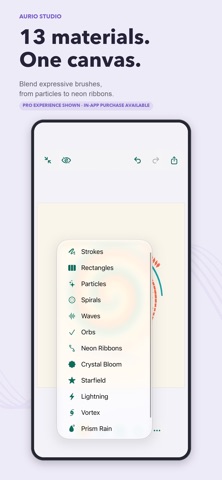
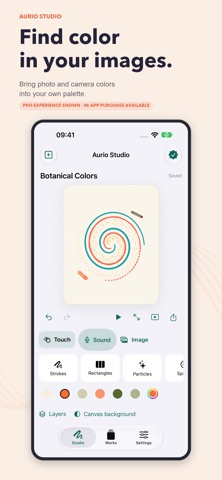
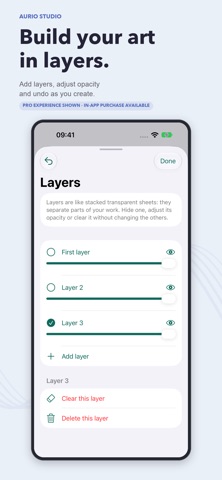
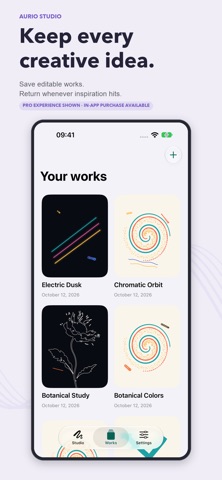
Paint with sound and music. Shape it with your hands. Aurio Studio turns your voice, nearby sounds and music reaching your microphone into visual art you can keep editing. Speak, sing or explore how sound changes the energy, color or width of your strokes. Draw with your finger or Apple Pencil on iPad and combine both ways of creating on one canvas. LET SOUND PAINT Enable the microphone, adjust sensitivity and choose how your artwork responds. Let sound generate strokes or guide their path with your finger. A STUDIO FOR YOUR IDEAS - Explore 13 materials, including strokes, particles, waves, spirals, orbs and neon ribbons. - Create full screen with compact tools you can hide. - Build with layers: add, hide, adjust opacity, clear or delete each layer. - Undo and redo as you create. - Extract a color palette from a photo or the camera. - Turn photo contours into editable strokes with Pro or temporary access. - Save editable works and return to them whenever inspiration strikes. - Replay your strokes and share images or silent 6-second videos. - Choose light, dark or system appearance on iPhone and iPad. START FREE Create with Strokes, Rectangles and Particles. The free version includes touch drawing, sound, layers, photo palettes, saving, replay and image export. AURIO PRO A one-time purchase, with no subscription, unlocks 10 additional materials, photo contours and video export, and removes ads. You can also watch an optional ad to unlock one specific feature for 30 minutes. Each temporary unlock is independent. Sound is analyzed on your device and is not saved as a voice recording. Music is captured through the microphone; songs are not imported and streaming services are not connected. Your voice, your music, your colors. Art you can make your own.
What's new · 2.0
Aurio Art becomes Aurio Studio: a new space to create with sound, music and images. - New design, icon and onboarding to explore every way to create. - Draw with your finger or Apple Pencil on iPad and combine your strokes with voice and music. - Choose how sound changes energy, color or brush width. - Combine 13 visual materials in one artwork. - Extract colors from photos or the camera and turn photo contours into editable strokes. - Work with layers: add, hide, adjust opacity, clear or delete, with undo and redo. - Create full screen with compact tools you can hide. - Save editable works and return to your creations whenever you like. - Replay your strokes and share images or silent 6-second videos. - Choose light, dark or system appearance.
Details