

AI Usage
Seung-Un Ham · Utilities
Independent analytics for this App Store listing. AppTracker is not affiliated with Seung-Un Ham.
Chart standing · US
What changed · US
Listing changes AppTracker has observed for this app in this storefront — new versions, price moves, rating shifts, and store copy.
• Settings now opens from the top left, leaving more room for trackers. • The free version may show a banner. Remove Ads is a one-time purchase in Settings. • Recent tracker edits sync more reliably across devices. • Progress bars update automatically, and Usage Pace shows whether you're ahead or behind your target. • Unmark All clears milestones, and Delete is in the long-press menu. • Siri and Spotlight can suggest updating a tracker. • Stepper buttons and reordering stay responsive during iCloud sync.
In-app purchases · US
No in-app purchases.
Screenshots

About
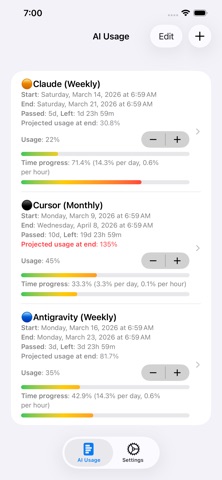
Track your AI service usage and stay within your limits. THE PROBLEM AI services have usage quotas. You lose track. Limits hit at the worst time. WHY CHECKING MANUALLY ISN'T ENOUGH Each service has its own settings page — but nobody opens five different apps to check usage one by one until it's too late. THE SOLUTION AIUsage tracks your AI service quotas — Claude, Cursor, Antigravity, and more. See exactly how much you've used, how much is left, and when it resets. Simple. Visual. No more surprise limits. Support: steve_ham@icloud.com
What's new · 1.2.8
• Settings now opens from the top left, leaving more room for trackers. • The free version may show a banner. Remove Ads is a one-time purchase in Settings. • Recent tracker edits sync more reliably across devices. • Progress bars update automatically, and Usage Pace shows whether you're ahead or behind your target. • Unmark All clears milestones, and Delete is in the long-press menu. • Siri and Spotlight can suggest updating a tracker. • Stepper buttons and reordering stay responsive during iCloud sync.
Details