

Volleyball Highlights
Aaron McDonald (AR) · Productivity
Independent analytics for this App Store listing. AppTracker is not affiliated with Aaron McDonald (AR).
Chart standing · US
What changed · US
Listing changes AppTracker has observed for this app in this storefront — new versions, price moves, rating shifts, and store copy.
Performance enhancements and better onboarding process. Increased usage for all users. share directly to instagram and tiktok!
Ratings breakdown · US
The star breakdown behind this app's rating in this storefront.
In-app purchases · US
What this app sells inside itself, grouped by kind and priced for this storefront.
Screenshots



About
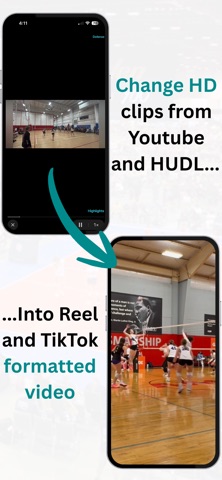
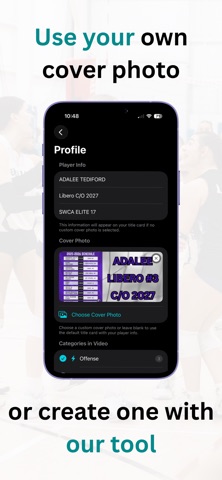
Highlights – Turn Your Sports Clips Into Pro‑Quality Highlight Videos Transform your volleyball footage into stunning, share‑ready highlight videos — automatically. Highlights is the easiest way for athletes, parents, and coaches to showcase big plays, track progress, and create professional‑looking reels in minutes without having to overpay for features you don't need. Whether you’re building a recruiting reel, celebrating a tournament weekend, or capturing your athlete’s growth, Highlights gives you the tools to turn everyday clips into something unforgettable. Create Highlight Videos in Seconds Import your clips, choose your categories, and let the app do the heavy lifting. Highlights automatically: Stitches clips together in the correct order Adds smooth transitions Preserves audio and timing Generates a clean, polished final video No editing experience required. Spotlight Your Best Moments Every clip can include a freeze‑frame spotlight that instantly draws attention to the key player. The app will -Freeze the action at the perfect moment -Darken the background -Highlight the athlete with a circular spotlight Then resumes the play seamlessly It’s the easiest way to make sure coaches and recruiters never miss the moment that matters. Transform you video into social media clips -the app can resize landscape video to portrait and optimize it for apps like TikTok and Instagram -Smart tracking follows the action and keeps the player in frame -Smooth camera tracking makes it appear as though your own professional videographer took the shot Organize Clips by Category. Category Titles can be edited as needed. Keep your footage structured and easy to manage. Sort clips into categories like: Offense Defense Serve Receive Blocking Setting Build category‑specific highlight reels or combine everything into one master video. Overlay titles can be added into your video with a single button. Clips can be saved and renamed for reference. Activate or Deactivate clips to create the video you want. Custom Cover Photos & Title Cards Make your highlight video stand out from the very first frame. You can: Upload a custom cover image Automatically generate a title card with player name, position, and team Create a professional intro without any editing tools Perfect for recruiting videos and social media posts. Live Preview That Matches the Final Export See exactly what your final video will look like. The app includes: A real‑time preview player Accurate spotlight overlays Freeze‑frame timing that matches export Smooth playback with no lag What you see is exactly what you get. Save, Share, and Celebrate Once your highlight video is ready, export it directly to your Photos library. From there, you can: Share with coaches Post on social media Send to family and friends Upload to recruiting platforms Your best moments deserve to be seen. Designed for Athletes, Parents, and Coaches Highlights is built for anyone who wants to turn raw sports footage into something meaningful. Whether you’re building a season‑long reel or capturing a single great play, the app makes the process fast, fun, and frustration‑free. Start Creating Your Highlight Reel Today Download Highlights and turn your clips into something unforgettable. Your best plays are waiting — let’s show them off. By downloading or using this app, you agree to Apple’s End User License Agreement. See Apple’s standard EULA for more information. https://www.apple.com/legal/internet-services/itunes/dev/stdeula/
What's new · 1.6
Performance enhancements and better onboarding process. Increased usage for all users. share directly to instagram and tiktok!
Details