

Compress PDF - Resize PDF
Shota Sukhiashvili · Utilities
Independent analytics for this App Store listing. AppTracker is not affiliated with Shota Sukhiashvili.
Chart standing · US
What changed · US
Listing changes AppTracker has observed for this app in this storefront — new versions, price moves, rating shifts, and store copy.
Optimize application details and enhance overall user experience
Price & rating history · US
Reconstructed from the listing changes AppTracker has observed in this storefront. A field is charted once it has changed more than once, and each line starts at the value it moved from.
Average rating · ★ 4.73 now · 5 changes on record
Ratings breakdown · US
The star breakdown behind this app's rating in this storefront.
In-app purchases · US
What this app sells inside itself, grouped by kind and priced for this storefront.
Screenshots


About
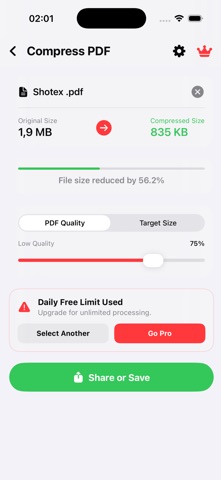
Compress PDFs and make PDFs smaller easily. Optimize PDFs for storage and sharing. Need to format a document for printing, work, or official submission? Resize PDF pages to A4, Letter, Legal, Tabloid, A3, and Custom Dimensions. Features: • Adjustable Quality: Use a simple slider to balance file size • Target Size: Set a goal size • Live Preview: Compare original vs. compressed file size instantly • Quick Share: Easily save to Files or share via email and messages • Smart Document Scanner: Capture and crop documents cleanly right from your camera • Photos to PDF: Convert your images and photos directly into a clean PDF document • Quick Text Creator: Convert plain text typed on your keyboard directly into flat, print-ready text documents • Advanced Organizer: Merge separate files together or cleanly extract specific pages into a new document • Live Text OCR: Instantly lift editable text directly out of captured images • PDF Markup: Annotate documents by drawing, highlighting, and adding text directly to the page PDFs are flattened during export. Text, links, and bookmarks will no longer be selectable. Free users: • Standard PDF Compression (1 per day) • Standard A4 Resizing (1 per day) • Photos to PDF conversion (1 per day) • Quick Text to PDF documents (1 per day) • PDF Markup & Annotation tools (1 per day) Premium unlocks: • Target File Size mode (specify KB/MB) • Merge separate PDFs together • Extract specific pages into a new file • Live Text OCR Extraction • Custom Page Sizer & All Page Formats • No Daily Limit Terms of Use: https://www.apple.com/legal/internet-services/itunes/dev/stdeula/ Privacy Policy: https://shotexstudio.com/compress-pdf-resize-pdf/ On-Device Processing: Private and secure—no files ever leave your phone.
What's new · 22
Optimize application details and enhance overall user experience
Details