

StemFM
STEM US Inc. · Music
Independent analytics for this App Store listing. AppTracker is not affiliated with STEM US Inc.
Chart standing · US
What changed · US
Listing changes AppTracker has observed for this app in this storefront — new versions, price moves, rating shifts, and store copy.
Sessions • Ask Chat for music to listen to, like "30 minutes of ambient music", and it now plays it for you in this session: it adds the songs, starts them playing and tells you what's on. It keeps one version of each song, puts them in an order where each tempo flows into the next, and picks the Transitions style the request suits (Full tracks, Balanced mix or Short & punchy), which then stays as your setting. When the songs run out, Play Forever keeps the music going as it does for any session. If none of the songs can play yet, Chat says so instead of claiming something is playing. • Scrolling through a long session while one of its songs is playing should feel smoother, especially while new songs are still being added to it. • While Chat makes a mix, the line under the conversation now tells you more of what it is doing as it happens: what it is looking for in the catalogue and what it finds, then each song in your mix as it is fetched and mixed, adding effects, matching the keys and finishing the mix. Each line stays up long enough to read. • You can now ask Chat to record your mix, and it hands you the mix as a file, ready to send or save. Asking Chat for a recording needs you to be signed in, as it does in the studio on the web: if you're not, Chat asks you to log in. Chat sometimes takes "bounce it" or "export it" as a request to record, so when you're not signed in, those can ask you to log in too. • When you ask for something Chat can't do yet, it now says so in plain words. • Ask Chat to like, heart or keep your session and it goes into your likes on stem.fm, as it does in the studio on the web. Liking is for signed-in accounts: if you're not signed in, Chat asks you to log in instead. • If you ask Chat to queue songs up next, it tells you there's no stream playing to queue them onto. • Chat starts looking up the songs and artists you name while you're still typing or talking, so it gets to work on your mix sooner. • Mixes you share from Chat, or ask Chat for, now come as M4A files instead of WAV: a fraction of the size, so they send faster, and they play just about anywhere. Each one is named after its mix and carries the mix's name and artists inside, so it shows up properly named in Files and other music apps. If a file can't be made, Chat tells you, and you can try again. • Chat now makes the whole of each mix in the background once its card appears, without ever holding up your next message. The card still plays the part it did, and says how long the full song runs once it's ready. It stops while the app is in the background and starts again when you come back. • Share on a mix's card now offers two choices, Snippet or Full song, each with how long it runs. Pick Full song while it's still being made and Chat makes it at full speed, opening the share sheet as soon as it's ready. • Asking Chat to bounce, export, record or save your mix now hands you the full song. If it's still being made, Chat says so and opens the share sheet when it's ready. If the full song can't be made, Chat hands you the part of the mix on its card and tells you so. • Once a mix's full song is ready, Chat adds it to your session as a song. It shows up in the session's songs straight away and plays from your phone while it's being processed, then becomes a song like any other. A mix that sounds the same as one already added, like after only setting a loop, isn't added again, and a mix with songs that can't leave the app stays in Chat. This is for your own sessions when you're signed in and your account can add songs: if you're not signed in, Chat tells you once that signing in keeps full songs in the session. • Chat now makes the mix for you. Ask for something and it picks the songs, lays them out and mixes them on your phone, the same way the studio on the web does, then shows the result as a card with its waveform and starts playing it. Each mix is about sixteen bars, from where your change can be heard, so it's ready quickly. • Play an…
Price & rating history · US
Reconstructed from the listing changes AppTracker has observed in this storefront. A field is charted once it has changed more than once, and each line starts at the value it moved from.
Average rating · ★ 3.88 now · 8 changes on record
Ratings breakdown · US
The star breakdown behind this app's rating in this storefront.
In-app purchases · US
What this app sells inside itself, grouped by kind and priced for this storefront.
Screenshots


Keywords this app targets
Search terms AppTracker associates with this app — estimates, not search volume. ❝ = in the app's title; a highlighted number is its current position for that term.
Similar apps
Competitors and close alternatives, as estimated by AppTracker.
 AI Vocal Remover - Stemify
Breeze Technology Co., Limited
AI Vocal Remover - Stemify
Breeze Technology Co., Limited
 Stemz: remover vocal audio pro
MWM
Stemz: remover vocal audio pro
MWM
 Stem Split - AI Vocal Remover
MUSIC AI STUDIO LTD
Stem Split - AI Vocal Remover
MUSIC AI STUDIO LTD
 Remixlive - Make Music & Beats
MIXVIBES
Remixlive - Make Music & Beats
MIXVIBES
 Edjing Mix: DJ Music Mixer App
MWM
1 shared topic
Edjing Mix: DJ Music Mixer App
MWM
1 shared topic
 DI.FM - Electronic Music Radio
Digitally Imported, Inc.
1 shared topic
DI.FM - Electronic Music Radio
Digitally Imported, Inc.
1 shared topic
 Cross DJ - Music Mixer App
MIXVIBES
1 shared topic
Cross DJ - Music Mixer App
MIXVIBES
1 shared topic
 Offtrack: the AI DJ app
Mixonset Inc.
Offtrack: the AI DJ app
Mixonset Inc.
About
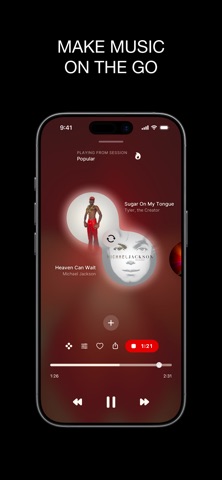
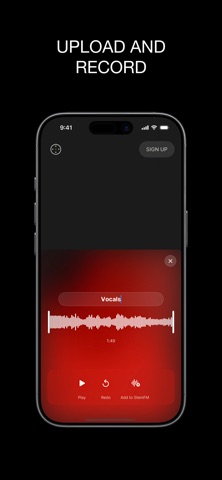
A place to experiment with and manage your music from the creators of Stem Player. Search any song, upload or record and store all your music. Turns songs into stems and calculate the beats to blend and transition songs together, this deep music intelligence powers all StemFM's creative tools so everything stays in time and harmonious. • Make music and DJ sessions just by typing • Record and bring in your own voice and instruments • Export stems and mixes • All music can become stems: vocals, drums, bass, and melody • Record your performances • Import your streaming playlists as DJ sessions • Bring anything you create in the app into the StemFM DAW on desktop StemFM Subscription • Unlimited songs and mixes in one place • Unlimited recordings and whole song exports • Ad free listening no interruptions • No contract required and cancel any time • Fair pay for artists StemFM requires a paid subscription. All features listed above are included with an active StemFM subscription. Follow us on Instagram: https://www.instagram.com/stemplayer Follow us on TikTok: https://www.tiktok.com/@stemplayer Follow us on X: https://x.com/stemplayer Join us on Discord: https://discord.gg/ZKcHqhwu3C Terms and Conditions: https://stem.fm/terms Privacy Policy: https://stem.fm/privacy
What's new · 1.1.6
Sessions • Ask Chat for music to listen to, like "30 minutes of ambient music", and it now plays it for you in this session: it adds the songs, starts them playing and tells you what's on. It keeps one version of each song, puts them in an order where each tempo flows into the next, and picks the Transitions style the request suits (Full tracks, Balanced mix or Short & punchy), which then stays as your setting. When the songs run out, Play Forever keeps the music going as it does for any session. If none of the songs can play yet, Chat says so instead of claiming something is playing. • Scrolling through a long session while one of its songs is playing should feel smoother, especially while new songs are still being added to it. • While Chat makes a mix, the line under the conversation now tells you more of what it is doing as it happens: what it is looking for in the catalogue and what it finds, then each song in your mix as it is fetched and mixed, adding effects, matching the keys and finishing the mix. Each line stays up long enough to read. • You can now ask Chat to record your mix, and it hands you the mix as a file, ready to send or save. Asking Chat for a recording needs you to be signed in, as it does in the studio on the web: if you're not, Chat asks you to log in. Chat sometimes takes "bounce it" or "export it" as a request to record, so when you're not signed in, those can ask you to log in too. • When you ask for something Chat can't do yet, it now says so in plain words. • Ask Chat to like, heart or keep your session and it goes into your likes on stem.fm, as it does in the studio on the web. Liking is for signed-in accounts: if you're not signed in, Chat asks you to log in instead. • If you ask Chat to queue songs up next, it tells you there's no stream playing to queue them onto. • Chat starts looking up the songs and artists you name while you're still typing or talking, so it gets to work on your mix sooner. • Mixes you share from Chat, or ask Chat for, now come as M4A files instead of WAV: a fraction of the size, so they send faster, and they play just about anywhere. Each one is named after its mix and carries the mix's name and artists inside, so it shows up properly named in Files and other music apps. If a file can't be made, Chat tells you, and you can try again. • Chat now makes the whole of each mix in the background once its card appears, without ever holding up your next message. The card still plays the part it did, and says how long the full song runs once it's ready. It stops while the app is in the background and starts again when you come back. • Share on a mix's card now offers two choices, Snippet or Full song, each with how long it runs. Pick Full song while it's still being made and Chat makes it at full speed, opening the share sheet as soon as it's ready. • Asking Chat to bounce, export, record or save your mix now hands you the full song. If it's still being made, Chat says so and opens the share sheet when it's ready. If the full song can't be made, Chat hands you the part of the mix on its card and tells you so. • Once a mix's full song is ready, Chat adds it to your session as a song. It shows up in the session's songs straight away and plays from your phone while it's being processed, then becomes a song like any other. A mix that sounds the same as one already added, like after only setting a loop, isn't added again, and a mix with songs that can't leave the app stays in Chat. This is for your own sessions when you're signed in and your account can add songs: if you're not signed in, Chat tells you once that signing in keeps full songs in the session. • Chat now makes the mix for you. Ask for something and it picks the songs, lays them out and mixes them on your phone, the same way the studio on the web does, then shows the result as a card with its waveform and starts playing it. Each mix is about sixteen bars, from where your change can be heard, so it's ready quickly. • Play an…
Details