

Lens Document Scan & Editor
COFFEE HUT E.E. · Business
Independent analytics for this App Store listing. AppTracker is not affiliated with COFFEE HUT E.E.
Chart standing · US
What changed · US
Listing changes AppTracker has observed for this app in this storefront — new versions, price moves, rating shifts, and store copy.
Refactored persistence layer for streamlined data access
Ratings breakdown · US
The star breakdown behind this app's rating in this storefront.
In-app purchases · US
What this app sells inside itself, grouped by kind and priced for this storefront.
Screenshots



About
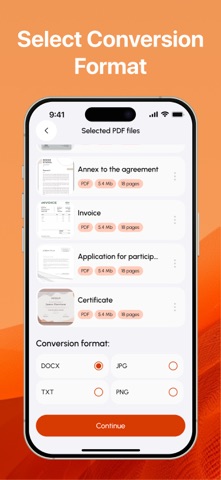
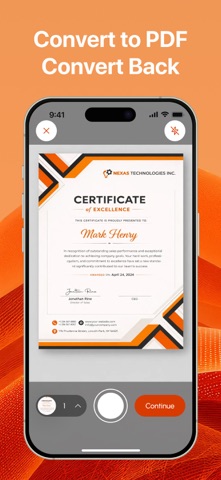
Photo to PDF Converter & Merge – Smart PDF Converter & Editor Turn any file into a clean, organized PDF in seconds — and just as easily convert it back. Photo to PDF Converter & Merge makes managing your documents effortless with fast conversion, simple editing, and smooth file organization. Main Features: • Create & Convert PDFs Turn photos, documents, or text files into PDFs. Merge multiple files, preview results, rename before saving, and export PDFs to DOCX, JPG, or TXT. Supported formats: JPG, PNG, DOCX, TXT, HTML, XLS. • Scan & Edit Easily Use your camera to scan with auto edge detection, build multi-page PDFs, and edit pages — delete, reorder, or insert new ones from your gallery. • Organize & Manage Files Access everything in My Documents. Sort or filter by date, name, or format; create folders and favorites; search, rename, delete, or share instantly. Photo to PDF Converter & Merge brings simplicity, speed, and control to your document workflow — everything you need to create, edit, and manage PDFs with ease. Privacy Policy: https://docs.google.com/document/d/1593DeL9SDhciSakdKgNKb3ovjBmNjnhMVeKg7Tem658/edit?usp=sharing Terms & Conditions: https://docs.google.com/document/d/17J6LifeQ2XHfWhpcbBpheiDdvFaF--Xz8CkgEgGV1W4/edit?usp=sharing
What's new · 1.0.14
Refactored persistence layer for streamlined data access
Details