

Aspector Squaready Multi
FANG Inc. · Photo & Video
Independent analytics for this App Store listing. AppTracker is not affiliated with FANG Inc.
Chart standing · US
What changed · US
Listing changes AppTracker has observed for this app in this storefront — new versions, price moves, rating shifts, and store copy.
This update introduces new features, including "Background Expansion" and "Image Editing" powered by Apple Intelligence. [New Features] - Background Expansion: Naturally extends the background into the margins while keeping your original image untouched. You can also generate a new background from text. - Image Editing: Easily edit your images with Apple Intelligence. Just pick one of the ready-made editing recipes. Of course, you can also describe in your own words how you'd like it edited. * "Background Expansion" and "Image Editing" are available on Apple Intelligence-compatible devices running iOS 27 or later. - Background Image: In addition to solid colors and the image you're editing, you can now use any image as the background. - Blur: Blur or pixelate any part of your images. It auto-detects subjects such as people so you can choose what to blur, and you can also paint the area to blur with your finger. - Tilt-shift: Applies a tilt-shift blur that makes your images look like miniature models. [Improvements] - Improved the crop tool for easier operation. - Fixed several minor bugs.
Price & rating history · US
Reconstructed from the listing changes AppTracker has observed in this storefront. A field is charted once it has changed more than once, and each line starts at the value it moved from.
Average rating · ★ 4.39 now · 24 changes on record
In-app purchases · US
What this app sells inside itself, grouped by kind and priced for this storefront.
Screenshots







About
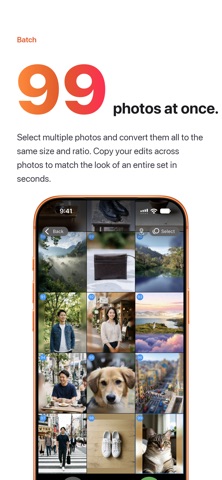
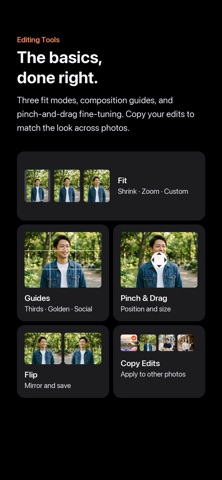
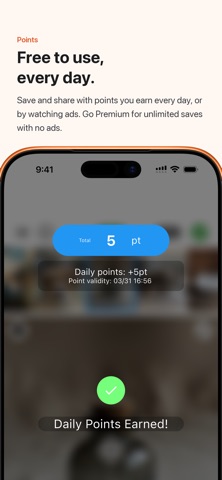
Aspectan - Aspect Ratio Photo Editor Aspectan is a photo editing app that lets you freely adjust the aspect ratio of your images and save or share them with ease. Edit multiple photos at once and efficiently prepare them for Instagram, X (Twitter), and other social media platforms. Now with AI-powered editing. ■ Edit Multiple Photos at Once Load multiple photos simultaneously, adjust the aspect ratio, background, and layout for each one, then save them all at once. You can also reorder photos by long-pressing a thumbnail. ■ AI Features (powered by Apple Intelligence) ・Background Expansion: Naturally extends the background into the margins while keeping your original image untouched. You can also generate a new background from text. ・Image Editing: Just pick one of the ready-made editing recipes — illustration, watercolor, aged sepia film, and more — and AI edits the image for you. Of course, you can also describe in your own words how you'd like it edited. * AI features are available on Apple Intelligence-compatible devices running iOS 27 or later. ■ Versatile Background Styles Choose from solid colors and blurred backgrounds (Hard, Normal, Soft, and Monotone), or use any image as the background. A color memo feature lets you save your favorite colors for easy access. ■ Flexible Fit Options Choose from four layout modes — Fit Inside, Fit Outside, Centering, and Custom Fit — to control exactly how your image is placed on the canvas. You can also save your own custom fit settings for quick reuse. ■ Precise Layout Control Use pinch gestures or drag the center button to zoom and reposition your image with precision. Center Lock and Edge Stop assist features help you snap to a clean layout quickly. ■ Guide Lines Display guide lines suited to your needs — including Rule of Thirds, Golden Ratio, Instagram, X (Twitter), and Grid Paper styles. ■ More Handy Features ・Smart Aspect Ratio: Automatically suggests the aspect ratio closest to your current image ・Flip: Mirror your image horizontally before saving ・Resolution Options: Save at original (high), medium (2048px), or low (1024px) resolution ・Auto-save: Your edits are saved automatically so you can pick up right where you left off ■ Supported Aspect Ratios 1:1 (square), 4:3, 3:4, 16:9, 9:16, screen size, and many more. ■ Blur, Pixelate & Tilt-Shift Auto-detects subjects such as people so you can choose what to blur, or paint any area with your finger. Choose blur or pixelate and adjust the strength. A tilt-shift effect gives your images a miniature-model look. ■ Premium Plan All editing features are available for free. With a Premium subscription (monthly or annual), you can save and share unlimited images, and enjoy an ad-free experience. Your subscription will be automatically renewed every "month" or "year". If you cancel at least 24 hours before the renewal date, automatic renewal will not occur from the next billing period. You can manage your subscription in the Account section of the Settings app. Terms of Use https://www.apple.com/legal/internet-services/itunes/dev/stdeula/
What's new · 4.3.0
This update introduces new features, including "Background Expansion" and "Image Editing" powered by Apple Intelligence. [New Features] - Background Expansion: Naturally extends the background into the margins while keeping your original image untouched. You can also generate a new background from text. - Image Editing: Easily edit your images with Apple Intelligence. Just pick one of the ready-made editing recipes. Of course, you can also describe in your own words how you'd like it edited. * "Background Expansion" and "Image Editing" are available on Apple Intelligence-compatible devices running iOS 27 or later. - Background Image: In addition to solid colors and the image you're editing, you can now use any image as the background. - Blur: Blur or pixelate any part of your images. It auto-detects subjects such as people so you can choose what to blur, and you can also paint the area to blur with your finger. - Tilt-shift: Applies a tilt-shift blur that makes your images look like miniature models. [Improvements] - Improved the crop tool for easier operation. - Fixed several minor bugs.
Details