

Invoice Maker Box - PDF Bill
永文 胡 · Business
Independent analytics for this App Store listing. AppTracker is not affiliated with 永文 胡.
Chart standing · US
What changed · US
Listing changes AppTracker has observed for this app in this storefront — new versions, price moves, rating shifts, and store copy.
Bugfixs
In-app purchases · US
No in-app purchases.
Screenshots




About
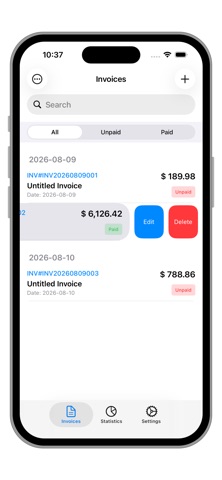
Invoice Maker Box is an invoice creation and management app designed for self-employed individuals, freelancers, and small-to-medium businesses. It helps you efficiently complete the entire process of creating, editing, previewing, and exporting invoices, making daily invoicing easier and more standardized. Make invoice creation and management simple and efficient. From entering invoice numbers, titles, and dates to adding line items, discounts, and tax rates, every step is clear and smooth. Key Features: 1. Invoice Creation & Editing - Customizable invoice details: Supports entering invoice number, invoice title, purchase order number, creation date, and due date. - Flexible due date settings: Options include None, Due on Receipt, 1 day, 2 days, 3 days, 7 days, 14 days, 30 days, and custom days. - Status management: Mark invoice status as "Unpaid" or "Paid" to easily track payment progress. 2. Item & Line Item Management - Item management library: Built-in independent item management module supporting adding, editing, and deleting items, with fields for item name, price, unit of measure, and description. - Adding items to invoices: Select items from the library and add them to an invoice, with automatic calculation of quantity, unit price, discount, tax rate, and final amount. - Discounts & tax rates: Supports both percentage-based discounts and fixed-amount discounts, with options for preset tax rates (e.g., VAT, GST, sales tax) or custom tax rates. 3. Customer & Issuer Information Management - Customer information management: Complete records including customer name, phone, email, address, shipping address, tax information, and internal notes for quick reference. - Issuer information management: Supports setting company name, logo, contact details, address, website, tax information, and license number to meet compliance requirements. - Quick selection: When creating a new invoice, directly select from existing customers and issuers to reduce duplicate entry. 4. Three Professional Preview Templates - Template 1: Suitable for formal business scenarios, with a visually striking and professional look. - Template 2: Clean and minimalist, ideal for eco-friendly or modern-style brands. - Template 3: Classic black-and-white tone, steady and reliable, with strong versatility. - Custom theme colors: Freely choose theme colors on the preview page to meet personalized display needs. 5. PDF Generation & Export - One‑tap PDF generation: Convert invoice content into high‑quality PDF files while preserving the complete layout and formatting. - System sharing: Supports sending PDFs via system sharing channels such as email and AirDrop. - Direct printing: Supports AirPrint wireless printing for convenient paper archiving. 6. Signature & Terms Support - Handwritten signature: Built‑in signature pad supports handwritten signatures in a white area, or you can import signature images via camera or photo library. - Terms management: Add and select standard terms and conditions, which are automatically appended to the bottom of the invoice to enhance contractual compliance. 7. Data Statistics Dashboard - Total invoices: Quickly view the total number of all invoices in the system. - Total revenue & accounts receivable: View paid and unpaid amounts for a clear picture of cash flow. 8. iCloud Sync & Backup - Manual backup & restore: Supports manually uploading backups to iCloud and downloading backups from iCloud to restore the local database. - Backup management: View backup timestamps and file sizes, with support for deleting outdated backups. 9. Data Security & Privacy Protection - Local storage: All data is stored only locally on your device and is not uploaded to any server. - Passcode lock: Supports a 6‑digit numeric passcode lock screen to protect sensitive invoice and customer information. Makes invoicing easier and bill management clearer.
What's new · 1.2
Bugfixs
Details