

mori: memento mori countdowns
akineticzen LLC · Lifestyle
Independent analytics for this App Store listing. AppTracker is not affiliated with akineticzen LLC.
Chart standing · US
What changed · US
Listing changes AppTracker has observed for this app in this storefront — new versions, price moves, rating shifts, and store copy.
landscape and ipad ui improvements
In-app purchases · US
No in-app purchases.
Screenshots




Keywords this app targets
Search terms AppTracker associates with this app — estimates, not search volume. ❝ = in the app's title; a highlighted number is its current position for that term.
Similar apps
Competitors and close alternatives, as estimated by AppTracker.
 DeathCount: Your Time Left
THOMAS MARIE PIERRE JEAN AXEL LANNEAU
DeathCount: Your Time Left
THOMAS MARIE PIERRE JEAN AXEL LANNEAU
 Memento Mori: Widget
Sergey Li
Memento Mori: Widget
Sergey Li
 Memento Mori – Life in Weeks
Beijing Dramavision Technology Co., Ltd.
Memento Mori – Life in Weeks
Beijing Dramavision Technology Co., Ltd.
 Death Day Countdown
Sven Balnojan
Death Day Countdown
Sven Balnojan
 Mori Weeks
Henning Koetz
Mori Weeks
Henning Koetz
 Life Countdown - Days Left
雷雷 张
Life Countdown - Days Left
雷雷 张
 Countdown Widget: Days Until
APPLAYERS LTD
Countdown Widget: Days Until
APPLAYERS LTD
 Day Counter - Time of X
Novaterna
Day Counter - Time of X
Novaterna
About
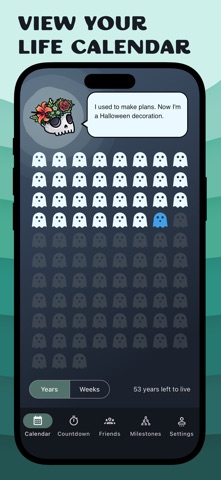
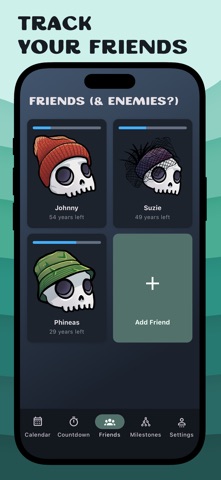
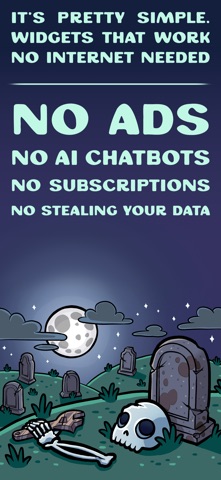
There's no need to be gloomy about mortality. Add memento mori widgets to your home screen, count down to everything worth counting (death included), view your life calendar, and receive unsolicited wisdom from our undead mascot. All (mostly) without the existential dread. What's inside: - Memento mori widgets for your home screen and lock screen that show your time left at a glance - Your whole life calendar, in weeks or years - A death clock that estimates your life expectancy from your demographics, override it if you know better - Countdown widgets for any important date: count down the days, weeks, months, or years left - Track the time left of your friends (and enemies?) for some extra motivation - Map your journey: plot life milestones and future goals and watch your story unfold - Endless customization: circles, diamonds, squares, tombstones, ghosts, stars, and plenty of silly hats - "Motivational" quotes from your skull companion - A wide variety of colorful customizable widgets, track your countdowns, stats, friends, life calendar, and more - Want more reminders? Use our optional notifications to get regular wisdom from the skeleton mascot. - Pay once and get everything. No in-app-purchases or subscriptions, ever. Life's short. Get started today. ------ Create countdowns - Count down to any important date and add it to your home screen as a highly customizable widget - Add checkpoints inside each milestone as needed - Days, weeks, months, or years left - Styles: life-calendar grid, progress bar, or gauge - Customize the grid: circles, ghosts, diamonds, squares, tombstones, stars, and more Colorful memento mori widgets for your home screen - Gentle reminders that stay out of your way - Keep a persistent death countdown on your home screen, along with a skull wearing the hat-of-the-day - Theming that matches your device - A variety of styles and configuration options Your life calendar (a.k.a. your life in weeks) - Your whole life at a glance, in weeks or years - Comes with a skull companion and its unsolicited wisdom - Plenty of themeing options for the grid: tombstones, ghosts, spiders, diamonds, trees, and more Track your friends - Add friends (and enemies?) to the lifespan tracker for some friendly, morbid competition - Choose the perfect hat for each one View a Variety of Stats - Statistics window with numerous different ways to phrase the time you have left - Track what matters to you: heartbears left, percent lived, sunsets left, cups of coffee left, or many more - Use any of these in the stats widget Get notifications to keep you on track - Opt-in notifications are entirely under your control - Remind yourself daily or weekly - Don't forget your mortality with regular wisdom from the skeleton plus stats, pushed as notifications Map your journey - Plot major life events and future goals - Rank them by happiness - Watch your story unfold as a graph - Syncs automatically with your countdowns, and vice versa It's pretty simple - No extra nonsense, just the features that matter - No ads, no AI, no subscriptions, no stealing your data - Pay once. That's it.
What's new · 2.5
landscape and ipad ui improvements
Details